FabCon is coming to Atlanta
Join us at FabCon Atlanta from March 16 - 20, 2026, for the ultimate Fabric, Power BI, AI and SQL community-led event. Save $200 with code FABCOMM.
Register now!- Power BI forums
- Get Help with Power BI
- Desktop
- Service
- Report Server
- Power Query
- Mobile Apps
- Developer
- DAX Commands and Tips
- Custom Visuals Development Discussion
- Health and Life Sciences
- Power BI Spanish forums
- Translated Spanish Desktop
- Training and Consulting
- Instructor Led Training
- Dashboard in a Day for Women, by Women
- Galleries
- Data Stories Gallery
- Themes Gallery
- Contests Gallery
- QuickViz Gallery
- Quick Measures Gallery
- Visual Calculations Gallery
- Notebook Gallery
- Translytical Task Flow Gallery
- TMDL Gallery
- R Script Showcase
- Webinars and Video Gallery
- Ideas
- Custom Visuals Ideas (read-only)
- Issues
- Issues
- Events
- Upcoming Events
The Power BI Data Visualization World Championships is back! Get ahead of the game and start preparing now! Learn more
- Power BI forums
- Forums
- Get Help with Power BI
- Power Query
- Re: PQ Data Transformation - transpose every nth r...
- Subscribe to RSS Feed
- Mark Topic as New
- Mark Topic as Read
- Float this Topic for Current User
- Bookmark
- Subscribe
- Printer Friendly Page


- Mark as New
- Bookmark
- Subscribe
- Mute
- Subscribe to RSS Feed
- Permalink
- Report Inappropriate Content
PQ Data Transformation - transpose every nth row with index or cell contents
Hi, everyone!
I have a dataset that looks like this:

I need to transpose my data every nth row (or for every cell that contains "Car" in Column B) to the next column so the data is manageable. I am open to suggestions on how to sort this data based on the current structure.
The file is here for reference: https://docs.google.com/spreadsheets/d/1IPKrEV_6yrDqEQpzcrJl0xxjkUQoQAtcvekTz_FfX3I/edit?usp=sharing
Thank you!
Solved! Go to Solution.


- Mark as New
- Bookmark
- Subscribe
- Mute
- Subscribe to RSS Feed
- Permalink
- Report Inappropriate Content
Hi @rhaddad87 ,
Paste the below into a new blank query to see the steps I took:
let
    Source = Table.FromRows(Json.Document(Binary.Decompress(Binary.FromText("jZXdasJAEEZfJeRaw+7MbH56a6kPUO/EC20DLW0thCL07RvjSG2/2eyCF2o+4WzOUbfb0vnlQ39Yki8X5Wo/FO78ZHysaV2sXvqnt8KNr1y5W/zd3g+vp364m65NH/Aw2Qz7U/9ebF4/+psd4W4cFJ/H4vFrf3w+fN9sGbYTIv9HPF+RGUQ9U0ghelfptM6hbKpwWTc2p1icbZqzy+Bs9K6jGQNUqlrnaGkirS1Sj6oA1aMiZG11i4pMVtXrVRflBOprGGOhDWzsRH2Lw2ijvrMxzUjJzWDqwcinMH8zJcoh7XTMNqmZKUkGKRpCUv2KEAoy5WsrhK7ioRL6QlbUFA2V0ZLJqkdjFcapUM9vMMEYQmWGjR0qCw7jP6bBxjRD5XoGUw/GTQqzqzQ9bnNAr+POBjU7FZcGFRQU/UEV9DPXqaCqeKeCupAVLcVZUdJcp6K+JKdTaWGMrB1skJUu2+Bwa/2jagPB26xmrIHSrIFTrF2lgQXJQW2vtzUEG9XMNdQZqOgJb+uVFTXNJRBGY7sf", BinaryEncoding.Base64), Compression.Deflate)), let _t = ((type nullable text) meta [Serialized.Text = true]) in type table [Date = _t, Data.Column1 = _t, Data.Column2 = _t, #"G2G Check" = _t, Index = _t]),
    addVehicle = Table.AddColumn(Source, "vehicle", each if Text.Contains([Data.Column1], "Car") then [Data.Column1] else null),
    fillDownVehicle = Table.FillDown(addVehicle,{"vehicle"}),
    filterCarHeaders = Table.SelectRows(fillDownVehicle, each not Text.Contains([Data.Column1], "Car"))
in
    filterCarHeaders
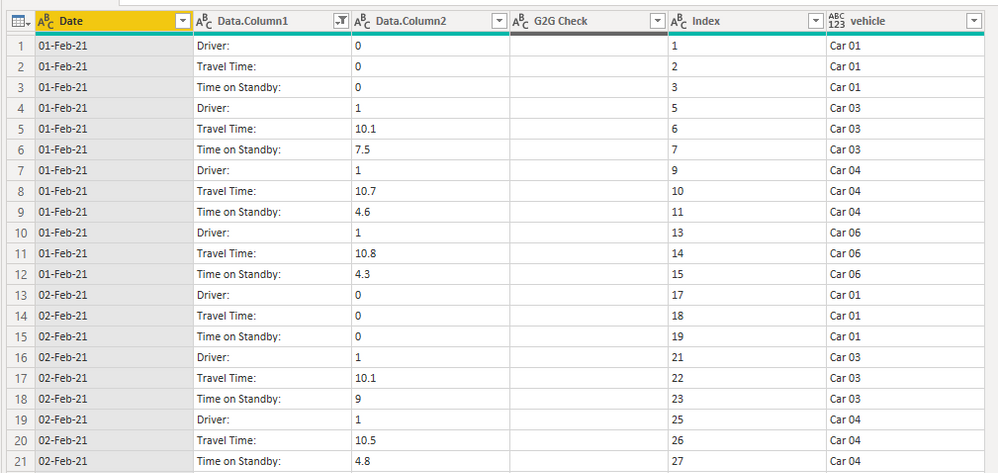
This puts your Car # headers into their own column so, from here, any other transformations you want to do should be simple.
I get this output:
Pete
Now accepting Kudos! If my post helped you, why not give it a thumbs-up?
Proud to be a Datanaut!
- Mark as New
- Bookmark
- Subscribe
- Mute
- Subscribe to RSS Feed
- Permalink
- Report Inappropriate Content
Hi @rhaddad87 ,
Paste the below into a new blank query to see the steps I took:
let
    Source = Table.FromRows(Json.Document(Binary.Decompress(Binary.FromText("jZXdasJAEEZfJeRaw+7MbH56a6kPUO/EC20DLW0thCL07RvjSG2/2eyCF2o+4WzOUbfb0vnlQ39Yki8X5Wo/FO78ZHysaV2sXvqnt8KNr1y5W/zd3g+vp364m65NH/Aw2Qz7U/9ebF4/+psd4W4cFJ/H4vFrf3w+fN9sGbYTIv9HPF+RGUQ9U0ghelfptM6hbKpwWTc2p1icbZqzy+Bs9K6jGQNUqlrnaGkirS1Sj6oA1aMiZG11i4pMVtXrVRflBOprGGOhDWzsRH2Lw2ijvrMxzUjJzWDqwcinMH8zJcoh7XTMNqmZKUkGKRpCUv2KEAoy5WsrhK7ioRL6QlbUFA2V0ZLJqkdjFcapUM9vMMEYQmWGjR0qCw7jP6bBxjRD5XoGUw/GTQqzqzQ9bnNAr+POBjU7FZcGFRQU/UEV9DPXqaCqeKeCupAVLcVZUdJcp6K+JKdTaWGMrB1skJUu2+Bwa/2jagPB26xmrIHSrIFTrF2lgQXJQW2vtzUEG9XMNdQZqOgJb+uVFTXNJRBGY7sf", BinaryEncoding.Base64), Compression.Deflate)), let _t = ((type nullable text) meta [Serialized.Text = true]) in type table [Date = _t, Data.Column1 = _t, Data.Column2 = _t, #"G2G Check" = _t, Index = _t]),
    addVehicle = Table.AddColumn(Source, "vehicle", each if Text.Contains([Data.Column1], "Car") then [Data.Column1] else null),
    fillDownVehicle = Table.FillDown(addVehicle,{"vehicle"}),
    filterCarHeaders = Table.SelectRows(fillDownVehicle, each not Text.Contains([Data.Column1], "Car"))
in
    filterCarHeaders
This puts your Car # headers into their own column so, from here, any other transformations you want to do should be simple.
I get this output:
Pete
Now accepting Kudos! If my post helped you, why not give it a thumbs-up?
Proud to be a Datanaut!
- Mark as New
- Bookmark
- Subscribe
- Mute
- Subscribe to RSS Feed
- Permalink
- Report Inappropriate Content
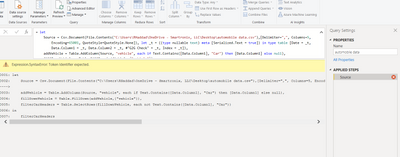
@BA_Pete when I try to make this work with the actual file I'm working with I get a Token Identifier Error. I know I'm getting something fundamentally wrong, can you take a quick peek?
Code:
= let
    Source = Csv.Document(File.Contents("C:\Users\RHaddad\OneDrive - xxxxxxx, LLC\Desktop\automobile data.csv"),[Delimiter=",", Columns=5, Encoding=65001, QuoteStyle=QuoteStyle.None]), let _t = ((type nullable text) meta [Serialized.Text = true]) in type table [Date = _t, Data.Column1 = _t, Data.Column2 = _t, #"G2G Check" = _t, Index = _t]),
    addVehicle = Table.AddColumn(Source, "vehicle", each if Text.Contains([Data.Column1], "Car") then [Data.Column1] else null),
    fillDownVehicle = Table.FillDown(addVehicle,{"vehicle"}),
    filterCarHeaders = Table.SelectRows(fillDownVehicle, each not Text.Contains([Data.Column1], "Car"))
in
    filterCarHeaders
Example:
Thanks for your help!
- Mark as New
- Bookmark
- Subscribe
- Mute
- Subscribe to RSS Feed
- Permalink
- Report Inappropriate Content
Hi @rhaddad87 ,
Difficult to say just from the screenshots.
If you select your Source step, does the table display in the preview ok? If not, then you'll need to look at how you've brought the table in to begin with.
This is helping you to identify where the issue is:

On that row, you should see a '^' symbol, pointing to the part of the code that PQ doesn't like.
If it does, then you can try manually doing the steps I took:
1) Add new custom column. Call it 'vehicle', Use this code:
if Text.Contains([Data.Column1], "Car") then [Data.Column1] else null
2) Select new [vehicle] column. Go to Transform tab > Fill (dropdown) > Down.
3) Filter your vehicle column on any vehicle (just to set up a new step with the correct previous step value). Edit this step so everything after the 'each' looks like this:
not Text.Contains([Data.Column1], "Car"))
Your full step code should look like this:
= Table.SelectRows(whateverYourPreviousStepNameIs, each not Text.Contains([Data.Column1], "Car"))
Pete
Now accepting Kudos! If my post helped you, why not give it a thumbs-up?
Proud to be a Datanaut!
- Mark as New
- Bookmark
- Subscribe
- Mute
- Subscribe to RSS Feed
- Permalink
- Report Inappropriate Content
Pete,
Thanks a lot! I got it to work. When you broke it out step by step that's what helped me understand the best.
You're the man!
- Mark as New
- Bookmark
- Subscribe
- Mute
- Subscribe to RSS Feed
- Permalink
- Report Inappropriate Content
How on earth did you figure that out so quickly?! Thank you!!!! This is fantastic!
- Mark as New
- Bookmark
- Subscribe
- Mute
- Subscribe to RSS Feed
- Permalink
- Report Inappropriate Content
Lol, thanks. It's what we do here! 🙂
Now accepting Kudos! If my post helped you, why not give it a thumbs-up?
Proud to be a Datanaut!

Helpful resources

Power BI Monthly Update - November 2025
Check out the November 2025 Power BI update to learn about new features.

Fabric Data Days
Advance your Data & AI career with 50 days of live learning, contests, hands-on challenges, study groups & certifications and more!

FabCon Atlanta 2026
Join us at FabCon Atlanta, March 16-20, for the ultimate Fabric, Power BI, AI and SQL community-led event. Save $200 with code FABCOMM.

| User | Count |
|---|---|
| 10 | |
| 6 | |
| 5 | |
| 4 | |
| 3 |


