Join us at FabCon Vienna from September 15-18, 2025
The ultimate Fabric, Power BI, SQL, and AI community-led learning event. Save €200 with code FABCOMM.
Get registered- Power BI forums
- Get Help with Power BI
- Desktop
- Service
- Report Server
- Power Query
- Mobile Apps
- Developer
- DAX Commands and Tips
- Custom Visuals Development Discussion
- Health and Life Sciences
- Power BI Spanish forums
- Translated Spanish Desktop
- Training and Consulting
- Instructor Led Training
- Dashboard in a Day for Women, by Women
- Galleries
- Data Stories Gallery
- Themes Gallery
- Contests Gallery
- Quick Measures Gallery
- Notebook Gallery
- Translytical Task Flow Gallery
- TMDL Gallery
- R Script Showcase
- Webinars and Video Gallery
- Ideas
- Custom Visuals Ideas (read-only)
- Issues
- Issues
- Events
- Upcoming Events
Enhance your career with this limited time 50% discount on Fabric and Power BI exams. Ends September 15. Request your voucher.
- Power BI forums
- Forums
- Get Help with Power BI
- Power Query
- Re: PQ Advanced Editor help for summing pivoted co...
- Subscribe to RSS Feed
- Mark Topic as New
- Mark Topic as Read
- Float this Topic for Current User
- Bookmark
- Subscribe
- Printer Friendly Page


- Mark as New
- Bookmark
- Subscribe
- Mute
- Subscribe to RSS Feed
- Permalink
- Report Inappropriate Content
PQ Advanced Editor help for summing pivoted columns
Hi.
I'm just getting started with modifying steps in Power Query using the advanced editor. My first foray involves summing the columns that are the result of a pivot step that results in columns with variable column names and variable N of columns. Here's what my data looks like coming from the source:
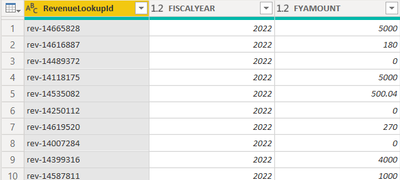
And here's the code from the advanced editor after I add the pivot step:
let
Source = Sql.Database(SOURCE),
#"Pivot FY" = Table.Pivot(Table.TransformColumnTypes(Source, {{"FISCALYEAR", type text}}, "en-US"), List.Distinct(Table.TransformColumnTypes(Source, {{"FISCALYEAR", type text}}, "en-US")[FISCALYEAR]), "FISCALYEAR", "FYAMOUNT", List.Sum)
in
#"Pivot FY"
I've been looking at this to try to work through this, and I feel like I'm close, but I'm getting errors trying to generate the range of columns I need to sum from the #"Pivot FY" step...basically the number of columns starting at 1.
Thanks so much for any push you can provide!
Solved! Go to Solution.


- Mark as New
- Bookmark
- Subscribe
- Mute
- Subscribe to RSS Feed
- Permalink
- Report Inappropriate Content
Hi @MarkPalmberg ,
Based on your description, you can try this query:
let
    Source = Table.FromRows(Json.Document(Binary.Decompress(Binary.FromText("ZdFLDoUgDIXhvTB2IC3PobIM4/63ce9Bk57iqMkXLH/wusIRtiC7CEYL9+YkRhbFUJaEM5UlQwpLgbSPuM0Vo7O0z55uclJhXuUfRYLm1FnQrO4rNIvbPAv7Ku/7nNYc3V1oTpVlNj8vNqzw7SHRwoLmvLPMZifUPKxQZRVxd6E5uTPN/uCwZtx+/wA=", BinaryEncoding.Base64), Compression.Deflate)), let _t = ((type nullable text) meta [Serialized.Text = true]) in type table [Category = _t, Year = _t, Sales = _t]),
    #"Changed Type" = Table.TransformColumnTypes(Source,{{"Category", type text}, {"Year", Int64.Type}, {"Sales", Int64.Type}}),
    #"Pivoted Column" = Table.Pivot(Table.TransformColumnTypes(#"Changed Type", {{"Year", type text}}, "en-US"), List.Distinct(Table.TransformColumnTypes(#"Changed Type", {{"Year", type text}}, "en-US")[Year]), "Year", "Sales", List.Sum),
    #"Grouped Rows" = Table.Group(#"Pivoted Column", {"Category"}, {{"Data", each _, type table [Category=nullable text, 2022=nullable number, 2023=nullable number, 2024=nullable number, 2025=nullable number, 2026=nullable number, 2027=nullable number, 2028=nullable number, 2029=nullable number]}}),
    #"Added Custom" = Table.AddColumn(#"Grouped Rows", "Total", each List.Sum(Table.Transpose(Table.RemoveColumns([Data],"Category"))[Column1]),type number),
    #"Expanded Data" = Table.ExpandTableColumn(#"Added Custom", "Data", {"2022", "2023", "2024", "2025", "2026", "2027", "2028", "2029"}, {"2022", "2023", "2024", "2025", "2026", "2027", "2028", "2029"})
in
    #"Expanded Data"
To make the column sum be variable, you can modify this query code as your needed:
Table.RemoveColumns([Data],"Category")
//if want to filter more rows, it could be like this:
Table.RemoveColumns([Data],{"Category","column2",...})

//if just needs a few columns, use Table.SelectColumns() instead of Table.RemoveColumns():
Table.SelectColumns([Data],{"Category","column2",...})
Best Regards,
Community Support Team _ Yingjie Li
If this post helps, then please consider Accept it as the solution to help the other members find it more quickly.

- Mark as New
- Bookmark
- Subscribe
- Mute
- Subscribe to RSS Feed
- Permalink
- Report Inappropriate Content
Table.ColumnNames(Table) will give you a list of the column names, and Table.ColumnCount(Table) will give you the number of columns, as will List.Count(Table.ColumnNames).
But I would probably do this. Right before Pivot, get the list of lists the column names and types, so you can use them in your query and get your counts and all that. Add new step, name it "Items":
= List.Zip({Table.Schema(Table)[Name], Table.Schema(Table)[TypeName]})
This will give you your list of columns and their type, which when you know what columns you want, you can wrap the whole thing in List.Select, man, the possibilities are endless.
--Nate
- Mark as New
- Bookmark
- Subscribe
- Mute
- Subscribe to RSS Feed
- Permalink
- Report Inappropriate Content
Thanks so much for this reply (and yours, too, @mahoneypat; I hear you, but this is for a specific table visual requested by the business, or I'd be "matrixing" it all day long).
So, I added
ColCount = Table.ColumnCount(Source),
just before my pivot step and got, as expected, 3 (revenueloopukip, fiscalyear, fyamount).
I then added a copy of that step *after* my pivot step, which yields 10. Also makes sense.
Now, I'd like to add a column to my pivot table that's a sum (using List.Sum to handle nulls?) of columns 1 (recognizing 0 index) through the value returned by Table.ColumnCount(PivotStep) of my PivotStep table.
Here's what the advanced editor looks like so far:
let
    Source = Sql.Database(SQL),
    SourceColumnCount = Table.ColumnCount(Source),
    #"Pivot FY" = Table.Pivot(Table.TransformColumnTypes(Source, {{"FISCALYEAR", type text}}, "en-US"), List.Distinct(Table.TransformColumnTypes(Source, {{"FISCALYEAR", type text}}, "en-US")[FISCALYEAR]), "FISCALYEAR", "FYAMOUNT", List.Sum),
    PivotColumns = Table.ColumnCount(#"Pivot FY"),
    PivotColumnNames = Table.ColumnNames(#"Pivot FY")
in
    PivotColumnNames
EDIT: Also worth noting that I get this error when trying to "Close and Load" this query:
"We cannot convert a value of type List to type Table."
- Mark as New
- Bookmark
- Subscribe
- Mute
- Subscribe to RSS Feed
- Permalink
- Report Inappropriate Content
Hi @MarkPalmberg ,
Table.ColumnNames() would return a list with table names, not a table but basically when close and apply it in power query, it should also have a table in power bi table view like this:
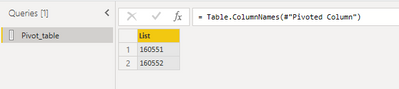
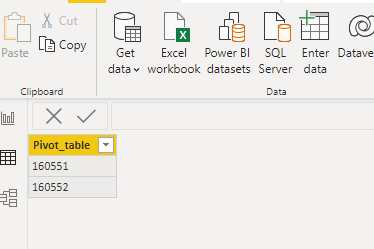
In addition, what is your expected output base on your sample picture, add a custom column to calculate the column count or anything else?
Best Regards,
Community Support Team _ Yingjie Li
If this post helps, then please consider Accept it as the solution to help the other members find it more quickly.
- Mark as New
- Bookmark
- Subscribe
- Mute
- Subscribe to RSS Feed
- Permalink
- Report Inappropriate Content
Thank you for the reply. Yes, I'm trying to add a column that's a sum of the columns from the Table.Pivot step. Everything from the second column (index 1) through the last column, whatever it might be. Like so:

- Mark as New
- Bookmark
- Subscribe
- Mute
- Subscribe to RSS Feed
- Permalink
- Report Inappropriate Content
Hi @MarkPalmberg ,
To calculate the pivot column total, you can try this query to add a custom column:
= Table.AddColumn(#"Pivoted Column", "Custom", each List.Sum(Table.Transpose(#"Pivoted Column")[Column1]), type number)
Best Regards,
Community Support Team _ Yingjie Li
If this post helps, then please consider Accept it as the solution to help the other members find it more quickly.
- Mark as New
- Bookmark
- Subscribe
- Mute
- Subscribe to RSS Feed
- Permalink
- Report Inappropriate Content
Thanks for this reply, @v-yingjl . The only issue here is that, since I'm trying to sum *only* the columns that are the result of the pivot, I don't want the first column included in the calculation. Here's how the data is originally formatted from the source:
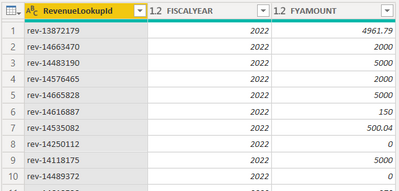
And after the pivot:

So I'm looking for the sum of all the columns *after* the first column. The columns names will be variable, so I don't want to refer to actual column names, and the number of columns to sum will be variable as well.
- Mark as New
- Bookmark
- Subscribe
- Mute
- Subscribe to RSS Feed
- Permalink
- Report Inappropriate Content
Hi @MarkPalmberg ,
Based on your description, you can try this query:
let
    Source = Table.FromRows(Json.Document(Binary.Decompress(Binary.FromText("ZdFLDoUgDIXhvTB2IC3PobIM4/63ce9Bk57iqMkXLH/wusIRtiC7CEYL9+YkRhbFUJaEM5UlQwpLgbSPuM0Vo7O0z55uclJhXuUfRYLm1FnQrO4rNIvbPAv7Ku/7nNYc3V1oTpVlNj8vNqzw7SHRwoLmvLPMZifUPKxQZRVxd6E5uTPN/uCwZtx+/wA=", BinaryEncoding.Base64), Compression.Deflate)), let _t = ((type nullable text) meta [Serialized.Text = true]) in type table [Category = _t, Year = _t, Sales = _t]),
    #"Changed Type" = Table.TransformColumnTypes(Source,{{"Category", type text}, {"Year", Int64.Type}, {"Sales", Int64.Type}}),
    #"Pivoted Column" = Table.Pivot(Table.TransformColumnTypes(#"Changed Type", {{"Year", type text}}, "en-US"), List.Distinct(Table.TransformColumnTypes(#"Changed Type", {{"Year", type text}}, "en-US")[Year]), "Year", "Sales", List.Sum),
    #"Grouped Rows" = Table.Group(#"Pivoted Column", {"Category"}, {{"Data", each _, type table [Category=nullable text, 2022=nullable number, 2023=nullable number, 2024=nullable number, 2025=nullable number, 2026=nullable number, 2027=nullable number, 2028=nullable number, 2029=nullable number]}}),
    #"Added Custom" = Table.AddColumn(#"Grouped Rows", "Total", each List.Sum(Table.Transpose(Table.RemoveColumns([Data],"Category"))[Column1]),type number),
    #"Expanded Data" = Table.ExpandTableColumn(#"Added Custom", "Data", {"2022", "2023", "2024", "2025", "2026", "2027", "2028", "2029"}, {"2022", "2023", "2024", "2025", "2026", "2027", "2028", "2029"})
in
    #"Expanded Data"
To make the column sum be variable, you can modify this query code as your needed:
Table.RemoveColumns([Data],"Category")
//if want to filter more rows, it could be like this:
Table.RemoveColumns([Data],{"Category","column2",...})

//if just needs a few columns, use Table.SelectColumns() instead of Table.RemoveColumns():
Table.SelectColumns([Data],{"Category","column2",...})
Best Regards,
Community Support Team _ Yingjie Li
If this post helps, then please consider Accept it as the solution to help the other members find it more quickly.
- Mark as New
- Bookmark
- Subscribe
- Mute
- Subscribe to RSS Feed
- Permalink
- Report Inappropriate Content
Thanks for this reply. The only issue is going to be that any hard-coded values for column names will cause the code to break when a new value appears.


- Mark as New
- Bookmark
- Subscribe
- Mute
- Subscribe to RSS Feed
- Permalink
- Report Inappropriate Content
You really should consider keeping your data unpivoted. It will make your analysis and visualization simpler. You can easily pivot the data out in the visual when needed (e.g., in a matrix visual).
Pat
Did I answer your question? Mark my post as a solution! Kudos are also appreciated!
To learn more about Power BI, follow me on Twitter or subscribe on YouTube.
@mahoneypa HoosierBI on YouTube
Helpful resources

Power BI Monthly Update - August 2025
Check out the August 2025 Power BI update to learn about new features.

Fabric Community Update - August 2025
Find out what's new and trending in the Fabric community.


