
This is best Fabric, Power BI, SQL and AI community event. How do we know? The last event sold out! Save €200 with code FABCMTY200.
Register nowA new Data Days event is coming soon! This time we’re going bigger than ever. Fabric, Power BI, SQL, AI and more. Don't miss out.
Hello There!
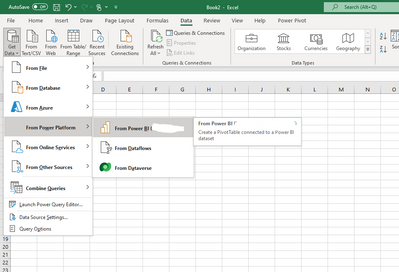
I have excel connected to pbi dataset, so that when i have to make a pivot i just select data from powerplatform like this:
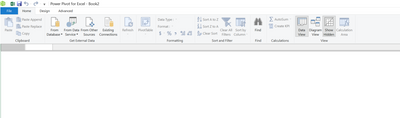
I have recently downloaded PowerPivot but that connection is not showing:
Even if i open a pivot and i select "Existing Connections" it gives me the dataset from which i have just created a pivot, but it seems that the connectiondoes not work and gives me a weird error of integrity protection.
Does anyone have an idea how to solve it?
Thanks!
Hi @Franc_98 ,
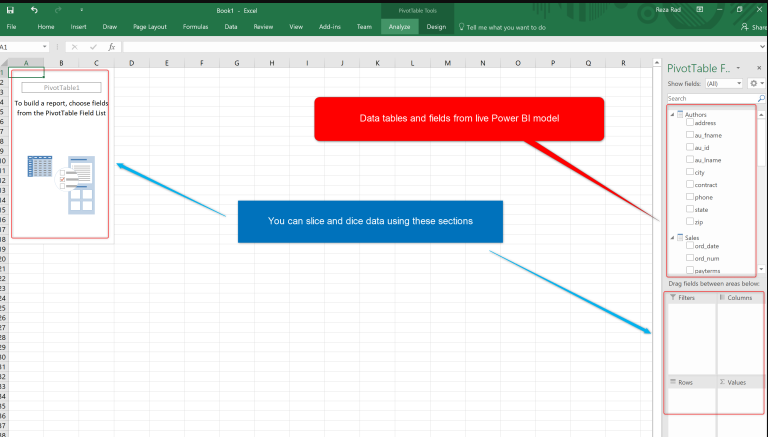
When selecting a dataset and clicking Insert PivotTable, is this layout displayed?
If not, you can click here to display the field list.
This actually creates a live connection to the Power BI dataset to facilitate the creation of insights using data from the dataset. Again, the modeling is limited due to the connection mode, You can only use fields/measures from the dataset.
Power BI and Excel; More than just an Integration
Best Regards,
Gao
Community Support Team
If there is any post helps, then please consider Accept it as the solution to help the other members find it more quickly. If I misunderstand your needs or you still have problems on it, please feel free to let us know. Thanks a lot!
How to get your questions answered quickly -- How to provide sample data in the Power BI Forum
Check out the May 2026 Power BI update to learn about new features.
Sign up to receive a private message when registration opens and key events begin.
If you have recently started exploring Fabric, we'd love to hear how it's going. Your feedback can help with product improvements.
| User | Count |
|---|---|
| 3 | |
| 3 | |
| 2 | |
| 2 | |
| 1 |