cancel
Showing results for 
Search instead for 
Did you mean: 

The Power BI Data Visualization World Championships is back! Get ahead of the game and start preparing now! Learn more

Reply
iskhj000
Frequent Visitor

Need urgent help - Made changes to a SharePoint list and now report will not work

I had a custom list being brought into a Power BI report and was working GREAT.  LOVE Power BI!!!!!


Did some clean up of unused fields in the SP list and now the refresh won't work.

I tried to pull the same list in Access and it works ok.  I created a new Excel and pulled in the SP list and it gets the same error.
 
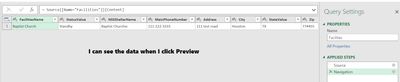
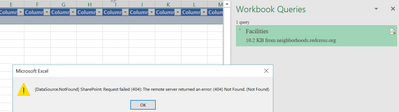
The data shows fine in Preview mode but when I "Close and Load" it then comes back and says: [DataSource.NotFound] SharepPont: Requested filed (404): The remote server returned an error: (404) Not found. (Not Found)

But whats not found?? The Preview data looks fine.

Other than deleting the SP list and starting over...I just don't know what else to do?2017-02-10_3-13-53.png2017-02-10_3-10-56.png

I am really trying to fix the Power BI - I just thought maybe pulling it thru Excel would shed some light.  Smiley Sad

1 ACCEPTED SOLUTION
hugoberry
Responsive Resident
Responsive Resident

When you've amended the SharePoint list it seems that SP created a new list id, and most probably Power BI tryes to connect to the old list with the old id in place. If it's feasible try to recreate the Power BI workbook. It's worth checking that the SP list id is the one that you need in Query Editor.

Another thing that you might try is to clean the Data Cache from Menu Options

View solution in original post

2 REPLIES 2
hugoberry
Responsive Resident
Responsive Resident

When you've amended the SharePoint list it seems that SP created a new list id, and most probably Power BI tryes to connect to the old list with the old id in place. If it's feasible try to recreate the Power BI workbook. It's worth checking that the SP list id is the one that you need in Query Editor.

Another thing that you might try is to clean the Data Cache from Menu Options

Clearing the cache worked----THANK YOU!!!!!!

Helpful resources

Announcements
Power BI DataViz World Championships

Power BI Dataviz World Championships

The Power BI Data Visualization World Championships is back! Get ahead of the game and start preparing now!

December 2025 Power BI Update Carousel

Power BI Monthly Update - December 2025

Check out the December 2025 Power BI Holiday Recap!

FabCon Atlanta 2026 carousel

FabCon Atlanta 2026

Join us at FabCon Atlanta, March 16-20, for the ultimate Fabric, Power BI, AI and SQL community-led event. Save $200 with code FABCOMM.