Forum Discussion

 Advocate V
Multilple recursive Inner and Anti Joins for robust fuzzy date matching - Can List.Accumulate help?

 Advocate V
Hi ImkeF
Unfortunately that approach isn’t robust under all circumstances, as it will always match an entry in one table with a previous entry in the other table even if a closer match is available. And this is a very real possibility in this dataset.
Revised sample file and screenshot: Match to closest day_20190722 buffer Imke.xlsx

 Community Champion
- JeffWeir7 years ago
My hard-coded query works fine, but I'm trying to find the time to see if I can learn how to write a dynamic function where I can specify the number of days to check either side. At the moment I progressively match the tables on larger values of a 'tolerance' factor X using this condition:
Table1.Date = Table2.Date +/- X .
And I'm effectiviely running this in a loop for values of X between 1 to 5, and removing successful matches on each pass leaving just unsuccessful ones. This lets me progressively increase the 'mismatch' tolerence on those dates, and remove matches at each pass leaving just the unmatched rows to do increasingly desperate matches on.
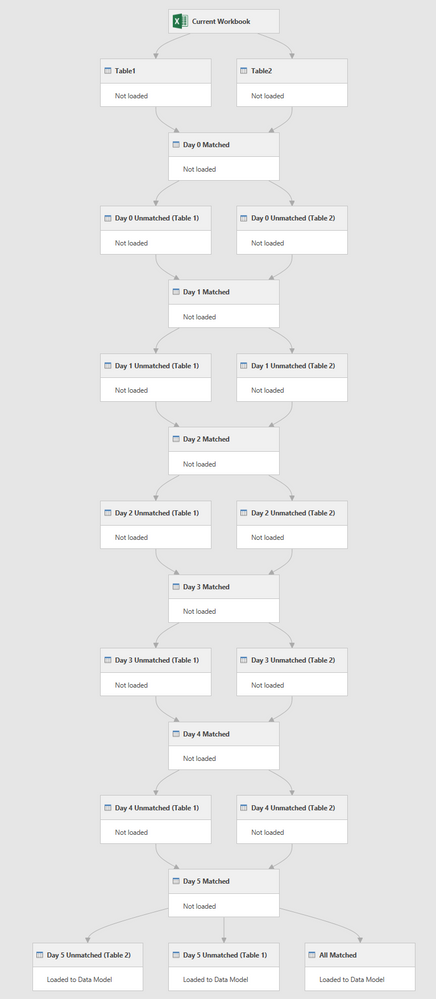
My query performs the following steps:
- Loads data from Table1 and Table2, and does an inner join on unique ID and Date
- Effectively removes these matches from Table1 and Table2 via an anti-join against each referenced table.
- Does an inner join on the remaining records, but this time offsets the dates in the Port table by +/- 1 day. This finds some more matches.
- Performs steps 2 and 3 over and over, increasing the date offset by 1 each time until I have captured all date mismatches up to a week.
The query dependency tree that results looks like so:
All that takes a lot of setup. I really need to work out if this can be turned into a function that is a) dynamic and b) efficient.
I still mean to take a crack at it, but it might be beyond my beginning/intermediate M.
For what it's worth, here's my current manual approach.
- ImkeF7 years ago
Hi JeffWeir ,
although a dynamic recursive approach (using List.Accumulate or List.Generate) would work here, that would still be a considerable amount of code (and work for me) and I'm not sure if it would perform faster than the following approach:
let
    Source = Table1,
    AllowedRange = Table.AddColumn(Source, "Days", each {-5..5}),
    ExpandAllowedRange = Table.ExpandListColumn(AllowedRange, "Days"),
    DaysAbsoluteFigures = Table.AddColumn(ExpandAllowedRange, "AbsDays", each Number.Abs([Days])),
    AllowedDates = Table.AddColumn(DaysAbsoluteFigures, "Dates", each Date.AddDays([Date], [Days])),
    #"Changed Type" = Table.TransformColumnTypes(AllowedDates,{{"Dates", type date}}),
    MergeTable2 = Table.NestedJoin(#"Changed Type", {"Dates", "ID", "Direction"}, Table2, {"Date", "ID", "Direction"}, "Table2", JoinKind.Inner),
    Cleanup = Table.RemoveColumns(MergeTable2,{"Table2", "Dates"}),
    #"Sorted Rows" = Table.Buffer(Table.Sort(Cleanup,{{"AbsDays", Order.Ascending}})),
    #"Removed Duplicates" = Table.Distinct(#"Sorted Rows", {"Date", "ID", "Direction"})
in
    #"Removed Duplicates"
This produces the "Matched Records"-table. Just do some Anti-Joins to retrieve the unmatched tables from there.
If performance is too bad, please come back.
- JeffWeir7 years ago
ImkeFThat Sorted Rows > Remove Duplicates step is clever.
I'll tweak my code to use this approach and see if there is a performance improvement. I still need to do lots of different passes, because i want this to be a 'progressive' match, so it may not simplify the query chain overly. But it will be interesting to see if there's any performance difference. Thanks :-)
- Loads data from Table1 and Table2, and does an inner join on unique ID and Date