Hi, @Burubear
Based on your description, I created data to reproduce your scenario. The pbix file is attached in the end.
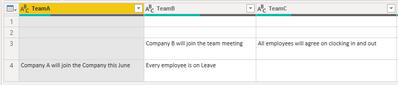
Table:

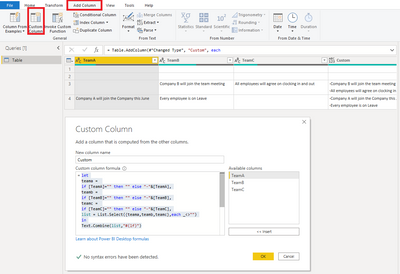
Here are the codes in 'Advanced Editor'.
let
    Source = Table.FromRows(Json.Document(Binary.Decompress(Binary.FromText("XY5BCoNADEWv8nHtJbR0U3oDcTHYj06dSURHy9y+YYpdCFmE/JeXdF1V1aX6+treNC5OMlp8fAh4qxekiUh0EZFMXkbDGssYl6CZ3H6oG1cSKhiCDrNhsFUnL+ieiv1UNxf1OU+T3/DYhea/H1zz/wIsMPGT7mD5tf8C", BinaryEncoding.Base64), Compression.Deflate)), let _t = ((type nullable text) meta [Serialized.Text = true]) in type table [TeamA = _t, TeamB = _t, TeamC = _t]),
    #"Changed Type" = Table.TransformColumnTypes(Source,{{"TeamA", type text}, {"TeamB", type text}, {"TeamC", type text}}),
    #"Added Custom" = Table.AddColumn(#"Changed Type", "Custom", each
let
teama =
if [TeamA]="" then "" else "-"&[TeamA],
teamb =
if [TeamB]="" then "" else "-"&[TeamB],
teamc =
if [TeamC]="" then "" else "-"&[TeamC],
list = List.Select({teama,teamb,teamc},each _<>"")
in
Text.Combine(list,"#(lf)")
)
in
    #"Added Custom"
Result:

Best Regards
Allan
If this post helps, then please consider Accept it as the solution to help the other members find it more quickly.