Fabric Data Days starts November 4th!
Advance your Data & AI career with 50 days of live learning, dataviz contests, hands-on challenges, study groups & certifications and more!
Get registered- Power BI forums
- Get Help with Power BI
- Desktop
- Service
- Report Server
- Power Query
- Mobile Apps
- Developer
- DAX Commands and Tips
- Custom Visuals Development Discussion
- Health and Life Sciences
- Power BI Spanish forums
- Translated Spanish Desktop
- Training and Consulting
- Instructor Led Training
- Dashboard in a Day for Women, by Women
- Galleries
- Data Stories Gallery
- Themes Gallery
- Contests Gallery
- Quick Measures Gallery
- Visual Calculations Gallery
- Notebook Gallery
- Translytical Task Flow Gallery
- TMDL Gallery
- R Script Showcase
- Webinars and Video Gallery
- Ideas
- Custom Visuals Ideas (read-only)
- Issues
- Issues
- Events
- Upcoming Events
Join us at FabCon Atlanta from March 16 - 20, 2026, for the ultimate Fabric, Power BI, AI and SQL community-led event. Save $200 with code FABCOMM. Register now.
- Power BI forums
- Forums
- Get Help with Power BI
- Power Query
- Re: Merge datasets into single report or use datas...
- Subscribe to RSS Feed
- Mark Topic as New
- Mark Topic as Read
- Float this Topic for Current User
- Bookmark
- Subscribe
- Printer Friendly Page


- Mark as New
- Bookmark
- Subscribe
- Mute
- Subscribe to RSS Feed
- Permalink
- Report Inappropriate Content
Merge datasets into single report or use dataset as source
I'm querying Salesforce for a very specific email activity report, which only reports the details of the email activity of the user who is running the report at the time. It's daft, but nooone can get around it, and the underlying object is not visible in the API either so it has to be a query on a report.
The only way to get a consolidated view of all email activity for all my users, is to log in with each of their credentials and query the report, and then merge them all together.
I had the bright idea of doing this in PBI, but you can only query Salesforce using one set of credentials within the PBIX file or the pbi service.
I thought maybe I could create a different pbix file for each, but then I'd have multiple datasets and I can't run a report off of multiple seperate datasets or merge them. A dashabord doesnt help me either because I need a single table.
Is there anyway to use each of the datasets as a source, so that I can query and merge them all in another pbix file.
Any help much aprpeciated as always.
thnx
Warren

- Mark as New
- Bookmark
- Subscribe
- Mute
- Subscribe to RSS Feed
- Permalink
- Report Inappropriate Content
Hi @warrencowan,
I don’t think you can use an automatic method to merge datasets into a single report. You would need to copy query of each PBIX file to a single central PBIX file, then create reports using queries in the central PBIX file.
Thanks,
Lydia Zhang
- Mark as New
- Bookmark
- Subscribe
- Mute
- Subscribe to RSS Feed
- Permalink
- Report Inappropriate Content
Thanks for replying Lydia. The queries themselves dont actually contain the credentials used to access salesforce though. I thought they are stored in the global permissions or the permissions for the pbix file.
Or are you saying there is a query for the overal pbix file. If so, do you think you could elaborate on where to find that?
- Mark as New
- Bookmark
- Subscribe
- Mute
- Subscribe to RSS Feed
- Permalink
- Report Inappropriate Content
Hi @warrencowan,
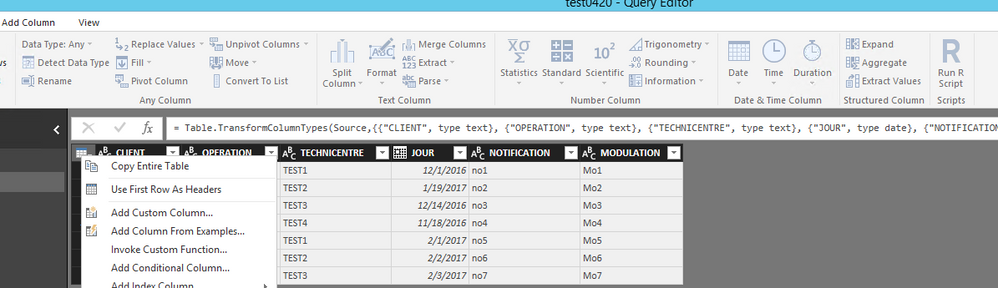
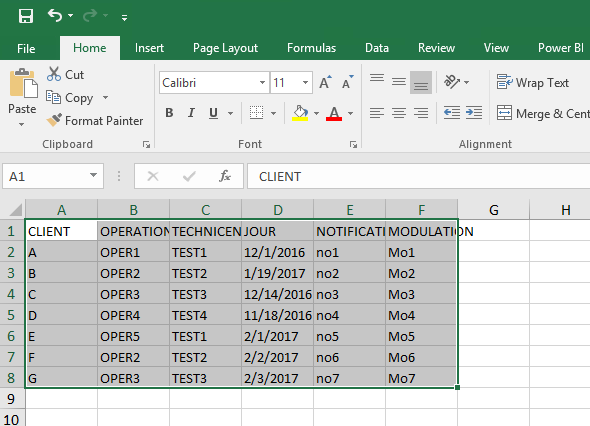
You can copy entire table in Query Editor of each PBIX file with different credentials and paste the data of each table to Excel file, then connect to the Excel file from a new PBIX file.
Thanks,
Lydia Zhang
- Mark as New
- Bookmark
- Subscribe
- Mute
- Subscribe to RSS Feed
- Permalink
- Report Inappropriate Content
do you mean paste as in a static one time copy paste, or are you saying that excel can query the individual pbix files as data sources.
a one time export isnt going to help unfortunately as this a comstanty updating report.
if you mean the latter i must confess i am unfamiliar with excels ability to query powerbi
- Mark as New
- Bookmark
- Subscribe
- Mute
- Subscribe to RSS Feed
- Permalink
- Report Inappropriate Content
ok lydia scrub that last comment. ive just read up on excel querying powerbi. completely missed that release. i will try that out and report back.
- Mark as New
- Bookmark
- Subscribe
- Mute
- Subscribe to RSS Feed
- Permalink
- Report Inappropriate Content
Hi Lydia, I dont think this can work as when you change the sign in settings for salesforce in the pbix file, all the other pbix files inherit it. am I missing something.
- Mark as New
- Bookmark
- Subscribe
- Mute
- Subscribe to RSS Feed
- Permalink
- Report Inappropriate Content
Hi @warrencowan,
I mean that you copy entire table of each PBIX file, then press Ctrl+V to paste these data in Excel. After you merge data of these tables in a single table in Excel, then connect to the Excel file in Power BI Desktop.
Thanks,
Lydia Zhang

- Mark as New
- Bookmark
- Subscribe
- Mute
- Subscribe to RSS Feed
- Permalink
- Report Inappropriate Content
I have the same issue. Is there a simple way to merge two or more datasets, without having to copy and paste queries for each table separately?
I am creating a core data model and the different domains are created in separate files (PBIX). There are 7 domains, each having anywhere from 13 to 22 tables. Copy and pasting each is a lot of extra work and not to mention the refresh that happens on each commit. This is why they were kept separate to minimize the load from other domains in the modeling phase.
- Mark as New
- Bookmark
- Subscribe
- Mute
- Subscribe to RSS Feed
- Permalink
- Report Inappropriate Content
This is a big issue for us. We need to combine different datasets. Each dataset has been created with specific credentials that should be given to other developers. For example, our HR group has created datasets with lists of employees. We need to use these datasets for other purposes. But the HR will NEVER give access to the HR data source so we can create our own reports. It would violate so many privacy issues. We need a way to connect one Power BI dataset with another. I find this a very limiting feature in Power BI.
- Mark as New
- Bookmark
- Subscribe
- Mute
- Subscribe to RSS Feed
- Permalink
- Report Inappropriate Content
Hi Lydia, I dont think this can work as when you change the sign in settings for salesforce in the pbix file, all the other pbix files inherit it. am I missing something
Helpful resources

Fabric Data Days
Advance your Data & AI career with 50 days of live learning, contests, hands-on challenges, study groups & certifications and more!

Power BI Monthly Update - October 2025
Check out the October 2025 Power BI update to learn about new features.

FabCon Atlanta 2026
Join us at FabCon Atlanta, March 16-20, for the ultimate Fabric, Power BI, AI and SQL community-led event. Save $200 with code FABCOMM.


