Join us at FabCon Vienna from September 15-18, 2025
The ultimate Fabric, Power BI, SQL, and AI community-led learning event. Save €200 with code FABCOMM.
Get registered- Power BI forums
- Get Help with Power BI
- Desktop
- Service
- Report Server
- Power Query
- Mobile Apps
- Developer
- DAX Commands and Tips
- Custom Visuals Development Discussion
- Health and Life Sciences
- Power BI Spanish forums
- Translated Spanish Desktop
- Training and Consulting
- Instructor Led Training
- Dashboard in a Day for Women, by Women
- Galleries
- Data Stories Gallery
- Themes Gallery
- Contests Gallery
- Quick Measures Gallery
- Notebook Gallery
- Translytical Task Flow Gallery
- TMDL Gallery
- R Script Showcase
- Webinars and Video Gallery
- Ideas
- Custom Visuals Ideas (read-only)
- Issues
- Issues
- Events
- Upcoming Events
Compete to become Power BI Data Viz World Champion! First round ends August 18th. Get started.
- Power BI forums
- Forums
- Get Help with Power BI
- Power Query
- Looping through rows to find the largest link
- Subscribe to RSS Feed
- Mark Topic as New
- Mark Topic as Read
- Float this Topic for Current User
- Bookmark
- Subscribe
- Printer Friendly Page

- Mark as New
- Bookmark
- Subscribe
- Mute
- Subscribe to RSS Feed
- Permalink
- Report Inappropriate Content
Looping through rows to find the largest link
Hello everyone, need your help browsing the lines to find the longest link. Indeed, for each letter in the Parent column, I try to iterate over the Link column, to get the common letter among the links (length > 1) (here "A" for the first row) then output the largest link containing this common letter. The Output column is my expected output. I tried to create a function to get the links containing the parent letter, and another to get the longest link. But no success.
I'm still new to Power Query so thank you and sorry in advance if I ask lots of follow up questions. I am enclosing a link to the file.
Many thanks,
Gop01
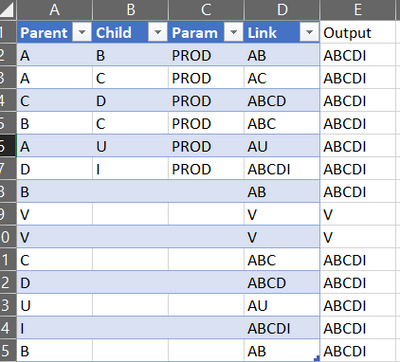
Solved! Go to Solution.


- Mark as New
- Bookmark
- Subscribe
- Mute
- Subscribe to RSS Feed
- Permalink
- Report Inappropriate Content
Hi @Anonymous ,
According to your description, here's my solution.
1. Create a custom column.
Length = Text.Length([Link])2. Create another custom column.
Output = let
T=Table.SelectRows(#"Added Custom1",(x)=>Text.Start(x[Link],1)=Text.Start([Link],1))
in
Table.SelectRows(#"Added Custom1",(x)=>Text.Start(x[Link],1)=Text.Start([Link],1)and x[Length]=List.Max(T[Length]))[Link]{0}
Get the correct result:

Here's the whole M syntax:
let
    Source = Table.FromRows(Json.Document(Binary.Decompress(Binary.FromText("i45WclTSUXIC4oAgfxcg5eikFKsDEXVGEnUGi4JEXJDVOruAxZ3QVDs5ww0JRRIOBYuCmJ6ohnjCTYEgqCPC4AJhWPnOSBqc4WbDRSBuC0UIQez3RFGDzepYAA==", BinaryEncoding.Base64), Compression.Deflate)), let _t = ((type nullable text) meta [Serialized.Text = true]) in type table [Parent = _t, Child = _t, Param = _t, Link = _t]),
    #"Changed Type" = Table.TransformColumnTypes(Source,{{"Parent", type text}, {"Child", type text}, {"Param", type text}, {"Link", type text}}),
    #"Added Custom1" = Table.AddColumn(#"Changed Type", "Length", each Text.Length([Link])),
    #"Added Custom" = Table.AddColumn(#"Added Custom1", "Output", each let T=Table.SelectRows(#"Added Custom1",(x)=>Text.Start(x[Link],1)=Text.Start([Link],1))
     in
     Table.SelectRows(#"Added Custom1",(x)=>Text.Start(x[Link],1)=Text.Start([Link],1)and x[Length]=List.Max(T[Length]))[Link]{0}),
    #"Removed Columns" = Table.RemoveColumns(#"Added Custom",{"Length"})
in
    #"Removed Columns"
I attach my sample below for your reference.
Best Regards,
Community Support Team _ kalyj
If this post helps, then please consider Accept it as the solution to help the other members find it more quickly.
- Mark as New
- Bookmark
- Subscribe
- Mute
- Subscribe to RSS Feed
- Permalink
- Report Inappropriate Content
Hi @Anonymous ,
According to your description, here's my solution.
1. Create a custom column.
Length = Text.Length([Link])2. Create another custom column.
Output = let
T=Table.SelectRows(#"Added Custom1",(x)=>Text.Start(x[Link],1)=Text.Start([Link],1))
in
Table.SelectRows(#"Added Custom1",(x)=>Text.Start(x[Link],1)=Text.Start([Link],1)and x[Length]=List.Max(T[Length]))[Link]{0}
Get the correct result:
Here's the whole M syntax:
let
    Source = Table.FromRows(Json.Document(Binary.Decompress(Binary.FromText("i45WclTSUXIC4oAgfxcg5eikFKsDEXVGEnUGi4JEXJDVOruAxZ3QVDs5ww0JRRIOBYuCmJ6ohnjCTYEgqCPC4AJhWPnOSBqc4WbDRSBuC0UIQez3RFGDzepYAA==", BinaryEncoding.Base64), Compression.Deflate)), let _t = ((type nullable text) meta [Serialized.Text = true]) in type table [Parent = _t, Child = _t, Param = _t, Link = _t]),
    #"Changed Type" = Table.TransformColumnTypes(Source,{{"Parent", type text}, {"Child", type text}, {"Param", type text}, {"Link", type text}}),
    #"Added Custom1" = Table.AddColumn(#"Changed Type", "Length", each Text.Length([Link])),
    #"Added Custom" = Table.AddColumn(#"Added Custom1", "Output", each let T=Table.SelectRows(#"Added Custom1",(x)=>Text.Start(x[Link],1)=Text.Start([Link],1))
     in
     Table.SelectRows(#"Added Custom1",(x)=>Text.Start(x[Link],1)=Text.Start([Link],1)and x[Length]=List.Max(T[Length]))[Link]{0}),
    #"Removed Columns" = Table.RemoveColumns(#"Added Custom",{"Length"})
in
    #"Removed Columns"
I attach my sample below for your reference.
Best Regards,
Community Support Team _ kalyj
If this post helps, then please consider Accept it as the solution to help the other members find it more quickly.
- Mark as New
- Bookmark
- Subscribe
- Mute
- Subscribe to RSS Feed
- Permalink
- Report Inappropriate Content
It works ! thank you


- Mark as New
- Bookmark
- Subscribe
- Mute
- Subscribe to RSS Feed
- Permalink
- Report Inappropriate Content
hi @Anonymous,
Something like this?
let
    Source = Table.FromRows(Json.Document(Binary.Decompress(Binary.FromText("i45WclTSUSosKkotUorVgfAcg13g7GBHMNMJyEwsTkkrTkxJS0+DCzkGO7kgcVz8vD2cnJRiYwE=", BinaryEncoding.Base64), Compression.Deflate)), let _t = ((type nullable text) meta [Serialized.Text = true]) in type table [Parent = _t, Link = _t]),
    #"Changed Type" = Table.TransformColumnTypes(Source,{{"Parent", type text}, {"Link", type text}}),
    #"Grouped Rows" = Table.Group(#"Changed Type", {"Parent"}, {{"Longest", (x)=> List.First(List.Sort(List.Select(x[Link], each Text.Contains(_, x[Parent]{0})), (x,y)=> if Text.Length(x) < Text.Length (y) then 1 else 0)) }}),
    #"Merged Queries" = Table.NestedJoin(#"Changed Type", {"Parent"}, #"Grouped Rows",  {"Parent"}, "Grouped Rows", JoinKind.LeftOuter),
    #"Expanded Grouped Rows" = Table.ExpandTableColumn(#"Merged Queries", "Grouped Rows", {"Longest"}, {"Longest"})
in
#"Expanded Grouped Rows"- Mark as New
- Bookmark
- Subscribe
- Mute
- Subscribe to RSS Feed
- Permalink
- Report Inappropriate Content
not excatly but thank you for your help .
Helpful resources

Power BI Monthly Update - July 2025
Check out the July 2025 Power BI update to learn about new features.

Fabric Community Update - August 2025
Find out what's new and trending in the Fabric community.


