Forum Discussion

Issue with unpivoting Excel Data
Hello There
I am trying to unpivot the excel data but it was not correctly unpivoted
see the below sample which i am trying to unvpoit from PBI designer .
I have employee sales by name but Pivoted date values
| EmpName | 12/12/2014 | 12/1/2004 | 12/14/2015 | 12/15/2002 | 12/16/1988 | 12/17/2014 |
| Saravanan | 1 | 2 | 2 | 0 | 2 | 3 |
| Jeff | 12 | 10 | 89 | 1 | 5 |
i selected the file from PBI designer then i tried to edit the query to use the first row as headers then wanted to Unpivot the sales data by employee by date

After i Clicked the Use First Row As Headers it ended up as below. it shows up ONLY the EmpName Column as Header but none of the dates become Header

and when i Unpivot the All Columns except EmpName it comes out like below which is totally wrong
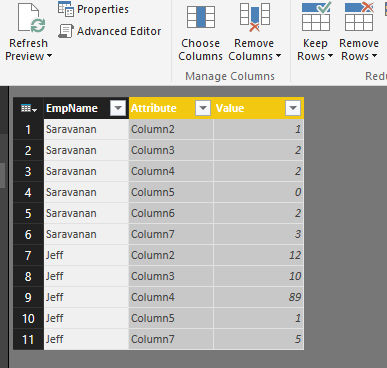
it does works well if its CSV and i can see what i want as below
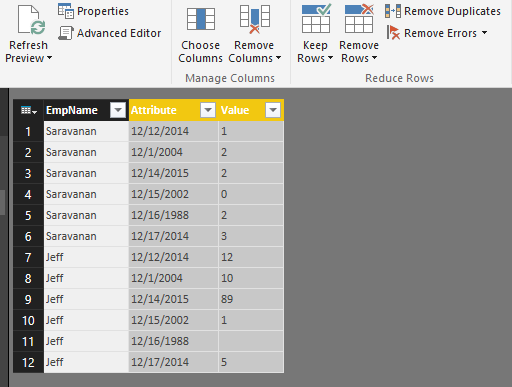
i think this is because of Excel mixed data type but can this be fixed or is there any work around ?
thanks
Saravanan
I believe the issue is that when you import from your Excel file, it is changing the types of the columns to "Any", should be the third step in your query. Go to View | Advanced Editor and edit the "any" to "text". Then and only then promote your headers.
let
Source = Excel.Workbook(File.Contents("C:\Temp\employees.xlsx"), null, true),
Sheet1_Sheet = Source{[Item="Sheet1",Kind="Sheet"]}[Data],
#"Changed Type" = Table.TransformColumnTypes(Sheet1_Sheet,{{"Column1", type text}, {"Column2", type text}, {"Column3", type text}, {"Column4", type text}, {"Column5", type text}, {"Column6", type text}, {"Column7", type text}}),
#"Promoted Headers" = Table.PromoteHeaders(#"Changed Type")
in
#"Promoted Headers"

2 Replies
- Greg_DecklerCommunity Champion
I believe the issue is that when you import from your Excel file, it is changing the types of the columns to "Any", should be the third step in your query. Go to View | Advanced Editor and edit the "any" to "text". Then and only then promote your headers.
let
Source = Excel.Workbook(File.Contents("C:\Temp\employees.xlsx"), null, true),
Sheet1_Sheet = Source{[Item="Sheet1",Kind="Sheet"]}[Data],
#"Changed Type" = Table.TransformColumnTypes(Sheet1_Sheet,{{"Column1", type text}, {"Column2", type text}, {"Column3", type text}, {"Column4", type text}, {"Column5", type text}, {"Column6", type text}, {"Column7", type text}}),
#"Promoted Headers" = Table.PromoteHeaders(#"Changed Type")
in
#"Promoted Headers" saravananNew Member
smoupre,
Great.. this was a quick FIX :)
it worked
thanks