cancel
Showing results for 
Search instead for 
Did you mean: 

The Power BI Data Visualization World Championships is back! It's time to submit your entry. Live now!

Reply
MonikaNandhini1
Frequent Visitor

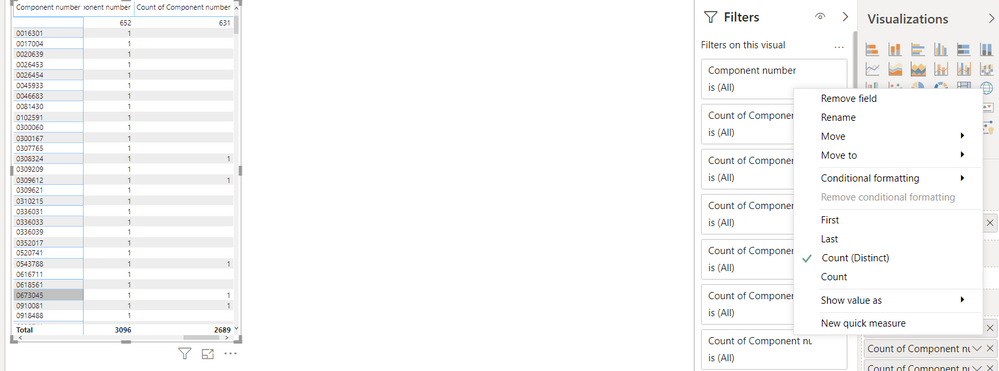
In connecting 2 files - Why is the blank header(left) and respective count is appearing on the top

 
    Though we have total count at the bottom of the Matix, why there is the count at first row with blank header ?  I'm clueless.
Note: I choose "Count(Distinct)"
Kindly do the needful  count 2.PNG
1 REPLY 1
AlB
Community Champion
Community Champion

Hi @MonikaNandhini1 

You'd need to show more of your model to get to an accurate answer. It could be that you simpliy have 652 rows for which the ComponentID is blank. Or, if you have a 1-to-many relationship through Component ID to another table, it could be that you have the table on the 1-side has component IDs that do not appear in the many-side table. Those will potentially be shown as blank, depending on how you build the visual.

Please mark the question solved when done and consider giving kudos if posts are helpful.

Contact me privately for support with any larger-scale BI needs

Cheers 

SU18_powerbi_badge

Helpful resources

Announcements
FabCon Atlanta 2026 carousel

FabCon Atlanta 2026

Join us at FabCon Atlanta, March 16-20, for the ultimate Fabric, Power BI, AI and SQL community-led event. Save $200 with code FABCOMM.