Forum Discussion

I am unable to schedule a data refresh. I have successfully configured the Personal Gateway.

 Resolver IV
Could you attach a screenshot ?

 ARaniga11 years agoFrequent Visitor
Okay, I have found the issue.
Following GA, I did not get a pop up inviting me to trial Power Bi Pro trial.
So I decided to setup a NEW Office 365 account and signed up as a Pro user.
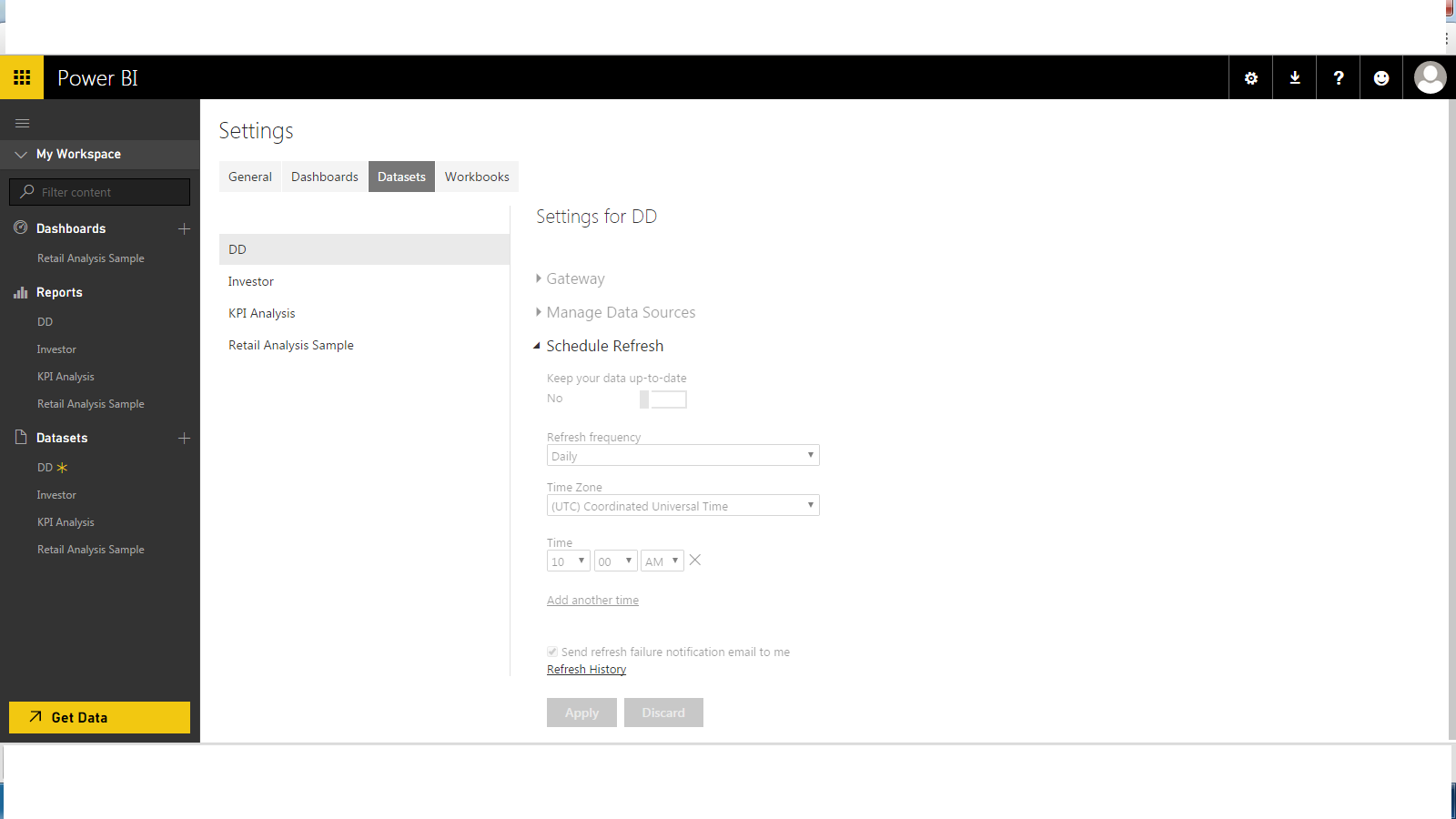
This all went well EXCEPT the new account had all my data source settings greyed out even through my personal gateway was setup correclty.
Yesterday, I switched back to my original account, received the Pro trial invite for 60 days and this solved my problem.
Now, I am able to refresh as required however still not confident that my scheduled refreshes are delivering as promised. I understand this is a known issue.
Hope this helps other.
- pankaj11 years agoRegular Visitor
Hi, I have a bit frustrating experience. I have purchased a Pro License and my Power BI Web and personal gateway are configured using the same id. Still the Gateway is appearing disabled to me for all data sources. Please help. Look at my above posts to get more information on issue I am facing.
 StefanRoth11 years agoNew Member
I am also a paying customer and I just cannot referesh my SQL data source.Please help, I am also experiencing the problems as the other users in this post.
Cheers,
Stefan mgriffin11 years agoFrequent Visitor
I am having the same exact problem.
This all started for me after installing Windows 10.
I have:
Deleted my personal gateway and reinstalled to ensure I'm not using a preview version
Ensured that I'm running all 64bit applications for Office.
I pay for the PowerBI service.
I'm hoping someone from Microsoft chimes in here; this seems to be a common problem for many of us.
Regards,
- pankaj11 years agoRegular VisitorSomething strange! Even my csv file upload using Power BI Desktop is having similar behavior. Must be some problem with my Power BI Gateway. Is there any possible way to troubleshoot.
- ARaniga11 years agoFrequent Visitor
Hi,
I am having exactly the same experienced where I am unable to edit data source settings.
Have followed multiple steps:1. Installed Personal Gateway on Multiple machines
2. Imported dataset to Power BI web via get data from local source
3. Imported dataset to Power BI web via OneDrive source
The error i'm get getting is along the lines of "The credentials on your cloud are not available" or similar.
Frustrating not to be able to get some direction on this.
 jeremyfirth11 years ago
Advocate II
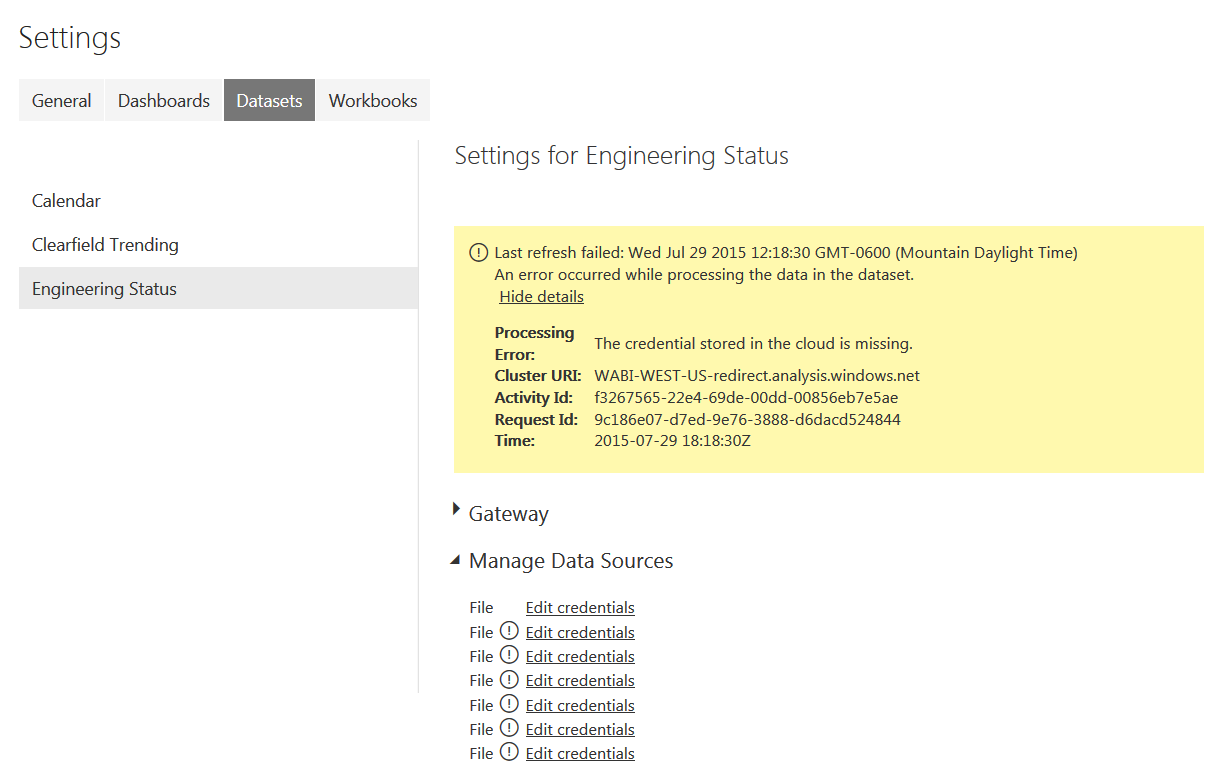
I have a very similar issue as the person above me. Built report in PowerBI Desktop. Publish to PowerBI.com. If I edit queries, the data pulls in just fine. But if I try to refresh now or schedule a refresh, I get the error below. Personal Gateway is running and isn't reporting any issues.
- mininair11 years ago
Microsoft Employee
Hi,
have you installed the latest GA version of the Personal Gateway? If not, please uninstall the preview version and reinstall the GA version. To install the GA version, you can download it from withint your Power BI account under the downloads section.
If you are still able to repro the issue, let us know and we'll look into it asap.
Thanks,Mini
- mininair11 years ago
Hey Jeremy,
Sorry about the issue! The error message means the credentials for the data source need to be updated.In your screenshot, I see ! symbols next to the File data source. Will you please click on those and update the credentials. Since it is a file data source, you'll be using Windows credentials. When you choose Windows credentials, you need to simply hit Sign In and it'll be accepted. If you are wondering, why do I not need to provide my windows credentials - this is because the Personal Gateway is running under your Windows credentials (when you set it up) and hence does not need your windows username/password to be entered in the Power BI service.
Hope this helps. Please update your credentials and you should be able to schedule refresh on the data source.
Thanks,Mini
- jeremyfirth11 years ago
I uninstalled the Personal Gateway just now and reinstalled it.
I have a clearer picture of the issue now. When I originally created my queries, they were pointing at a file that was on a mapped network drive. The query used the mapped drive letter instead of the network address. I noticed this yesterday, and changed my queries to use the full network path instead of the mapped drive letter.
I originally created this in PowerBI Desktop, and I have deleted everything from PowerBI.com and cleared my data cache, and I went to PowerBI.com and used Get Data to re-pull the report into PowerBI.com (instead of using publish in PowerBI Desktop per some advice on another thread.)
Here's the strange/interesting part: when I look at the schedule now refresh options on PowerBI.com, I have 7 data connections, but only 4 queries. So PowerBI is trying to connect to those 3 original connections that were looking at a network mapped drive instead of the full network address. Those connections are kicking out the error. The data connections to the full network address queries are working fine.
Since 3 out of 7 of the connections are erroring, the overall dataset won't update through PowerBI.com. I have no way of deleting those data connections, even though they are no longer needed. I don't know why the pbix file is keeping a history of those original file paths, even though I've changed my queries.
I can refresh the data through PowerBI Desktop, because it appears to not be trying to connect to the old mapped network drive paths the way that PowerBI.com is.
I just refreshed the data from within PowerBI Desktop, then went to PowerBI.com and used Get Data to pull it in. Now there are only 4 data sources. I clicked through them, logged in to each one, set up a scheduled refresh, then hit Refresh Now on the Dataset.
SUCCESS!
Thanks for the help.
- ARaniga11 years agoFrequent Visitor
Hi Mini,
Like Jeremy above I am getting a similar error.
However, unlike Jeremy I am unable to update my data source credentials per screenshot below.
Any ideas appreciated...
- StefanRoth11 years agoNew Member
Is there any update on this problem? I addressed this problem several times, directly to the Support but after the second mail no one answers anymore and this for a paying service....