Forum Discussion
How to use incremental refresh by forcing queryfolding with a predefined SQL Query and ODBC
- Anonymous4 years ago
Managed to get it to work!!
Since I do not know how to format a string to the desired way in M as stated bedore from "DD/MM/YYY "to "YYYY-MM-DD"(duo to baiscally not knowing much M) Wh not do it on the DB side ?
Since i am using postgre I am using one of its functions (might not work or need adapting to other SQL servers) I used TO_TIMESTAMP function. it accepts a string as argument (id this context provided dinamically by the RangeStart and RangeEnd Parameters )and converts it to a timestamp that can then be read nativelly by the server so the WHERE clause works as expected.
In the end the final code turned to be
let
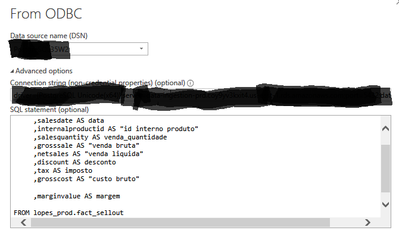
Fonte = Odbc.Query("driver={PostgreSQL Unicode(x64)};server=*DUMMY ADRESS HERE*", "SELECT #(lf) internalstoreid AS ""id interno estabelecimento""#(lf) ,salesdate AS data#(lf) ,internalproductid AS ""id interno produto""#(lf) ,salesquantity AS venda_quantidade#(lf) ,grosssale AS ""venda bruta""#(lf) ,netsales AS ""venda liquida""#(lf) ,discount AS desconto#(lf) ,tax AS imposto#(lf) ,grosscost AS ""custo bruto""#(lf) #(lf) ,marginvalue AS margem#(lf) #(lf)FROM lopes_prod.fact_sellout #(lf) WHERE salesdate >= TO_TIMESTAMP('"& Text.From(RangeStart) & "', 'DD-MM-YYYY' ) AND salesdate < TO_TIMESTAMP ('"& Text.From(RangeEnd) & "' , 'DD-MM-YYYY' )"),
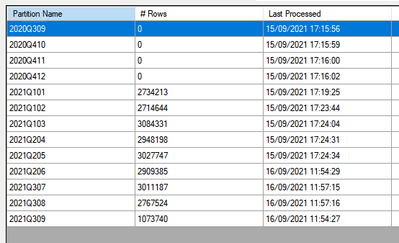
Made some tests, and It works fine Powerbi has no issue with it ! its reduced my refresh time by 1/4 and properly refreshes only the set ammount defined in the incremental refresh (in my tests it is 4 Months) as can be seen in SSMSSo success !
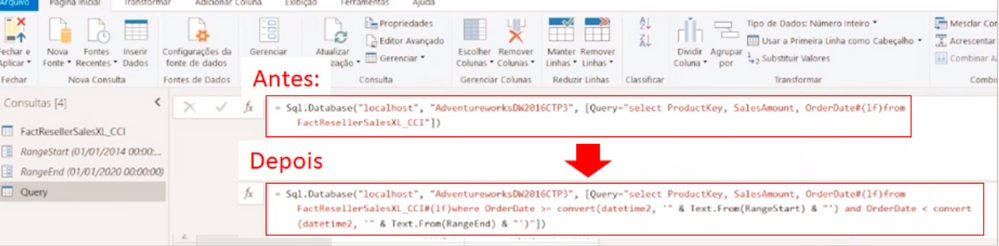
TL:DR. it is possible to bypass the powerquery behavior of not query folding when using a pre defined SQL statement , by adding dynamic parameters via M code integrated with the query supplied to the source independent of the source (ODBC in this case)
Progress, Kinda of... My DB is POSTGREE so "convert" is not a valid function.
So I tweaked the code to
= Odbc.Query("driver={PostgreSQL Unicode(x64)}*ADDADRESSHERE*", "SELECT #(lf) internalstoreid AS ""id interno estabelecimento""#(lf) ,salesdate AS data#(lf) ,internalproductid AS ""id interno produto""#(lf) ,salesquantity AS venda_quantidade#(lf) ,grosssale AS ""venda bruta""#(lf) ,netsales AS ""venda liquida""#(lf) ,discount AS desconto#(lf) ,tax AS imposto#(lf) ,grosscost AS ""custo bruto""#(lf) #(lf) ,marginvalue AS margem#(lf) #(lf)FROM lopes_prod.fact_sellout #(lf) WHERE salesdate >= CAST('"& Text.From(RangeStart) & "' AS TIMESTAMP) AND salesdate <= CAST ('"& Text.From(RangeEnd) & "' AS TIMESTAMP)")
But now I am getting a different error message
Atleast I know that it is correctly retrieving my parameters and turning them into a text inside the query since "13/09/2021 00:00:00" is my RangeEnd Parameter.
The issue now seems to be that the DB uses yyyy-mm-dd 00:00:00 datetime format. So the query needs to transform my parameter written as dd/mm/yyy 00:00:00(and i cant change this in PBI it has to be written this way) into the aforementioned datetime format.
TL:DR: How to I turn my '"& Text.From(RangeEnd) & "' (that returns dd/mm/yyy 00:00:00 as text) i.e: "13/09/2021 00:00:00" into "2021-09-13 00:00:00" By using M functions.
- Anonymous4 years agoNot applicable
Managed to get it to work!!
Since I do not know how to format a string to the desired way in M as stated bedore from "DD/MM/YYY "to "YYYY-MM-DD"(duo to baiscally not knowing much M) Wh not do it on the DB side ?
Since i am using postgre I am using one of its functions (might not work or need adapting to other SQL servers) I used TO_TIMESTAMP function. it accepts a string as argument (id this context provided dinamically by the RangeStart and RangeEnd Parameters )and converts it to a timestamp that can then be read nativelly by the server so the WHERE clause works as expected.
In the end the final code turned to be
let
Fonte = Odbc.Query("driver={PostgreSQL Unicode(x64)};server=*DUMMY ADRESS HERE*", "SELECT #(lf) internalstoreid AS ""id interno estabelecimento""#(lf) ,salesdate AS data#(lf) ,internalproductid AS ""id interno produto""#(lf) ,salesquantity AS venda_quantidade#(lf) ,grosssale AS ""venda bruta""#(lf) ,netsales AS ""venda liquida""#(lf) ,discount AS desconto#(lf) ,tax AS imposto#(lf) ,grosscost AS ""custo bruto""#(lf) #(lf) ,marginvalue AS margem#(lf) #(lf)FROM lopes_prod.fact_sellout #(lf) WHERE salesdate >= TO_TIMESTAMP('"& Text.From(RangeStart) & "', 'DD-MM-YYYY' ) AND salesdate < TO_TIMESTAMP ('"& Text.From(RangeEnd) & "' , 'DD-MM-YYYY' )"),
Made some tests, and It works fine Powerbi has no issue with it ! its reduced my refresh time by 1/4 and properly refreshes only the set ammount defined in the incremental refresh (in my tests it is 4 Months) as can be seen in SSMSSo success !
TL:DR. it is possible to bypass the powerquery behavior of not query folding when using a pre defined SQL statement , by adding dynamic parameters via M code integrated with the query supplied to the source independent of the source (ODBC in this case)