


Forum Discussion
ifillingham
5 years agoFrequent Visitor
Help creating an academic year calendar in Power Query
Hi there, I hope someone can help me out with making an academic year calendar using Power Query rather than PowerBI and Dax. The reason for using Power Query rather than DAX is to limit any impa...
- 5 years ago
Hi,
The solution is quite simple.
1. Load your excel table in to the power query
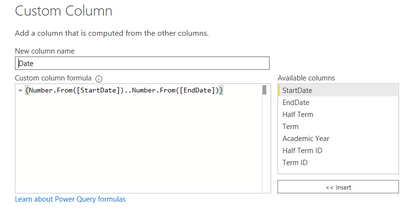
2. Create a custom column with following formula: (this will create a dates in your table based on your start and end date)3. Go to your new column and expand it to the rows:
4. Change Data Type of new column from Numbers to Dates
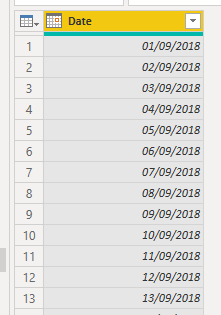
5. You have your wished calendar:
Let me know, if you solved it.
Migasuke
Memorable Member
5 years agoHi,
The solution is quite simple.
1. Load your excel table in to the power query
2. Create a custom column with following formula: (this will create a dates in your table based on your start and end date)
3. Go to your new column and expand it to the rows:
4. Change Data Type of new column from Numbers to Dates
5. You have your wished calendar:
Let me know, if you solved it.