Forum Discussion

Getting data from on-prem sharepoint into Power BI Desktop

 10 years ago
Okey, we have found the solution. Thanks to our internal pros! :-) We had the following behavior:
- Some URLs (SharePoint Site) worked, others not.
- With Fiddler we found out that the URL for the Webservice, which Power BI Deskotp calls in the background, are not always the same. Example: https://example.url.com/spsite1 called the Webservice /spsite1/_vti_bin/ListData.svc/$metadata and the other URL https://example.url.com/spsite2 called the Webserive /spsite2/_api/web/$metadata.
- The "spsite1" worked, "spsite2" not.
- We found out that one site was based on a upgraded SharePoint 2010 site template and the the other based on a SharePoint 2013 site template. So, thats the reason for the different calls of webservice URLs (old and new). The "old" one worked, the "new" one not.
- We found a workaround. Now all works fine. Go to the SharePoint Server and to the "_vti_pvt"-folder in your "inetpub" of IIS. Then look for the file "service.cnf" and delete it - or better rename it. Power BI takes the old OData service when he can not find this file. That's it.Hope it helps as a workaround.
philip
Hello,
I have the same issue since days. Did you have found a solution for this? I tried many things, also the thing with the column name.
Thanks for an answer in advance, philip
- stefam10 years agoFrequent Visitor
We did stumble upon a solution! I hope it works for you...
When connecting to the SharePoint site, we dat to do two things:
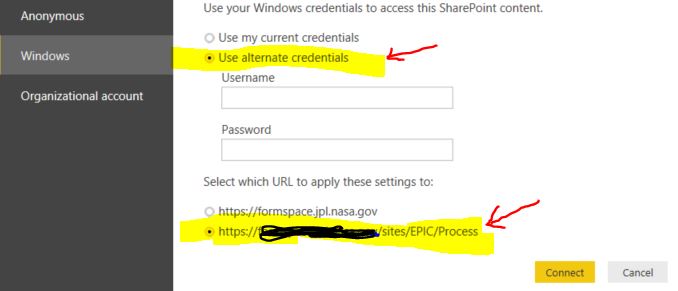
- Authenticate with your Windows: Alternate Credentials AND
- When selecting which URL to apply the settings to, you must select the bottom one – specific to the subsite
Then we were able to connect to the site and see all the lists an the site!
I am now able to select and connect to all the 10-15 lists on the site except, of course, the one which I need.
But that is another issue...
Mike
- pnussbaumer10 years agoFrequent Visitor
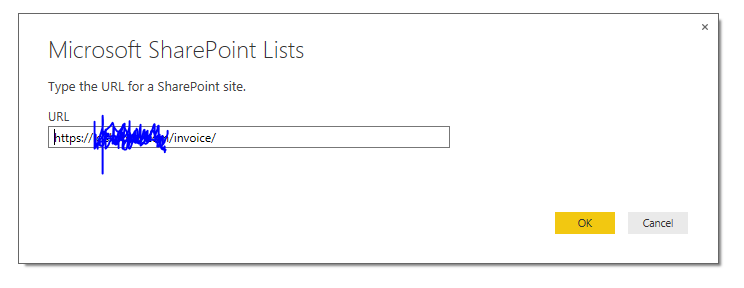
Mike, thanks very much for your help. But the thing is that I don't have the option to give the credentials to the connection. So first this screen:
Then I press "Ok" and after one second it appears that screen:
Is there a possibility to apply to that URL credentials?
Thanks again.philip
- stefam10 years agoFrequent Visitor
Weird. Try File->Options and Settings->Data Source Settings and then delete that data source.
Then try reconnecting to the SharePoint source - it should then ask you for a credential.
Mike
 mstefancik10 years agoAdvocate IV
Hi stefam, I connect the same way to SharePoint lists using alternate windows credentials for Odata feed.
In Power BI desktop it works fine, I can see all the lists and create reports as well as refresh data. Than I publish it to Powerbi.com service. I want to schedule refresh. How did you achieve this? As In service it is not possible to setup refresh using alternate windows credentials.
Thx
- stefam10 years agoFrequent Visitor
Sorry, Can't help there - We don't publish to PowerBI.com - It is not currently secured for the type of data we work with. Hoping to use it when it gets implemented in MAG, but I don't have an answer for your question today.
Mike