FabCon is coming to Atlanta
Join us at FabCon Atlanta from March 16 - 20, 2026, for the ultimate Fabric, Power BI, AI and SQL community-led event. Save $200 with code FABCOMM.
Register now!- Power BI forums
- Get Help with Power BI
- Desktop
- Service
- Report Server
- Power Query
- Mobile Apps
- Developer
- DAX Commands and Tips
- Custom Visuals Development Discussion
- Health and Life Sciences
- Power BI Spanish forums
- Translated Spanish Desktop
- Training and Consulting
- Instructor Led Training
- Dashboard in a Day for Women, by Women
- Galleries
- Data Stories Gallery
- Themes Gallery
- Contests Gallery
- QuickViz Gallery
- Quick Measures Gallery
- Visual Calculations Gallery
- Notebook Gallery
- Translytical Task Flow Gallery
- TMDL Gallery
- R Script Showcase
- Webinars and Video Gallery
- Ideas
- Custom Visuals Ideas (read-only)
- Issues
- Issues
- Events
- Upcoming Events
The Power BI Data Visualization World Championships is back! Get ahead of the game and start preparing now! Learn more
- Power BI forums
- Forums
- Get Help with Power BI
- Power Query
- Re: Getting data from CSV files that have slightly...
- Subscribe to RSS Feed
- Mark Topic as New
- Mark Topic as Read
- Float this Topic for Current User
- Bookmark
- Subscribe
- Printer Friendly Page

- Mark as New
- Bookmark
- Subscribe
- Mute
- Subscribe to RSS Feed
- Permalink
- Report Inappropriate Content
Getting data from CSV files that have slightly different columns each week
I have a CSV file, when stripped down to the barest form, that looks like this:
WW33
Job,WW31,WW32,WW33
JobA,4,4,4
JobB,2,6,3
JobC,2,4,7
As you can probably guess, this is weekly data, with each Work Week (WW) as column heading. The last column is the most recent WW, and although data goes back only 3 weeks here, in my real data it goes back 12 weeks. So far so good. The next week (WW34 in this case), I will again get a similar file, but the oldest week column (WW31 in this case) eliminated, and the new week added. So, my WW34 and WW35 files would looks like this:
WW34
Job,WW32,WW33,WW34
JobA,4,4,3
JobB,6,3,4
JobC,4,7,8
WW35
Job,WW33,WW34,WW35
JobA,4,3,2
JobB,3,4,1
JobC,7,8,5
Do note that I have no control over the format of data and cannot be changed.
My goal is to set up a PowerBI project where it reads data from a certain folder, and whenever someone drops the new weeks' file, it reads data and combines them all into a single data table that should look like this:
Expected
Job,WW31,WW32,WW33,WW34,WW35
JobA,4,4,4,3,2
JobB,2,6,3,4,1
JobC,2,4,7,8,5
Simply put, it should have as many columns as there are weeks in all files combined, and it shouldn't have duplicate columns. I'm not quite sure how I can achieve this. If I simply set PowerBI to read data from a folder and do 'Combine and Transform', this is what I get, which obviously isn't what I want.
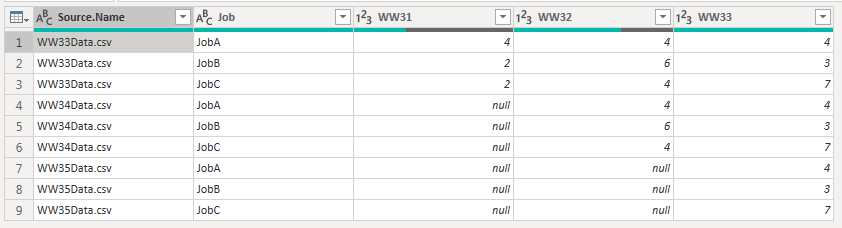
Is there a way to get and format data the way I want?
Solved! Go to Solution.


- Mark as New
- Bookmark
- Subscribe
- Mute
- Subscribe to RSS Feed
- Permalink
- Report Inappropriate Content
Hi @Anonymous
Try this. It's basically loading the files from the folder, transposing the tables, eliminating duplicates and transposing again
let
    Source = Folder.Files(FOLDER_WHERE_YOUR_DATA_IS),
    #"Added Custom" = Table.AddColumn(Source, "Custom", each Csv.Document([Content])),
    #"Added Custom1" = Table.AddColumn(#"Added Custom", "Custom.1", each Table.Transpose([Custom])),
    #"Removed Other Columns" = Table.SelectColumns(#"Added Custom1",{"Custom.1"}),
    #"Expanded Custom.1" = Table.ExpandTableColumn(#"Removed Other Columns", "Custom.1", {"Column1", "Column2", "Column3", "Column4"}, {"Column1", "Column2", "Column3", "Column4"}),
    #"Removed Duplicates" = Table.Distinct(#"Expanded Custom.1", {"Column1"}),
    #"Transposed Table" = Table.Transpose(#"Removed Duplicates"),
    #"Promoted Headers" = Table.PromoteHeaders(#"Transposed Table", [PromoteAllScalars=true]),
    #"Changed Type" = Table.TransformColumnTypes(#"Promoted Headers",{{"Job", type text}, {"WW31", Int64.Type}, {"WW32", Int64.Type}, {"WW33", Int64.Type}, {"WW34", Int64.Type}, {"WW35", Int64.Type}})
in
    #"Changed Type"
Please mark the question solved when done and consider giving kudos if posts are helpful.
Contact me privately for support with any larger-scale BI needs, tutoring, etc.
Cheers

- Mark as New
- Bookmark
- Subscribe
- Mute
- Subscribe to RSS Feed
- Permalink
- Report Inappropriate Content
Hi @Anonymous
Try this. It's basically loading the files from the folder, transposing the tables, eliminating duplicates and transposing again
let
    Source = Folder.Files(FOLDER_WHERE_YOUR_DATA_IS),
    #"Added Custom" = Table.AddColumn(Source, "Custom", each Csv.Document([Content])),
    #"Added Custom1" = Table.AddColumn(#"Added Custom", "Custom.1", each Table.Transpose([Custom])),
    #"Removed Other Columns" = Table.SelectColumns(#"Added Custom1",{"Custom.1"}),
    #"Expanded Custom.1" = Table.ExpandTableColumn(#"Removed Other Columns", "Custom.1", {"Column1", "Column2", "Column3", "Column4"}, {"Column1", "Column2", "Column3", "Column4"}),
    #"Removed Duplicates" = Table.Distinct(#"Expanded Custom.1", {"Column1"}),
    #"Transposed Table" = Table.Transpose(#"Removed Duplicates"),
    #"Promoted Headers" = Table.PromoteHeaders(#"Transposed Table", [PromoteAllScalars=true]),
    #"Changed Type" = Table.TransformColumnTypes(#"Promoted Headers",{{"Job", type text}, {"WW31", Int64.Type}, {"WW32", Int64.Type}, {"WW33", Int64.Type}, {"WW34", Int64.Type}, {"WW35", Int64.Type}})
in
    #"Changed Type"
Please mark the question solved when done and consider giving kudos if posts are helpful.
Contact me privately for support with any larger-scale BI needs, tutoring, etc.
Cheers
- Mark as New
- Bookmark
- Subscribe
- Mute
- Subscribe to RSS Feed
- Permalink
- Report Inappropriate Content
But if I did that, wouldn't I need to go and change the query every week whenever I add a new file to my folder?
- Mark as New
- Bookmark
- Subscribe
- Mute
- Subscribe to RSS Feed
- Permalink
- Report Inappropriate Content
@Anonymous
Nope. It should work as you add more files. Try it out, first with the files you showed and then add another one and see. The only thing you might have to change is the last step in the code above, to make it a bit more flexible when changing the data types. Something like (for the last step above):
= Table.TransformColumnTypes(#"Promoted Headers", List.RemoveFirstN(List.Zip({Table.ColumnNames(#"Promoted Headers"), List.Repeat({Int64.Type},Table.ColumnCount(#"Promoted Headers"))}),1))This changes the column types by extracting their names rather than hardcoding those as we did earlier
Please mark the question solved when done and consider giving kudos if posts are helpful.
Contact me privately for support with any larger-scale BI needs, tutoring, etc.
Cheers
- Mark as New
- Bookmark
- Subscribe
- Mute
- Subscribe to RSS Feed
- Permalink
- Report Inappropriate Content
Yes I see that! I have one more request/concern - although I showed only 3 Jobs, in reality there's hundreds, so is it possible to repeast the following line the same way?
#"Expanded Custom.1" = Table.ExpandTableColumn(#"Removed Other Columns", "Custom.1", {"Column1", "Column2", "Column3", "Column4"}, {"Column1", "Column2", "Column3", "Column4"}),
- Mark as New
- Bookmark
- Subscribe
- Mute
- Subscribe to RSS Feed
- Permalink
- Report Inappropriate Content
OK, I do believe that I figured it out.
This will go through all the columns without having to specify their names.
#"Expanded Custom.1" = Table.ExpandTableColumn(#"Removed Other Columns", "Custom.1", List.Union(List.Transform(#"Removed Other Columns"[Custom.1], each Table.ColumnNames(_)))),- Mark as New
- Bookmark
- Subscribe
- Mute
- Subscribe to RSS Feed
- Permalink
- Report Inappropriate Content
@Anonymous
Yep. Elegant solution 🙂
Please mark the question solved when done and consider giving kudos if posts are helpful.
Contact me privately for support with any larger-scale BI needs, tutoring, etc.
Cheers
- Mark as New
- Bookmark
- Subscribe
- Mute
- Subscribe to RSS Feed
- Permalink
- Report Inappropriate Content
try if this (or a modified version) function could be useful to your job.
let
    conc=(utab,ntab)=>
    let
    lstabs=List.Transform({1..ntab}, each "w"&Text.From(Number.From(Text.End(utab,2))-ntab+_-1)),
    Cws=Table.TransformRows(Expression.Evaluate(utab,#shared), (ru)=>Record.Combine(List.Transform(lstabs, each Expression.Evaluate(_,#shared){[Job=ru[Job]]})&{ru}))
    in
    Table.FromRecords(Cws)
in
   conc
the function takes in input a tablename (as text) and a number (the number of table you want to concat with the leader table. The names are supposed to be leadername+decreasing number as suffix. But if you have a list of table from other source there is no need to costruct the list names)
The result is a table which is a concatenation of all tables.



- Mark as New
- Bookmark
- Subscribe
- Mute
- Subscribe to RSS Feed
- Permalink
- Report Inappropriate Content
I would create a function (or modify the Transform Example File query) to unpivot all the Week columns, append the files together, and then remove rows with duplicate Week and Job. You could then pivot it back out, but I recommend you keep it unpivoted.
If this works for you, please mark it as the solution. Kudos are appreciated too. Please let me know if not.
Regards,
Pat
Did I answer your question? Mark my post as a solution! Kudos are also appreciated!
To learn more about Power BI, follow me on Twitter or subscribe on YouTube.
@mahoneypa HoosierBI on YouTube
- Mark as New
- Bookmark
- Subscribe
- Mute
- Subscribe to RSS Feed
- Permalink
- Report Inappropriate Content
Can you perhaps show me with an example? I'm pretty new to this and not quite sure what you mean.
Helpful resources

Power BI Dataviz World Championships
The Power BI Data Visualization World Championships is back! Get ahead of the game and start preparing now!

Power BI Monthly Update - December 2025
Check out the December 2025 Power BI Holiday Recap!

FabCon Atlanta 2026
Join us at FabCon Atlanta, March 16-20, for the ultimate Fabric, Power BI, AI and SQL community-led event. Save $200 with code FABCOMM.


