Forum Discussion

Failed to Import Data - SQL Azure direct connection

I am now trying from Power BI Desktop to connect to the same SQL Azure database and get the following:
Unble to Connect
Details: "Microsoft SQL: Connection Timeout Expired. The timeout period elapsed while attempting to consume the pre-login handshake acknowledgement. This could be because the pre-login handshake failed or the server was unable to respond back in time. The duration spent while attempting to connect to this server was - [Pre-Login] initialization=58; handshake=14931; "
I am able to connect fine with SSMS to the SQL Azure database from the same machine. Any ideas?
thanks,
Mark
- mwiggins10 years agoNew Member
Wow, I'm overwhemled by the responses. This is a great support forum.
 Anonymous10 years agoNot applicable
mwiggins by "verified the firewall rule is set to on" can I assume that the IP you set as a rule is not your internal network IP, but is the IP that your internet connection has, and that the user you are trying to connect to the database has permissions.
My initial impression is that this is a config issue and not a Power BI issue.
- mwiggins10 years agoNew Member
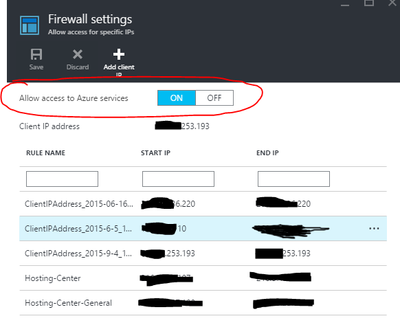
By "verified the firewall rule is set to on" I meant the "Allow access to Azure services" (see attached) to connect from the Power BI portal. I did also add my NAT'd IP address to the firewall rule, to test the connection from SSMS and Power BI Desktop running on my local machine. SSMS is able to connect but PowerBI Desktop is not, see previous message.
thanks,
Mark