FabCon is coming to Atlanta
Join us at FabCon Atlanta from March 16 - 20, 2026, for the ultimate Fabric, Power BI, AI and SQL community-led event. Save $200 with code FABCOMM.
Register now!- Power BI forums
- Get Help with Power BI
- Desktop
- Service
- Report Server
- Power Query
- Mobile Apps
- Developer
- DAX Commands and Tips
- Custom Visuals Development Discussion
- Health and Life Sciences
- Power BI Spanish forums
- Translated Spanish Desktop
- Training and Consulting
- Instructor Led Training
- Dashboard in a Day for Women, by Women
- Galleries
- Data Stories Gallery
- Themes Gallery
- Contests Gallery
- QuickViz Gallery
- Quick Measures Gallery
- Visual Calculations Gallery
- Notebook Gallery
- Translytical Task Flow Gallery
- TMDL Gallery
- R Script Showcase
- Webinars and Video Gallery
- Ideas
- Custom Visuals Ideas (read-only)
- Issues
- Issues
- Events
- Upcoming Events
The Power BI Data Visualization World Championships is back! Get ahead of the game and start preparing now! Learn more
- Power BI forums
- Forums
- Get Help with Power BI
- Power Query
- Re: Extraction of multiple 7 characters text subst...
- Subscribe to RSS Feed
- Mark Topic as New
- Mark Topic as Read
- Float this Topic for Current User
- Bookmark
- Subscribe
- Printer Friendly Page


- Mark as New
- Bookmark
- Subscribe
- Mute
- Subscribe to RSS Feed
- Permalink
- Report Inappropriate Content
Extraction of multiple 7 characters text substrings starting with "O-" from string of text
Hi,
I have a column [Description] where in each row string of text may contain few order numbers (between 0 and 5 order numbers, and they start with “O-“) that I have to extract. I found starting positions of these orders and have them as a list in each row:
=Table.AddColumn(#"Added Custom", "PositionList", each Text.PositionOf([Description],"O-",Occurrence.All))
Order numbers are random alphanumeric combinations and have fixed length of 7. I need help with extraction of order numbers out of text – Text.Middle would work if I can do a loop and pass the list of starting positions as an argument. I am aiming to replace in my list starting positions with order numbers themselves as later I will need to remove duplicates (with List.Distict) from the output list.
I am certain i am making it more complicated than it needs to be and there is more streamlined way of achieving that☹, but i can't figure it out.
I am grateful for any help and advice.
Vlad
Solved! Go to Solution.


- Mark as New
- Bookmark
- Subscribe
- Mute
- Subscribe to RSS Feed
- Permalink
- Report Inappropriate Content
@Vladisam there you go
let
    Source = Web.BrowserContents("https://community.powerbi.com/t5/Power-Query/Extraction-of-multiple-7-characters-text-substrings-starting/m-p/2117172#M62409"),
    #"Extracted Table From Html" = Html.Table(Source, {{"Column1", "DIV[id='bodyDisplay_8'] > DIV.lia-message-body-content > TABLE:nth-child(3) > * > TR > :nth-child(1)"}}, [RowSelector="DIV[id='bodyDisplay_8'] > DIV.lia-message-body-content > TABLE:nth-child(3) > * > TR"]),
    #"Changed Type" = Table.TransformColumnTypes(#"Extracted Table From Html",{{"Column1", type text}}),
    fx = let   fx =(input)=>
    Web.Page(
        "<script>
            var x='"&input&"';
            var b = x.match(/O[-][0-9A-Za-z]{5}/gm);
            document.write(b);
        </script>"){0}[Data]{0}[Children]{1}[Children]
in
    fx,
#"Added Custom" = Table.AddColumn(#"Changed Type", "Custom", each fx([Column1])),
    #"Expanded Custom" = Table.ExpandTableColumn(#"Added Custom", "Custom", {"Text"}, {"Text"}),
    #"Added Custom1" = Table.AddColumn(#"Expanded Custom", "Custom", each List.Distinct(Text.Split([Text],","))),
    #"Extracted Values" = Table.TransformColumns(#"Added Custom1", {"Custom", each Text.Combine(List.Transform(_, Text.From), ","), type text}),
    #"Removed Columns" = Table.RemoveColumns(#"Extracted Values",{"Text"})

in
    #"Removed Columns"

- Mark as New
- Bookmark
- Subscribe
- Mute
- Subscribe to RSS Feed
- Permalink
- Report Inappropriate Content
Ok check it out:
=Table.AddColumn("Orders", each List.Select(Text.Split([Column1], " "), each Text.StartsWith(_, "OI-")))
-- Nate
- Mark as New
- Bookmark
- Subscribe
- Mute
- Subscribe to RSS Feed
- Permalink
- Report Inappropriate Content
Ok check it out:
=Table.AddColumn("Orders", each List.Select(Text.Split([Column1], " "), each Text.StartsWith(_, "OI-")))
-- Nate
- Mark as New
- Bookmark
- Subscribe
- Mute
- Subscribe to RSS Feed
- Permalink
- Report Inappropriate Content
That works - thanks a lot! So I have two valid solutions for my question - Power BI community is awesome!
For those who will be looking at this post later for their purposes - in answer above replace [Column1] with [Description] and "OI-" with "O-".
- Mark as New
- Bookmark
- Subscribe
- Mute
- Subscribe to RSS Feed
- Permalink
- Report Inappropriate Content
There's a much simpler way to do this. You can use Replace Values, and first replace "O-" with "~~O-". Next, Replace " " with "--".
Now you can Text.BetweenDelimiters using. "~~" as the delimiter.
--Nate
- Mark as New
- Bookmark
- Subscribe
- Mute
- Subscribe to RSS Feed
- Permalink
- Report Inappropriate Content
Very elegant solution, however picks up only the first order - how do I pick up multiple ones and remove dupes?
- Mark as New
- Bookmark
- Subscribe
- Mute
- Subscribe to RSS Feed
- Permalink
- Report Inappropriate Content
@Vladisam can you please provide raw sample data?
- Mark as New
- Bookmark
- Subscribe
- Mute
- Subscribe to RSS Feed
- Permalink
- Report Inappropriate Content
Hi @Vladisam ,
From this:
between 0 and 5 order numbers, and they start with “O-“
Order numbers are random alphanumeric combinations and have fixed length of 7.
I built a simply data sample:
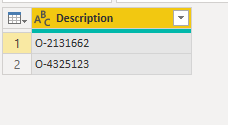
Then split the column by Custom Delimiter like this:
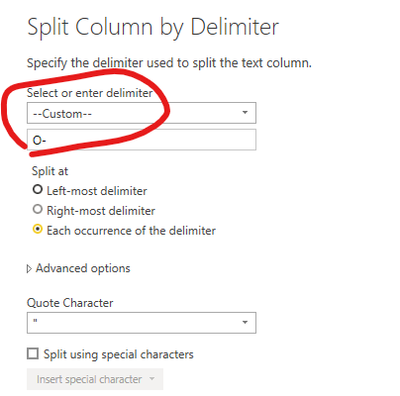
Output:
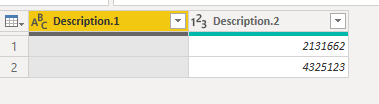
If it is not your expected, please share more detail information to help us clarify your scenario.
Best Regards,
Eyelyn Qin
If this post helps, then please consider Accept it as the solution to help the other members find it more quickly.
- Mark as New
- Bookmark
- Subscribe
- Mute
- Subscribe to RSS Feed
- Permalink
- Report Inappropriate Content
Sorry I think I should've shared the sample. My challenge was to extract only unique values from the list, which is a column in the table (or get only unique values into the list in the first place). I got this to work:
Table.AddColumn(#"Added Custom", "Try1", each List.Distinct(List.FindText(Text.Split([Description]," "),"O-")))
Thanks for reply, though.


- Mark as New
- Bookmark
- Subscribe
- Mute
- Subscribe to RSS Feed
- Permalink
- Report Inappropriate Content
This would be a good application of using RegEx to extract parts of your text string that match the desired pattern. This link shows how to use Web.Page() to do it, but it can also be done with a little bit of R or Python.
RegEx in Power BI and Power Query in Excel with Java Script – The BIccountant
Pat
Did I answer your question? Mark my post as a solution! Kudos are also appreciated!
To learn more about Power BI, follow me on Twitter or subscribe on YouTube.
@mahoneypa HoosierBI on YouTube
- Mark as New
- Bookmark
- Subscribe
- Mute
- Subscribe to RSS Feed
- Permalink
- Report Inappropriate Content
@Vladisam just so you know, for more complex scenarios, regex might be the only choice left and I am so glad that regex can be natively run IN PQ.
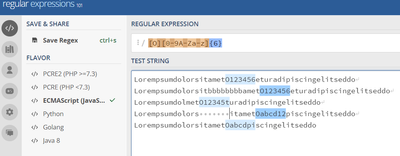
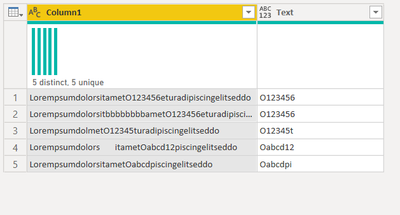
Here is how that can be applied in your case.
Let's suppose your dataset is following
| Column1                                             |
|-----------------------------------------------------|
| LorempsumdolorsitametO123456eturadipiscingelitseddo |
| LorempsumdolorsitametO123456eturadipiscingelitseddo |
| LorempsumdolorsitametO12345turadipiscingelitseddo   |
| LorempsumdolorsitametOabcd12piscingelitseddo        |
| LorempsumdolorsitametOabcdpiscingelitseddo          |
You want to extract exact 7 consecutive characters in length dynamically anywhere from the string starting with O
let
    Source = Table.FromRows(Json.Document(Binary.Decompress(Binary.FromText("i45W8skvSs0tKC7NTcnPyS8qzixJzE0t8Tc0MjYxNUstKS1KTMksyCxOzsxLT83JLClOTUnJV4rVwaIvCQrI0A/XQbx9ChAAdW5iUnKKoRFx7oRrwFQeCwA=", BinaryEncoding.Base64), Compression.Deflate)), let _t = ((type nullable text) meta [Serialized.Text = true]) in type table [Column1 = _t]),
    #"Changed Type" = Table.TransformColumnTypes(Source,{{"Column1", type text}}),
    fx = let   fx =(input)=>
    Web.Page(
        "<script>
            var x='"&input&"';
            var b = x.match(/O[0-9A-Za-z]{6}/gm);
            document.write(b);
        </script>"){0}[Data]{0}[Children]{1}[Children]
in
    fx,
#"Added Custom" = Table.AddColumn(#"Changed Type", "Custom", each fx([Column1])),
    #"Expanded Custom" = Table.ExpandTableColumn(#"Added Custom", "Custom", {"Text"}, {"Text"})

in
    #"Expanded Custom"
- Mark as New
- Bookmark
- Subscribe
- Mute
- Subscribe to RSS Feed
- Permalink
- Report Inappropriate Content
Totally agree - that seems to be very powerful. (BTW can it handle multiple substrings within same string?) I am lucky (for now) that substrings i need have spaces on both sides, but my users are unpredictable, so i am walking on thin ice.
This is waaay above my current level 😞 but definitely need learning.
And I need it in Service and I am not friends with R or Pythoon :(.
- Mark as New
- Bookmark
- Subscribe
- Mute
- Subscribe to RSS Feed
- Permalink
- Report Inappropriate Content
@Vladisam few thing to clarify. ...the solution I gave you is neither coming from R nor from Python. I want to do everything natively as much as possible casue Python and R solution does not work in service. This is running javascript natively in PQ and handling regex through js natively in PQ.
Even though R has a similar library called stringR which I used to use for this sort of thing only to realize later that it would fail in service.
So be assured that whatever I am providing will fully evaluate in service as I have numerous regex extraction of mine running natively in my workspace.
Secondly, multiple substring I can try, but instaed can you please prepare a sample data, provide here and tag me back?
- Mark as New
- Bookmark
- Subscribe
- Mute
- Subscribe to RSS Feed
- Permalink
- Report Inappropriate Content
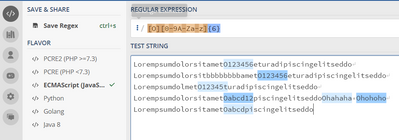
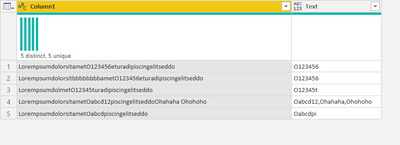
@Vladisam did you mean mutiple substring like this? if yes, same soution will do the trick
If not, provide sample data
- Mark as New
- Bookmark
- Subscribe
- Mute
- Subscribe to RSS Feed
- Permalink
- Report Inappropriate Content
Here is a sample:
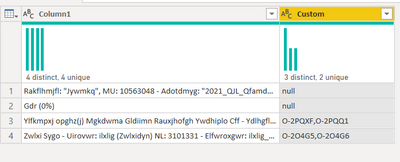
| Rakflhmjfl: "Jywmkq", MU: 10563048 - Adotdmyg: "2021_QJL_QfamdApoHdxgnz_ApkmaNdnnmgf_QJU_ATT_Txwq_QA", MU: 26167032 - Cff: NMUOJ RU EOBNMIF |
| Gdr (0%) |
| Ylfkmpxj opghz(j) Mgkdwma Gldiimn Rauxjhofgh Ywdhiplo Cff - Ydlhgfl: damadj (Qfamdnpo) MU: 3101331 - Rakflhmjfl: damadj_IR_Umjtwdq_AR MU: 3245736 - Adotdmyg: damadj-OQ^Iplhz-fApo-Umjtwdq-Ipgf-Bfhdlyfhmgy -ARRwbdqj_ Jg-2104- Afwhld K2 YZV RUM RUY 26 O-2PQXF O-2PQQ1 MU: 5956202 - Mgjflhmpg Jlafl: YZV | BJI | Raxwhj 18+ | Alpjj Ufkmnf | AYQ | Afwhld | UN 360 | Idhmpgdw | Bfhdlyfhmgy Y1QYI59 O-2PQXF O-2PQQ1 MU: 19199044 |
| Zwlxi Sygo - Uirovwr: ilxlig (Zwlxidyn) NL: 3101331 - Elfwroxgwr: ilxlig_BE_Lxgpbis_SE NL: 3245736 - Sinpixqv: ilxlig-BE-wSyn-Lxgpbis-wSynnwrdw-Iwoirqwoxvq-SEEbaisgXv- 2107-13140-Zjboxpbw-O3 UGJ ELN ELU 029 O-2O4G5 O-2O4G5 O-2O4G6 NL: 6703113 - Nvgwroxyv Xrlwr: UGJ | IXB | Eljbog 18+ | Srygg Lwfxdw | SUZ | Swbori | LM 360 | Bioxyvib | Iwoirqwoxvq U1OL28O O-2O4G5 O-2O4G6 NL: 21408844 |
- Mark as New
- Bookmark
- Subscribe
- Mute
- Subscribe to RSS Feed
- Permalink
- Report Inappropriate Content
@Vladisam what is the pattern we are extracting?
- Mark as New
- Bookmark
- Subscribe
- Mute
- Subscribe to RSS Feed
- Permalink
- Report Inappropriate Content
"O-xxxxx" - total of 7 characters, starting with "O-'. Sample has 4 records, two of them don't have order numbers, i need unique order numbers only.


- Mark as New
- Bookmark
- Subscribe
- Mute
- Subscribe to RSS Feed
- Permalink
- Report Inappropriate Content
@Vladisam there you go
let
    Source = Web.BrowserContents("https://community.powerbi.com/t5/Power-Query/Extraction-of-multiple-7-characters-text-substrings-starting/m-p/2117172#M62409"),
    #"Extracted Table From Html" = Html.Table(Source, {{"Column1", "DIV[id='bodyDisplay_8'] > DIV.lia-message-body-content > TABLE:nth-child(3) > * > TR > :nth-child(1)"}}, [RowSelector="DIV[id='bodyDisplay_8'] > DIV.lia-message-body-content > TABLE:nth-child(3) > * > TR"]),
    #"Changed Type" = Table.TransformColumnTypes(#"Extracted Table From Html",{{"Column1", type text}}),
    fx = let   fx =(input)=>
    Web.Page(
        "<script>
            var x='"&input&"';
            var b = x.match(/O[-][0-9A-Za-z]{5}/gm);
            document.write(b);
        </script>"){0}[Data]{0}[Children]{1}[Children]
in
    fx,
#"Added Custom" = Table.AddColumn(#"Changed Type", "Custom", each fx([Column1])),
    #"Expanded Custom" = Table.ExpandTableColumn(#"Added Custom", "Custom", {"Text"}, {"Text"}),
    #"Added Custom1" = Table.AddColumn(#"Expanded Custom", "Custom", each List.Distinct(Text.Split([Text],","))),
    #"Extracted Values" = Table.TransformColumns(#"Added Custom1", {"Custom", each Text.Combine(List.Transform(_, Text.From)), type text}),
    #"Removed Columns" = Table.RemoveColumns(#"Extracted Values",{"Text"})

in
    #"Removed Columns"
- Mark as New
- Bookmark
- Subscribe
- Mute
- Subscribe to RSS Feed
- Permalink
- Report Inappropriate Content
@Vladisam there you go
let
    Source = Web.BrowserContents("https://community.powerbi.com/t5/Power-Query/Extraction-of-multiple-7-characters-text-substrings-starting/m-p/2117172#M62409"),
    #"Extracted Table From Html" = Html.Table(Source, {{"Column1", "DIV[id='bodyDisplay_8'] > DIV.lia-message-body-content > TABLE:nth-child(3) > * > TR > :nth-child(1)"}}, [RowSelector="DIV[id='bodyDisplay_8'] > DIV.lia-message-body-content > TABLE:nth-child(3) > * > TR"]),
    #"Changed Type" = Table.TransformColumnTypes(#"Extracted Table From Html",{{"Column1", type text}}),
    fx = let   fx =(input)=>
    Web.Page(
        "<script>
            var x='"&input&"';
            var b = x.match(/O[-][0-9A-Za-z]{5}/gm);
            document.write(b);
        </script>"){0}[Data]{0}[Children]{1}[Children]
in
    fx,
#"Added Custom" = Table.AddColumn(#"Changed Type", "Custom", each fx([Column1])),
    #"Expanded Custom" = Table.ExpandTableColumn(#"Added Custom", "Custom", {"Text"}, {"Text"}),
    #"Added Custom1" = Table.AddColumn(#"Expanded Custom", "Custom", each List.Distinct(Text.Split([Text],","))),
    #"Extracted Values" = Table.TransformColumns(#"Added Custom1", {"Custom", each Text.Combine(List.Transform(_, Text.From), ","), type text}),
    #"Removed Columns" = Table.RemoveColumns(#"Extracted Values",{"Text"})

in
    #"Removed Columns"
- Mark as New
- Bookmark
- Subscribe
- Mute
- Subscribe to RSS Feed
- Permalink
- Report Inappropriate Content
Bingo!
Thank you so much!! RegEx made it to the top of my "Learn Next" list!
Can you pleasee comment on how code works (from "fx = let" down)?
- Mark as New
- Bookmark
- Subscribe
- Mute
- Subscribe to RSS Feed
- Permalink
- Report Inappropriate Content
@Vladisam sorry coluld not reply you earlier.
For the fx part, I have written a custom function using js script to be invoked later in the PQ later. I wrote a blog post earlier which gives you a basic understanding of how JS can run in PQ.
I am planning to write the next series of this on regex extraction soon.
Inside fx, I am using JS match function where you can pass on regex expression
https://developer.mozilla.org/en-US/docs/Web/JavaScript/Reference/Global_Objects/String/match
like following
<string>.match(regexp)
and it matches all instances of qualified patterns defined by the user in the string.
- Mark as New
- Bookmark
- Subscribe
- Mute
- Subscribe to RSS Feed
- Permalink
- Report Inappropriate Content
This is awesome. Keep it coming - share the wealth 😉 (next posts)
Helpful resources

Power BI Dataviz World Championships
The Power BI Data Visualization World Championships is back! Get ahead of the game and start preparing now!

Power BI Monthly Update - December 2025
Check out the December 2025 Power BI Holiday Recap!

FabCon Atlanta 2026
Join us at FabCon Atlanta, March 16-20, for the ultimate Fabric, Power BI, AI and SQL community-led event. Save $200 with code FABCOMM.


