FabCon is coming to Atlanta
Join us at FabCon Atlanta from March 16 - 20, 2026, for the ultimate Fabric, Power BI, AI and SQL community-led event. Save $200 with code FABCOMM.
Register now!- Power BI forums
- Get Help with Power BI
- Desktop
- Service
- Report Server
- Power Query
- Mobile Apps
- Developer
- DAX Commands and Tips
- Custom Visuals Development Discussion
- Health and Life Sciences
- Power BI Spanish forums
- Translated Spanish Desktop
- Training and Consulting
- Instructor Led Training
- Dashboard in a Day for Women, by Women
- Galleries
- Data Stories Gallery
- Themes Gallery
- Contests Gallery
- QuickViz Gallery
- Quick Measures Gallery
- Visual Calculations Gallery
- Notebook Gallery
- Translytical Task Flow Gallery
- TMDL Gallery
- R Script Showcase
- Webinars and Video Gallery
- Ideas
- Custom Visuals Ideas (read-only)
- Issues
- Issues
- Events
- Upcoming Events
Get Fabric Certified for FREE during Fabric Data Days. Don't miss your chance! Request now
- Power BI forums
- Forums
- Get Help with Power BI
- Power Query
- Re: Extracting Title from SharePoint Online list
- Subscribe to RSS Feed
- Mark Topic as New
- Mark Topic as Read
- Float this Topic for Current User
- Bookmark
- Subscribe
- Printer Friendly Page


- Mark as New
- Bookmark
- Subscribe
- Mute
- Subscribe to RSS Feed
- Permalink
- Report Inappropriate Content
Extracting Title from SharePoint Online list
I'm trying to extract the title from the Record in the Modified By column of a SharePoint list.
I'm accessing the SharePoint List using Power BI Desktop October release and the new Beta 2.0 connector.
The Modified By column returns a type List in each row of the data.
Below is my sad attempt to extract this to a type Record. After which I can expand and get to the Title field.
let
    Source = SharePoint.Tables("https://xxxxxx.sharepoint.com/sites/CustomerHub/", [Implementation="2.0", ViewMode="All"]),
    #"fdc6dc7f-80f9-45e0-b350-e93e1f714ccc" = Source{[Id="fdc6dc7f-80f9-45e0-b350-e93e1f714ccc"]}[Items],
    #"Removed Other Columns" = Table.SelectColumns(#"fdc6dc7f-80f9-45e0-b350-e93e1f714ccc",{"Customer Name", "Outcomes Manager", "Modified By"}),
    #"xForm Outcomes Manager" = Table.TransformColumns(#"Removed Other Columns", {"Modified By", each try if Value.Is("Modified By", type list) then Table.ExpandListColumn(#"Removed Other Columns", "Modified By") else "xb" otherwise "xxx"})
in
    #"xForm Outcomes Manager"
Once This is working I can expand it to other fields that I also need the details from.
Currently every row is returning "xb" - to me this suggests that my Table.ExpandListColumn is failing?
Table.ExpandRecordColumn(#"Renamed Columns1", "Modified By", "title")
- David
- David
Solved! Go to Solution.


- Mark as New
- Bookmark
- Subscribe
- Mute
- Subscribe to RSS Feed
- Permalink
- Report Inappropriate Content
Hi David,
To summarise, if you want to extract the title directly from the List use this code
#"Added Custom1" = Table.AddColumn(#"Added Custom", "Modified By", each try Record.Field([Outcomes Manager]{0}, "title") otherwise "")
To extract the Record from the List use this code
Transform = Table.TransformColumns(#"Added Custom", {{"Outcomes Manager", each if Value.Is(_,type list) then try _{0} otherwise "" else [title = "not assigned"], type record}} )
NOTE: I've put a try..otherwise in there to allow for an empty list.
Examples of both of these are in this PBIX file.
Cheers
Phil
If I answered your question please mark my post as the solution.
If my answer helped solve your problem, give it a kudos by clicking on the Thumbs Up.
Did I answer your question? Then please mark my post as the solution.
If I helped you, click on the Thumbs Up to give Kudos.
Blog :: YouTube Channel :: Connect on Linkedin
Proud to be a Super User!
- Mark as New
- Bookmark
- Subscribe
- Mute
- Subscribe to RSS Feed
- Permalink
- Report Inappropriate Content
Hi David,
To summarise, if you want to extract the title directly from the List use this code
#"Added Custom1" = Table.AddColumn(#"Added Custom", "Modified By", each try Record.Field([Outcomes Manager]{0}, "title") otherwise "")
To extract the Record from the List use this code
Transform = Table.TransformColumns(#"Added Custom", {{"Outcomes Manager", each if Value.Is(_,type list) then try _{0} otherwise "" else [title = "not assigned"], type record}} )
NOTE: I've put a try..otherwise in there to allow for an empty list.
Examples of both of these are in this PBIX file.
Cheers
Phil
If I answered your question please mark my post as the solution.
If my answer helped solve your problem, give it a kudos by clicking on the Thumbs Up.
Did I answer your question? Then please mark my post as the solution.
If I helped you, click on the Thumbs Up to give Kudos.
Blog :: YouTube Channel :: Connect on Linkedin
Proud to be a Super User!
- Mark as New
- Bookmark
- Subscribe
- Mute
- Subscribe to RSS Feed
- Permalink
- Report Inappropriate Content
Nice Summary, thank you Phil.
- David
- Mark as New
- Bookmark
- Subscribe
- Mute
- Subscribe to RSS Feed
- Permalink
- Report Inappropriate Content
Glad to help
If I answered your question please mark my post as the solution.
If my answer helped solve your problem, give it a kudos by clicking on the Thumbs Up.
Did I answer your question? Then please mark my post as the solution.
If I helped you, click on the Thumbs Up to give Kudos.
Blog :: YouTube Channel :: Connect on Linkedin
Proud to be a Super User!
- Mark as New
- Bookmark
- Subscribe
- Mute
- Subscribe to RSS Feed
- Permalink
- Report Inappropriate Content
Which post would you like me to accept as the solution?
If you summarise in a post I'm happy to accept that one.
- Mark as New
- Bookmark
- Subscribe
- Mute
- Subscribe to RSS Feed
- Permalink
- Report Inappropriate Content
Hi @dgwilson
In the Modified By column click on the double headed arrow and then Expand to New Rows

That should give you a column of Records. Again,click on the double headed arrow on the Modified By column then click on OK to extract the columns including the Title you are after.
Regards.
Phil
If I answered your question please mark my post as the solution.
If my answer helped solve your problem, give it a kudos by clicking on the Thumbs Up.
Did I answer your question? Then please mark my post as the solution.
If I helped you, click on the Thumbs Up to give Kudos.
Blog :: YouTube Channel :: Connect on Linkedin
Proud to be a Super User!
- Mark as New
- Bookmark
- Subscribe
- Mute
- Subscribe to RSS Feed
- Permalink
- Report Inappropriate Content
Thanks Phil...
I managed to get to that point about the same time you posted the message! 🙂
Next trick is to do the same thing but on a column where some of the fields are blank.
i.e. not every row has a "List".
- David
- Mark as New
- Bookmark
- Subscribe
- Mute
- Subscribe to RSS Feed
- Permalink
- Report Inappropriate Content
Hi @dgwilson
Not sure what you mean, can you give an example?
Phil
If I answered your question please mark my post as the solution.
If my answer helped solve your problem, give it a kudos by clicking on the Thumbs Up.
Did I answer your question? Then please mark my post as the solution.
If I helped you, click on the Thumbs Up to give Kudos.
Blog :: YouTube Channel :: Connect on Linkedin
Proud to be a Super User!
- Mark as New
- Bookmark
- Subscribe
- Mute
- Subscribe to RSS Feed
- Permalink
- Report Inappropriate Content
See below how only some of the rows have a "type" list. Within that list is a record ... and that's what I want to get to. That record is an Office 365 Person (I may have expressed that wrong) but is the same type of record as the "Modified By"... so I want "title".
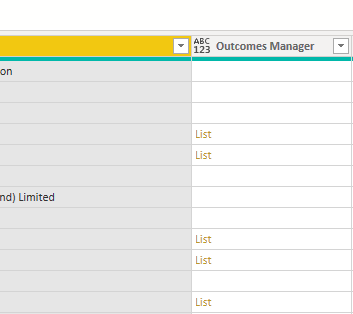
I'm here currently and everything has returned "not assigned" for every row.
= Table.TransformColumns(#"Expanded Modified By1", {"Outcomes Manager", each try Table.ExpandListColumn(#"Expanded Modified By1", "Outcomes Manager"{0}) otherwise [title = "not assigned"]})
- David
- Mark as New
- Bookmark
- Subscribe
- Mute
- Subscribe to RSS Feed
- Permalink
- Report Inappropriate Content
Hi @dgwilson
The double headed arrow to expand the lists is not shown because one of the values in that column is a space, empty string (blank) or some other whitespace character.
Click on the single drop down arrow at the top of the column to filter those out and then you can expand the lists.
Phil
If I answered your question please mark my post as the solution.
If my answer helped solve your problem, give it a kudos by clicking on the Thumbs Up.
Did I answer your question? Then please mark my post as the solution.
If I helped you, click on the Thumbs Up to give Kudos.
Blog :: YouTube Channel :: Connect on Linkedin
Proud to be a Super User!
- Mark as New
- Bookmark
- Subscribe
- Mute
- Subscribe to RSS Feed
- Permalink
- Report Inappropriate Content
That's the trick... I won't want the list filtered... I need those blanks.
I'm currently trying to test for "list" type. It isn't working... hopefully I'm on the right path.
= Table.TransformColumns(#"Expanded Modified By1", "Outcomes Manager", each try if Value.Is("Modified By", type list) = true then Table.ExpandListColumn(#"Expanded Modified By1", "Outcomes Manager"{0})else [title = "not assigned"] otherwise [title = "try failure"])
- David
- Mark as New
- Bookmark
- Subscribe
- Mute
- Subscribe to RSS Feed
- Permalink
- Report Inappropriate Content
Hi @dgwilson
Try this line instead. It'll give you a string of comma separated values from within each list.
= Table.TransformColumns(#"Expanded Modified By1", {"Outcomes Manager", each try Text.Combine(List.Transform(_, Text.From), ",") otherwise "", type text})
Here's a sample PBIX file where I've included 2 examples of extracting lists from columns with empty rows.
You can use try .. otherwise as above, or you can leave out the otherwise and then replace errors.
Using try..otherwise is probably better but never hurts to know other ways to do things.
Regards
Phil
If I answered your question please mark my post as the solution.
If my answer helped solve your problem, give it a kudos by clicking on the Thumbs Up.
Did I answer your question? Then please mark my post as the solution.
If I helped you, click on the Thumbs Up to give Kudos.
Blog :: YouTube Channel :: Connect on Linkedin
Proud to be a Super User!
- Mark as New
- Bookmark
- Subscribe
- Mute
- Subscribe to RSS Feed
- Permalink
- Report Inappropriate Content
Thank you for this Phil.
I can see what you've done in the PBIX... for me the Otherwise condition is being triggered.
Now this is likely because inside the list is a record. That's what we need to get out.
Good news is that you've used Table. TransformColumns - I was beginning to wonder if it was the right thing.
How do we modify your sample so that the list includes a record (first and only entry).
An image of the record structure is below. It's straight forward and I'm only after the "title".
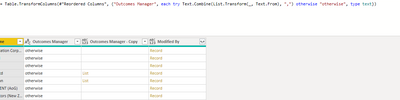

I modified in your PBIX this line on "Table Try Otherwise"
Table.AddColumn(#"Changed Type", "Custom", each if [Data] =1 then {} else if [Data] = 2 then {[title="David"]} else if [Data] = 3 then "" else if [Data] = 4 then {[title="Phil"]} else {"x","y","z"})
Some progress... it's not right yet...
= Table.TransformColumns(#"Added Custom", {"Custom", each try if Value.Is(_, type list) then Table.ExpandListColumn(#"Added Custom", "Custom") else [] otherwise [name="otherwise"], type record})
- David
- Mark as New
- Bookmark
- Subscribe
- Mute
- Subscribe to RSS Feed
- Permalink
- Report Inappropriate Content
Hi David,
OK let's change tack, try this one line instead which willgive you another column with the title in it.
#"Added Custom1" = Table.AddColumn(#"Added Custom", "Modified By", each try Record.Field([Outcomes Manager]{0}, "title") otherwise "")
and here's the PBIX file showing what I did with sample data.
Regards
Phil
If I answered your question please mark my post as the solution.
If my answer helped solve your problem, give it a kudos by clicking on the Thumbs Up.
Did I answer your question? Then please mark my post as the solution.
If I helped you, click on the Thumbs Up to give Kudos.
Blog :: YouTube Channel :: Connect on Linkedin
Proud to be a Super User!
- Mark as New
- Bookmark
- Subscribe
- Mute
- Subscribe to RSS Feed
- Permalink
- Report Inappropriate Content
Hi Phil...
I'm pleased to report success! Nice work.
#"Added Custom1" = Table.AddColumn(#"Added Custom", "Modified By", each try Record.Field([Outcomes Manager]{0}, "title") otherwise "")
Given this... it should be possible to extract the record from the list? Either to the same or new column.
- David
- Mark as New
- Bookmark
- Subscribe
- Mute
- Subscribe to RSS Feed
- Permalink
- Report Inappropriate Content
FYI care of Owen Auger we have this:
= Table.TransformColumns(#"Expanded Modified By", {{"Outcomes Manager", each if http://Value.Is(_,type list) then List.Transform(_,each [title]) else {"not assigned"}, type list}} )I've also asked Owen about extracting the "record".
- David
- Mark as New
- Bookmark
- Subscribe
- Mute
- Subscribe to RSS Feed
- Permalink
- Report Inappropriate Content
c/- @OwenAuger
Here it is.
= Table.TransformColumns(#"Added Custom1", {{"Custom", each if Value.Is(_,type list) then _{0} else [title = "not assigned"], type record}} )
_{0}
Thank you both @PhilipTreacy and @OwenAuger - Awesome.
- David

Helpful resources

Power BI Monthly Update - November 2025
Check out the November 2025 Power BI update to learn about new features.

Fabric Data Days
Advance your Data & AI career with 50 days of live learning, contests, hands-on challenges, study groups & certifications and more!

FabCon Atlanta 2026
Join us at FabCon Atlanta, March 16-20, for the ultimate Fabric, Power BI, AI and SQL community-led event. Save $200 with code FABCOMM.

| User | Count |
|---|---|
| 10 | |
| 9 | |
| 6 | |
| 5 | |
| 3 |


