FabCon is coming to Atlanta
Join us at FabCon Atlanta from March 16 - 20, 2026, for the ultimate Fabric, Power BI, AI and SQL community-led event. Save $200 with code FABCOMM.
Register now!- Power BI forums
- Get Help with Power BI
- Desktop
- Service
- Report Server
- Power Query
- Mobile Apps
- Developer
- DAX Commands and Tips
- Custom Visuals Development Discussion
- Health and Life Sciences
- Power BI Spanish forums
- Translated Spanish Desktop
- Training and Consulting
- Instructor Led Training
- Dashboard in a Day for Women, by Women
- Galleries
- Data Stories Gallery
- Themes Gallery
- Contests Gallery
- Quick Measures Gallery
- Visual Calculations Gallery
- Notebook Gallery
- Translytical Task Flow Gallery
- TMDL Gallery
- R Script Showcase
- Webinars and Video Gallery
- Ideas
- Custom Visuals Ideas (read-only)
- Issues
- Issues
- Events
- Upcoming Events
Calling all Data Engineers! Fabric Data Engineer (Exam DP-700) live sessions are back! Starting October 16th. Sign up.
- Power BI forums
- Forums
- Get Help with Power BI
- Power Query
- Re: Hi Re: [Expression.Error] We cannot convert a ...
- Subscribe to RSS Feed
- Mark Topic as New
- Mark Topic as Read
- Float this Topic for Current User
- Bookmark
- Subscribe
- Printer Friendly Page

- Mark as New
- Bookmark
- Subscribe
- Mute
- Subscribe to RSS Feed
- Permalink
- Report Inappropriate Content
[Expression.Error] We cannot convert a value of type List to type Record.
Hi there
I am new to PowerBI and learning as I go. I am using PowerBI to query a REST API, and this is all working correctly. I have created a measure which again works correctly, however I have created a new entry in one of the current fields (in the API backend) that I pull from the API (which incidently was working correctly) which on refreshing the data, selecting the column then 'load more' I get the following:
[Expression.Error] We cannot convert a value of type List to type Record.
The field before had some simple text entries in it and I have added another entry - again text based - nothing complex.
Could some steer me as to the nature of why I am getting this error please so I can understand how to fix it?
Thanks


- Mark as New
- Bookmark
- Subscribe
- Mute
- Subscribe to RSS Feed
- Permalink
- Report Inappropriate Content
That error is coming from Power Query when you are loading data, and somewhere either in your M code or source data, you are getting a list of data and are then trying to handle it like a record, thus the error.
Go into Power Query and look at the query that should now have a yellow triangle next to it and see if you can find the source of the error. We'd need screenshots to really help. If you find a "cell" that has the word "Error" in it, please click on the white area next to the word Error (not on the word Error itself) and give us a usable screenshot of what is appearing in the small window at the bottom of the query in yellow.
Did I answer your question? Mark my post as a solution!
Did my answers help arrive at a solution? Give it a kudos by clicking the Thumbs Up!
DAX is for Analysis. Power Query is for Data Modeling
Proud to be a Super User!
MCSA: BI Reporting- Mark as New
- Bookmark
- Subscribe
- Mute
- Subscribe to RSS Feed
- Permalink
- Report Inappropriate Content
Hi thanks for the reply, I check the query editor no steps have a yellow triangle against them. I am selecting the column
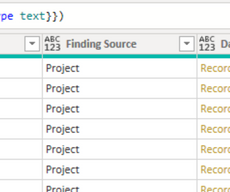
Then selecting the drop down
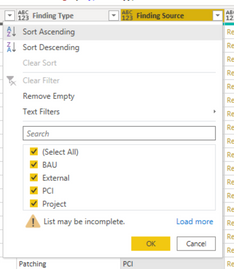
I click on 'Load more' then I recieve the error
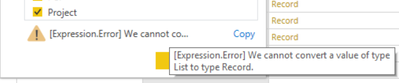
Hope that helps
- Mark as New
- Bookmark
- Subscribe
- Mute
- Subscribe to RSS Feed
- Permalink
- Report Inappropriate Content
That is because in your data, beyond the first few hundred rows it initially looks at, there is a List embedded where it expects a Record. When you click Load More, it reads the entire data set until:
- it gets 1,000 values for the filter, at which point it stops
- It reads all of the records and populates the filter with what it found, not to exceed 1,000 records.
Yours stops when it encounters an error. It may not even be in that field. It just cannot process more.
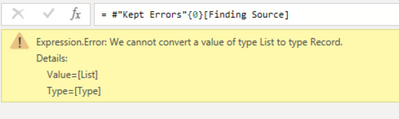
On this table, tell it to Keep Errors.

The do a Refresh All so it reads everything. It should show you the record(s) that have the issue.
Did I answer your question? Mark my post as a solution!
Did my answers help arrive at a solution? Give it a kudos by clicking the Thumbs Up!
DAX is for Analysis. Power Query is for Data Modeling
Proud to be a Super User!
MCSA: BI Reporting- Mark as New
- Bookmark
- Subscribe
- Mute
- Subscribe to RSS Feed
- Permalink
- Report Inappropriate Content
OK done now it returns a value of 758 on that column as has having errors, if I click the first entry I get the following:


- Mark as New
- Bookmark
- Subscribe
- Mute
- Subscribe to RSS Feed
- Permalink
- Report Inappropriate Content
Hello @Anonymous
is this column a calculated column? Probably there the error is coming from
BR
Jimmy
- Mark as New
- Bookmark
- Subscribe
- Mute
- Subscribe to RSS Feed
- Permalink
- Report Inappropriate Content
Jimmy
No it is not a calculated column
Thanks
- Mark as New
- Bookmark
- Subscribe
- Mute
- Subscribe to RSS Feed
- Permalink
- Report Inappropriate Content
Hello @Anonymous
could you please post the m-code from advanced editor
BR
Jimmy
- Mark as New
- Bookmark
- Subscribe
- Mute
- Subscribe to RSS Feed
- Permalink
- Report Inappropriate Content
Jimmy
Is this what you are after - I have removed the URL details
let
Source = Json.Document(Web.Contents("<REDACTED>")),
List = {1..Source[page_count]},
#"Converted to Table" = Table.FromList(List, Splitter.SplitByNothing(), null, null, ExtraValues.Error),
#"Changed Type" = Table.TransformColumnTypes(#"Converted to Table",{{"Column1", type text}}),
#"Invoked Custom Function" = Table.AddColumn(#"Changed Type", "Data", each getPage([Column1])),
#"Expanded Data" = Table.ExpandTableColumn(#"Invoked Custom Function", "Data", {"Column1.id", "Column1.type", "Column1.sourceId", "Column1.summary", "Column1.reference", "Column1.description", "Column1.statusId", "Column1.sourceSeverityId", "Column1.customSeverityId", "Column1.discoveryDate", "Column1.dueDate", "Column1.ownerId", "Column1.exploitabilityEase", "Column1.exploitAvailable", "Column1.sourceSeverity", "Column1.source", "Column1.closedDate", "Column1.destinationHostIp", "Column1.destinationHost", "Column1.solution", "Column1.categories", "Column1.keywords", "Column1.linkedPentests", "Column1.linkedRisks", "Column1.linkedActions", "Column1.status", "Column1.customSeverity", "Column1.owner", "Column1.customFields", "Column1._links"}, {"Data.Column1.id", "Data.Column1.type", "Data.Column1.sourceId", "Data.Column1.summary", "Data.Column1.reference", "Data.Column1.description", "Data.Column1.statusId", "Data.Column1.sourceSeverityId", "Data.Column1.customSeverityId", "Data.Column1.discoveryDate", "Data.Column1.dueDate", "Data.Column1.ownerId", "Data.Column1.exploitabilityEase", "Data.Column1.exploitAvailable", "Data.Column1.sourceSeverity", "Data.Column1.source", "Data.Column1.closedDate", "Data.Column1.destinationHostIp", "Data.Column1.destinationHost", "Data.Column1.solution", "Data.Column1.categories", "Data.Column1.keywords", "Data.Column1.linkedPentests", "Data.Column1.linkedRisks", "Data.Column1.linkedActions", "Data.Column1.status", "Data.Column1.customSeverity", "Data.Column1.owner", "Data.Column1.customFields", "Data.Column1._links"}),
#"Renamed Columns" = Table.RenameColumns(#"Expanded Data",{{"Data.Column1.type", "Type"}, {"Data.Column1.summary", "Summary"}, {"Data.Column1.description", "Description"}, {"Data.Column1.discoveryDate", "Discovery Date"}, {"Data.Column1.source", "Vuln-Source"}, {"Data.Column1.destinationHostIp", "IP Address"}, {"Data.Column1.destinationHost", "Hostname"}, {"Data.Column1.solution", "Recommendation"}, {"Data.Column1.status", "Status"}, {"Data.Column1.customSeverity", "<REDACTED> Severity"}}),
#"Expanded Data.Column1.customFields" = Table.ExpandRecordColumn(#"Renamed Columns", "Data.Column1.customFields", {"msTags", "ddFindingType", "ddFindingSource"}, {"Data.Column1.customFields.msTags", "Data.Column1.customFields.ddFindingType", "Data.Column1.customFields.ddFindingSource"}),
#"Renamed Columns1" = Table.RenameColumns(#"Expanded Data.Column1.customFields",{{"Data.Column1.customFields.ddFindingType", "Finding Type"}, {"Data.Column1.customFields.ddFindingSource", "Finding Source"}}),
#"Renamed Columns2" = Table.RenameColumns(#"Renamed Columns1",{{"Data.Column1.closedDate", "Closed Date"}}),
#"Changed Type1" = Table.TransformColumnTypes(#"Renamed Columns2",{{"Discovery Date", type datetime}, {"Data.Column1.customFields.msTags", type text}}),
#"Renamed Columns3" = Table.RenameColumns(#"Changed Type1",{{"Data.Column1.customFields.msTags", "Tags"}}),
#"Kept Errors" = Table.SelectRowsWithErrors(#"Renamed Columns3", {"Finding Source"})
in
#"Kept Errors"
- Mark as New
- Bookmark
- Subscribe
- Mute
- Subscribe to RSS Feed
- Permalink
- Report Inappropriate Content
Hello @Anonymous
this code is ok. The problem is caused by the function getPage, that somehow for some transformation needs a record, but it gets a list instead.
BR
Jimmy
- Mark as New
- Bookmark
- Subscribe
- Mute
- Subscribe to RSS Feed
- Permalink
- Report Inappropriate Content
Your List{1..Source[page_count]} is incorrectly referencing a column instead of a scalar value as well. ALSO, I'd change that parameter to ExtraValues.Ignore, just in case.
- Mark as New
- Bookmark
- Subscribe
- Mute
- Subscribe to RSS Feed
- Permalink
- Report Inappropriate Content
Jimmy
Thanks for the help, but I am not sure what that means - would viewing the code for the getPage be of use?
- Mark as New
- Bookmark
- Subscribe
- Mute
- Subscribe to RSS Feed
- Permalink
- Report Inappropriate Content
Hello @Anonymous
in the following step you can see that some custom function is applied to read the data. This function creates your output, and probably it's there where the error is caused

BR
Jimmy
- Mark as New
- Bookmark
- Subscribe
- Mute
- Subscribe to RSS Feed
- Permalink
- Report Inappropriate Content
What is getPage doing @Anonymous ?
The function itself may be fine assuming everything coming in is a record. But if it is coming in as a List then the function needs to be rewritten.
However, given that not everything is an error, only 758 records of your total data set are, then it suggests that the field in question is sometimes a list, and sometimes a record. getPage would need to be rewritten to handle that. The fastest way would be to adjust the getPage code to this:
try INSERT YOUR getPage CODE HERE otherwise nullSo if it is a record, getPage works, or adjust the code near the top as follows:
#"Invoked Custom Function" = Table.AddColumn(#"Changed Type", "Data", each getPage([Column1])),becomes
#"Invoked Custom Function" = Table.AddColumn(#"Changed Type", "Data", each try getPage([Column1]) otherwise null),That will simply drop the invalid data that getPage cannot handle. That may be the solution. It will certianly clear this error, but may drop needed data since anything on those 758 rows will not come through.
Without the source data to look at though it is very difficult to troubleshoot in a forum.
Did I answer your question? Mark my post as a solution!
Did my answers help arrive at a solution? Give it a kudos by clicking the Thumbs Up!
DAX is for Analysis. Power Query is for Data Modeling
Proud to be a Super User!
MCSA: BI Reporting- Mark as New
- Bookmark
- Subscribe
- Mute
- Subscribe to RSS Feed
- Permalink
- Report Inappropriate Content
Thanks in regards to where I am and the code source this is the resource I used
https://stackoverflow.com/questions/46904641/how-to-get-paginated-data-from-api-in-power-bi
- Mark as New
- Bookmark
- Subscribe
- Mute
- Subscribe to RSS Feed
- Permalink
- Report Inappropriate Content
Hello @Anonymous
this could get nasty and without nowing the datasource (data elaborated by the getpage-function) is almost inpossible to help. If your Json-data however comes in formated in a way data for some field you have a record and list, you could make a Table.TransformColumns with Table.ExpandTableColumn instead of usind only Table.ExpandRecordColumm. Here a practicable example
let
    Source = Json.Document("[{""a"":2},[""a;2""]]#(cr)#(lf)"),
    #"Converted to Table" = Table.FromList(Source, Splitter.SplitByNothing(), null, null, ExtraValues.Error),
    TransformColumns = Table.TransformColumns
    (
        #"Converted to Table",
        {
            {
                "Column1",
                each if Value.Is(_, type list) then Table.FromRecords({Record.FromList({List.Transform(_, each Text.Split(_,";")){0}{1}},{List.Transform(_, each Text.Split(_,";")){0}{0}})},null,MissingField.Error)  else if Value.Is(_, type record) then Table.FromRecords({_},null,MissingField.Error) else null
            }
        }
    ),
    #"Expanded Column1" = Table.ExpandTableColumn(TransformColumns, "Column1", {"a"}, {"a"})
in
    #"Expanded Column1"
Copy paste this code to the advanced editor in a new blank query to see how the solution works.
If this post helps or solves your problem, please mark it as solution (to help other users find useful content and to acknowledge the work of users that helped you)
Kudoes are nice too
Have fun
Jimmy
- Mark as New
- Bookmark
- Subscribe
- Mute
- Subscribe to RSS Feed
- Permalink
- Report Inappropriate Content
I must admit this is getting abit above me at the mo and I will need to go back and take on board all suggested here, I would like to say thanks to both for the help and guidance provided so what is the best way to the thanks to the both of you - click the kudos button on different posts?
- Mark as New
- Bookmark
- Subscribe
- Mute
- Subscribe to RSS Feed
- Permalink
- Report Inappropriate Content
Absolutely @Anonymous- always good to give kudos to posts that are helpful. 👍😁
sorry couldn't be more help. It is difficult to troubleshoot shoot errors on a forum and even more so when it is the result of nested tables, lists, and records.
Did I answer your question? Mark my post as a solution!
Did my answers help arrive at a solution? Give it a kudos by clicking the Thumbs Up!
DAX is for Analysis. Power Query is for Data Modeling
Proud to be a Super User!
MCSA: BI Reporting- Mark as New
- Bookmark
- Subscribe
- Mute
- Subscribe to RSS Feed
- Permalink
- Report Inappropriate Content
You are using a list as your parameter for the getpage() function [Column1]. You could probably just do Table.AddColumn(PriorStep, "Page", each [Column1])
- Mark as New
- Bookmark
- Subscribe
- Mute
- Subscribe to RSS Feed
- Permalink
- Report Inappropriate Content
Hi thanks for the reply, is that in reference to line 6 #"Converted to Table" or line 7 #"Expanded Column1" - please?


- Mark as New
- Bookmark
- Subscribe
- Mute
- Subscribe to RSS Feed
- Permalink
- Report Inappropriate Content
Hi @Anonymous ,
Based on the current information, I cannot reproduce your issue. It is suggest to provide more information to help me better understand the issue you are experiencing.
Best Regards,
Icey
Helpful resources

FabCon Global Hackathon
Join the Fabric FabCon Global Hackathon—running virtually through Nov 3. Open to all skill levels. $10,000 in prizes!

Power BI Monthly Update - October 2025
Check out the October 2025 Power BI update to learn about new features.

FabCon Atlanta 2026
Join us at FabCon Atlanta, March 16-20, for the ultimate Fabric, Power BI, AI and SQL community-led event. Save $200 with code FABCOMM.


