Fabric Data Days starts November 4th!
Advance your Data & AI career with 50 days of live learning, dataviz contests, hands-on challenges, study groups & certifications and more!
Get registered- Power BI forums
- Get Help with Power BI
- Desktop
- Service
- Report Server
- Power Query
- Mobile Apps
- Developer
- DAX Commands and Tips
- Custom Visuals Development Discussion
- Health and Life Sciences
- Power BI Spanish forums
- Translated Spanish Desktop
- Training and Consulting
- Instructor Led Training
- Dashboard in a Day for Women, by Women
- Galleries
- Data Stories Gallery
- Themes Gallery
- Contests Gallery
- Quick Measures Gallery
- Visual Calculations Gallery
- Notebook Gallery
- Translytical Task Flow Gallery
- TMDL Gallery
- R Script Showcase
- Webinars and Video Gallery
- Ideas
- Custom Visuals Ideas (read-only)
- Issues
- Issues
- Events
- Upcoming Events
Join us at FabCon Atlanta from March 16 - 20, 2026, for the ultimate Fabric, Power BI, AI and SQL community-led event. Save $200 with code FABCOMM. Register now.
- Power BI forums
- Forums
- Get Help with Power BI
- Power Query
- Re: Expanding column after left join shuffles valu...
- Subscribe to RSS Feed
- Mark Topic as New
- Mark Topic as Read
- Float this Topic for Current User
- Bookmark
- Subscribe
- Printer Friendly Page

- Mark as New
- Bookmark
- Subscribe
- Mute
- Subscribe to RSS Feed
- Permalink
- Report Inappropriate Content
Expanding column after left join shuffles values in single column
Hi all,
I cant figure out what is going on in the case below. Hope somebody can tell me what I might be doing wrong.
So I merged two tables based on the columns "UOKey" and "RepetitionNr". So far so good, when I check the individual rows, the join was succesfully performed, just as an example, see that row 1 matches up nicely (UOKey and RepNr). All other rows do too.

Now when I try to expand the rows, something strange happens. The columns in the row "EVENT_TIME", seem to shuffle for now clear reason. I assume that since I am only expanding, all rows of my UnitOperationStart (The starting table for the join), should remain tied together. But when I expand, see that the event times seem to shuffle, e.g. RepetitionNr 1, for UOKey "EMZ239D1BBRE521625LEGEN" first had event time 06:03:51, after expanding, it has 14:16:31 (see below) .
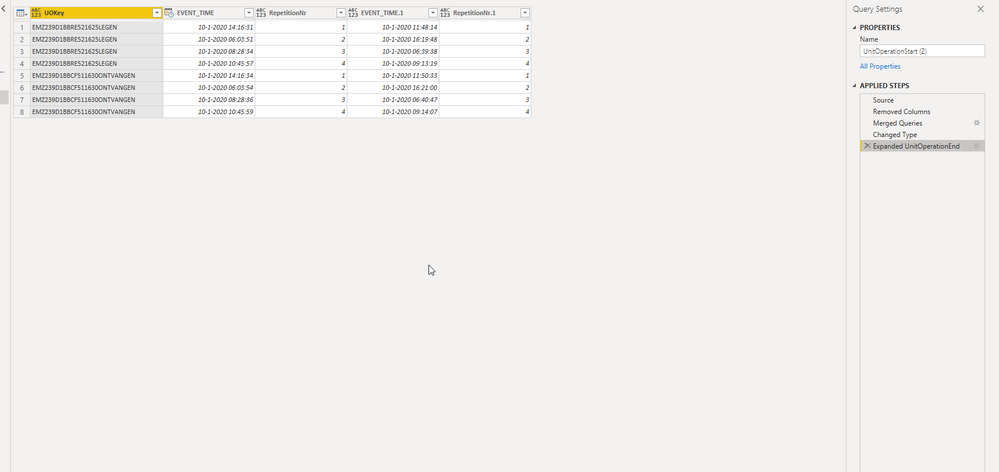
I would not expect this to happen. Why doesnt row 1 (or any row with repetition nr 1 and uokey "EMZ239D1BBRE521625LEGEN" still have EVENT_TIME 06:03 and the merged EVENT_TIME.1 of 06:39.38)?
Please help me, this is driving me bonkers! Thanks in advance
Here is my code from the advanced editor
let
    Source = UnitOperationStart,
    #"Removed Columns" = Table.RemoveColumns(Source,{"BatchID", "Unit", "UnitOperation", "Label"}),
    #"Merged Queries" = Table.NestedJoin(#"Removed Columns", {"UOKey", "RepetitionNr"}, UnitOperationEnd, {"UOKey", "RepetitionNr"}, "UnitOperationEnd", JoinKind.LeftOuter),
    #"Changed Type" = Table.TransformColumnTypes(#"Merged Queries",{{"EVENT_TIME", type datetime}}),
    #"Expanded UnitOperationEnd" = Table.ExpandTableColumn(#"Changed Type", "UnitOperationEnd", {"EVENT_TIME", "RepetitionNr"}, {"EVENT_TIME.1", "RepetitionNr.1"})
in
    #"Expanded UnitOperationEnd"
Solved! Go to Solution.


- Mark as New
- Bookmark
- Subscribe
- Mute
- Subscribe to RSS Feed
- Permalink
- Report Inappropriate Content
Hi @Anonymous ,
I just got an ideia...
How about if you Group, Sort and add the index column (those 2 last inside the [Data] column instead of sort / group / index ?
Like:
#"Grouped Rows" = Table.Group(#"Sorted Rows", {"UnitOperationKey"}, {{"Data", each Table.AddIndexColumn(Table.Sort(_,{"StartTime"} ), "SequenceNr", 1,1), type table [UnitOperationKey=text, NoOfRepetitionsOfUO=number, StartTime=datetime, BatchID=text, Unit=text, Label=text, UnitOperation=text, SequenceNr=number]}})
Did I answer your question? Mark my post as a solution!
Proud to be a Super User!


- Mark as New
- Bookmark
- Subscribe
- Mute
- Subscribe to RSS Feed
- Permalink
- Report Inappropriate Content
Hi @Anonymous ,
Try to change the order of "Changed Type" and "Expanded UnitOperationEnd".
If this post helps, then please consider Accept it as the solution to help the other members find it.
- Mark as New
- Bookmark
- Subscribe
- Mute
- Subscribe to RSS Feed
- Permalink
- Report Inappropriate Content
I have removed the change type step, but I dont see how this changes anything. Also swapping the two steps doesnt change anything.


- Mark as New
- Bookmark
- Subscribe
- Mute
- Subscribe to RSS Feed
- Permalink
- Report Inappropriate Content
Looks like your composite key is not properly describing the relationship between the two tables.
- Mark as New
- Bookmark
- Subscribe
- Mute
- Subscribe to RSS Feed
- Permalink
- Report Inappropriate Content
Hi Ibendin, thanks for your response. How do I fix this?
- Mark as New
- Bookmark
- Subscribe
- Mute
- Subscribe to RSS Feed
- Permalink
- Report Inappropriate Content
Include the event time in the composite key or use index columns.
- Mark as New
- Bookmark
- Subscribe
- Mute
- Subscribe to RSS Feed
- Permalink
- Report Inappropriate Content
Now I see what you mean with composite key. I already use a composite key with an index, the event time wont work, because the two events that I want to link never occur at the same time. Alos, I believe match on the composite key isnt the problem here, as the matching works fine (see the example), the problem occurs upon expanding the values from the matched records.
- Mark as New
- Bookmark
- Subscribe
- Mute
- Subscribe to RSS Feed
- Permalink
- Report Inappropriate Content
Hi @Anonymous ,
Is it possible to take a look at your pbix file ?
Did I answer your question? Mark my post as a solution!
Proud to be a Super User!
- Mark as New
- Bookmark
- Subscribe
- Mute
- Subscribe to RSS Feed
- Permalink
- Report Inappropriate Content
Yes, sure. How can I share this? Also taking into account the confidentiality of my data sources
- Mark as New
- Bookmark
- Subscribe
- Mute
- Subscribe to RSS Feed
- Permalink
- Report Inappropriate Content
@Anonymous ,
You can use google drive/one drive/dropbox and share the link here or through private message.
Please mask any sensitive information.
Did I answer your question? Mark my post as a solution!
Proud to be a Super User!
- Mark as New
- Bookmark
- Subscribe
- Mute
- Subscribe to RSS Feed
- Permalink
- Report Inappropriate Content
I tried to reproduce the problem with a smaller dataset so that I could send the pbix + csv file (one that I dont directly load from our database, but on a subset that I retrieve as a CSV file via SQL Server).
However, I am unable to reproduce it like this. Do you have any idea on how this is possible? I am applying the exact same steps (just copy pasted the steps from advanced editor and changed the source from our database to the csv file).
Thanks again.
Bram
- Mark as New
- Bookmark
- Subscribe
- Mute
- Subscribe to RSS Feed
- Permalink
- Report Inappropriate Content
Hi @Anonymous ,
Have you tried it with those rows you found the issue ?
Did I answer your question? Mark my post as a solution!
Proud to be a Super User!
- Mark as New
- Bookmark
- Subscribe
- Mute
- Subscribe to RSS Feed
- Permalink
- Report Inappropriate Content
Yes, I did. Also tried some other examples, but keep getting the same behavouir for the large dataset, whereas for the smaller dataset I seem to have no problem at all. I also already tried to run directly from two different databases (a production and an acceptance env) but both give the same results, i.e. in case my source is the database directly > I observe the behaviour as in my initial reproduction. In case I first query to pull a subset directly from the SQL database and I transfer that to a CSV that I then load into PowerQuery, I get the result that I expect.
The both applied steps are exactly the same, only the source changes. Any ideas on what this might be?
- Mark as New
- Bookmark
- Subscribe
- Mute
- Subscribe to RSS Feed
- Permalink
- Report Inappropriate Content
@Anonymous ,
If I got it right, can you make a csv only with those values with weird behaviour ?
Did I answer your question? Mark my post as a solution!
Proud to be a Super User!
- Mark as New
- Bookmark
- Subscribe
- Mute
- Subscribe to RSS Feed
- Permalink
- Report Inappropriate Content
Yes, this is what I did, but if I use this CSV (only with some values where the problem occurs) and use it as the source than I dont get the problem anymore. I only get the problem with the complete dataset. That is what is so weird.
- Mark as New
- Bookmark
- Subscribe
- Mute
- Subscribe to RSS Feed
- Permalink
- Report Inappropriate Content
@Anonymous ,
Can you provide the m code for both tables ?
Did I answer your question? Mark my post as a solution!
Proud to be a Super User!
- Mark as New
- Bookmark
- Subscribe
- Mute
- Subscribe to RSS Feed
- Permalink
- Report Inappropriate Content
Hi,
Yeah sure, here you go! I of course mocked up the datasetnames and source adress
// Table with end times

let
    Source = Sql.Databases("linktosource"),
    dataset = Source{[Name="dataset"]}[Data],
    dbo_data = dataset{[Schema="dbo",Item="xxx"]}[Data],
    #"Filtered Rows" = Table.SelectRows(dataset, each [MSG_ID] = "ONOSRT"),
    #"Renamed Columns" = Table.RenameColumns(#"Filtered Rows",{{"TEXT_2", "UO"}}),
    #"Removed Columns" = Table.RemoveColumns(#"Renamed Columns",{"DB_INSERT_TIME", "SUBSYSTEM"}),
    #"Reordered Columns" = Table.ReorderColumns(#"Removed Columns",{"EVENT_TIME", "MSG_ID", "BATCH_ID", "UO", "UNIT", "VALUE_1", "VALUE_2", "VALUE_3", "VALUE_4", "VALUE_5", "VALUE_6", "TEXT_1", "TEXT_3", "TEXT_4", "REP_ID", "REP_HISTDATE", "REP_DELETED"}),
    #"Renamed Columns1" = Table.RenameColumns(#"Reordered Columns",{{"UO", "UnitOperation"}}),
    #"Reordered Columns1" = Table.ReorderColumns(#"Renamed Columns1",{"EVENT_TIME", "MSG_ID", "BATCH_ID", "UNIT", "UnitOperation", "VALUE_1", "VALUE_2", "VALUE_3", "VALUE_4", "VALUE_5", "VALUE_6", "TEXT_1", "TEXT_3", "TEXT_4", "REP_ID", "REP_HISTDATE", "REP_DELETED"}),
    #"Renamed Columns2" = Table.RenameColumns(#"Reordered Columns1",{{"UNIT", "Unit"}, {"BATCH_ID", "BatchID"}}),
    #"Removed Columns1" = Table.RemoveColumns(#"Renamed Columns2",{"MSG_ID", "TEXT_1", "VALUE_1", "VALUE_2", "VALUE_3", "VALUE_4", "VALUE_5", "VALUE_6", "TEXT_3"}),
    #"Renamed Columns3" = Table.RenameColumns(#"Removed Columns1",{{"TEXT_4", "Label"}}),
    #"Removed Columns2" = Table.RemoveColumns(#"Renamed Columns3",{"REP_ID", "REP_HISTDATE"}),
    #"Renamed Columns4" = Table.RenameColumns(#"Removed Columns2",{{"REP_DELETED", "Key"}}),
    #"Removed Columns3" = Table.RemoveColumns(#"Renamed Columns4",{"Key"}),
    #"Reordered Columns2" = Table.ReorderColumns(#"Removed Columns3",{"EVENT_TIME", "BatchID", "Unit", "Label", "UnitOperation"}),
    #"Renamed Columns5" = Table.RenameColumns(#"Reordered Columns2",{{"EVENT_TIME", "StartTime"}}),
    #"Added Custom" = Table.AddColumn(#"Renamed Columns5", "Custom", each [BatchID]&[Unit]&[Label]&[UnitOperation]),
    #"Renamed Columns6" = Table.RenameColumns(#"Added Custom",{{"Custom", "UnitOperationKey"}}),
    #"Reordered Columns3" = Table.ReorderColumns(#"Renamed Columns6",{"UnitOperationKey", "StartTime", "BatchID", "Unit", "Label", "UnitOperation"}),
    #"Sorted Rows" = Table.Sort(#"Reordered Columns3",{{"StartTime", Order.Ascending}}),
    #"Grouped Rows" = Table.Group(#"Sorted Rows", {"UnitOperationKey"}, {{"Data", each _, type table [UnitOperationKey=text, NoOfRepetitionsOfUO=number, StartTime=datetime, BatchID=text, Unit=text, Label=text, UnitOperation=text]}}),
    #"Added Custom1" = Table.AddColumn(#"Grouped Rows", "Custom", each Table.AddIndexColumn( [Data], "Partition", 1,1)),
    #"Removed Columns4" = Table.RemoveColumns(#"Added Custom1",{"Data"}),
    #"Expanded Custom" = Table.ExpandTableColumn(#"Removed Columns4", "Custom", {"StartTime", "BatchID", "Unit", "Label", "UnitOperation", "Partition"}, {"StartTime", "BatchID", "Unit", "Label", "UnitOperation", "Partition"})
in
    #"Expanded Custom"


// Table with start times on to which we left join the end times
    Source = Sql.Databases("linktosource"),
    dataset = Source{[Name="dataset"]}[Data],
    dbo_data = dataset{[Schema="dbo",Item="xxx"]}[Data],
    #"Filtered Rows" = Table.SelectRows(dataset, each [MSG_ID] = "ONOEOK"),
    #"Renamed Columns" = Table.RenameColumns(#"Filtered Rows",{{"TEXT_2", "UO"}}),
    #"Removed Columns" = Table.RemoveColumns(#"Renamed Columns",{"DB_INSERT_TIME", "SUBSYSTEM"}),
    #"Reordered Columns" = Table.ReorderColumns(#"Removed Columns",{"EVENT_TIME", "MSG_ID", "BATCH_ID", "UO", "UNIT", "VALUE_1", "VALUE_2", "VALUE_3", "VALUE_4", "VALUE_5", "VALUE_6", "TEXT_1", "TEXT_3", "TEXT_4", "REP_ID", "REP_HISTDATE", "REP_DELETED"}),
    #"Renamed Columns1" = Table.RenameColumns(#"Reordered Columns",{{"UO", "UnitOperation"}}),
    #"Reordered Columns1" = Table.ReorderColumns(#"Renamed Columns1",{"EVENT_TIME", "MSG_ID", "BATCH_ID", "UNIT", "UnitOperation", "VALUE_1", "VALUE_2", "VALUE_3", "VALUE_4", "VALUE_5", "VALUE_6", "TEXT_1", "TEXT_3", "TEXT_4", "REP_ID", "REP_HISTDATE", "REP_DELETED"}),
    #"Renamed Columns2" = Table.RenameColumns(#"Reordered Columns1",{{"UNIT", "Unit"}, {"BATCH_ID", "BatchID"}}),
    #"Removed Columns1" = Table.RemoveColumns(#"Renamed Columns2",{"MSG_ID", "TEXT_1", "VALUE_1", "VALUE_2", "VALUE_3", "VALUE_4", "VALUE_5", "VALUE_6", "TEXT_3"}),
    #"Renamed Columns3" = Table.RenameColumns(#"Removed Columns1",{{"TEXT_4", "Label"}}),
    #"Removed Columns2" = Table.RemoveColumns(#"Renamed Columns3",{"REP_ID", "REP_HISTDATE"}),
    #"Renamed Columns4" = Table.RenameColumns(#"Removed Columns2",{{"REP_DELETED", "Key"}}),
    #"Removed Columns3" = Table.RemoveColumns(#"Renamed Columns4",{"Key"}),
    #"Reordered Columns2" = Table.ReorderColumns(#"Removed Columns3",{"EVENT_TIME", "BatchID", "Unit", "Label", "UnitOperation"}),
    #"Renamed Columns5" = Table.RenameColumns(#"Reordered Columns2",{{"EVENT_TIME", "StartTime"}}),
    #"Added Custom" = Table.AddColumn(#"Renamed Columns5", "Custom", each [BatchID]&[Unit]&[Label]&[UnitOperation]),
    #"Renamed Columns6" = Table.RenameColumns(#"Added Custom",{{"Custom", "UnitOperationKey"}}),
    #"Reordered Columns3" = Table.ReorderColumns(#"Renamed Columns6",{"UnitOperationKey", "StartTime", "BatchID", "Unit", "Label", "UnitOperation"}),
    #"Sorted Rows" = Table.Sort(#"Reordered Columns3",{{"StartTime", Order.Ascending}}),
    #"Grouped Rows" = Table.Group(#"Sorted Rows", {"UnitOperationKey"}, {{"Data", each _, type table [UnitOperationKey=text, NoOfRepetitionsOfUO=number, StartTime=datetime, BatchID=text, Unit=text, Label=text, UnitOperation=text]}}),
    #"Added Custom1" = Table.AddColumn(#"Grouped Rows", "Custom", each Table.AddIndexColumn( [Data], "Partition", 1,1)),
    #"Removed Columns4" = Table.RemoveColumns(#"Added Custom1",{"Data"}),
    #"Expanded Custom" = Table.ExpandTableColumn(#"Removed Columns4", "Custom", {"StartTime", "BatchID", "Unit", "Label", "UnitOperation", "Partition"}, {"StartTime", "BatchID", "Unit", "Label", "UnitOperation", "Partition"}),
    #"Merged Queries" = Table.NestedJoin(#"Expanded Custom", {"UnitOperationKey", "Partition"}, UnitOperationEnd, {"UnitOperationKey", "Partition"}, "UnitOperationEnd", JoinKind.LeftOuter)
in
    #"Merged Queries"
- Mark as New
- Bookmark
- Subscribe
- Mute
- Subscribe to RSS Feed
- Permalink
- Report Inappropriate Content
@Anonymous ,
Try resuming those rename/remove/reorder steps in less steps, if possible one for each.
Also, can you group and create this index column after the merge ? (You don't need the sort step in order to group).
Let's try eliminating some steps to check if the merge step is impacted with the previous.
Did I answer your question? Mark my post as a solution!
Proud to be a Super User!
- Mark as New
- Bookmark
- Subscribe
- Mute
- Subscribe to RSS Feed
- Permalink
- Report Inappropriate Content
Thanks for the suggestions, tried it but I still get the same behaviour.
Let me give you some context on why I sort and group in this order:
I have a flat list of transactions, where our system logs start and end times of certain operations. Now I want to calculate the duration of the operations (i.e. by subtracting end from start). This would be easy if each operation only occured once, but some operations fail, and are started again.
- For this I need the index on group level (i.e. each entry in a group is a repetition of the same operation, only starting at a different time).
- I also need to sort before I group (or straight after, but I though doing it before would be easier option) to make sure sequence is ok when I assign the index.
- Later I use the composite key + sequence index to map start operations to end operation and subtract the two to get my duration.
- Due to the above (repeated operations) I cant merge before assigning the sequence number, because there is no 1-1 relationship yet
- I also cant simply index the full list before merging, because then my start and end operations wont match (i.e. my transaction logs have some operations that only have and End event (not sure why, perhaps because of the timehorizon that the database keeps the transaction logs) and some that only have a Start event (havent finished yet)
I also added my new code snippets based on your suggestion (all steps after I retrieved the source). Do you have any other ideas? Meanwhile, I will also try to run this query directly in SQLServer to see if the problem is on the PowerQuery side or perhaps on "our" dataset end. I will need to brush up my SQL skills for this though ^^. Thanks again!
//Unit operation start table and merge steps
    #"Filtered Rows" = Table.SelectRows(dataset, each [MSG_ID] = "ONOSRT"),

    #"Removed Columns" = Table.RemoveColumns(#"Filtered Rows"
                                                ,{"MSG_ID"
                                                , "REP_ID"
                                                , "REP_HISTDATE"
                                                , "TEXT_1"
                                                , "VALUE_1"
                                                , "VALUE_2"
                                                , "VALUE_3"
                                                , "VALUE_4"
                                                , "VALUE_5"
                                                , "VALUE_6"
                                                , "TEXT_3"
                                                , "DB_INSERT_TIME"
                                                , "SUBSYSTEM"
                                                , "REP_DELETED"}
                                                ),
    #"Renamed Columns" = Table.RenameColumns(#"Removed Columns"
                                                ,{{"EVENT_TIME", "StartTime"}
                                                , {"TEXT_4", "Label"}
                                                , {"TEXT_2","UnitOperation"}
                                                , {"UNIT", "Unit"}
                                                , {"BATCH_ID", "BatchID"} }
                                                ),
    #"Added CompositeKey UO" = Table.AddColumn(#"Renamed Columns"
                                        , "UnitOperationKey", each [BatchID]&[Unit]&[Label]&[UnitOperation]),
    #"Sorted Rows" = Table.Sort(#"Added CompositeKey UO",{{"StartTime", Order.Ascending}}),
    #"Grouped Rows" = Table.Group(#"Sorted Rows", {"UnitOperationKey"}, {{"Data", each _, type table [UnitOperationKey=text, NoOfRepetitionsOfUO=number, StartTime=datetime, BatchID=text, Unit=text, Label=text, UnitOperation=text]}}),
    #"Added SequenceNr" = Table.AddColumn(#"Grouped Rows", "Custom", each Table.AddIndexColumn( [Data], "SequenceNr", 1,1)),
    #"Removed Columns4" = Table.RemoveColumns(#"Added SequenceNr",{"Data"}),
    #"Expanded Custom" = Table.ExpandTableColumn(#"Removed Columns4", "Custom", {"StartTime", "BatchID", "Unit", "Label", "UnitOperation", "SequenceNr"}, {"StartTime", "BatchID", "Unit", "Label", "UnitOperation", "SequenceNr"}),
    #"Merged Queries" = Table.NestedJoin(#"Expanded Custom", {"UnitOperationKey", "SequenceNr"}, UOEnd, {"UnitOperationKey", "SequenceNr"}, "UOEnd", JoinKind.LeftOuter),
    #"Expanded UOEnd" = Table.ExpandTableColumn(#"Merged Queries", "UOEnd", {"StartTime", "SequenceNr"}, {"UOEnd.StartTime", "UOEnd.SequenceNr"})
in
    #"Expanded UOEnd"


//UnitOperationEnd table
let
    #"Filtered Rows" = Table.SelectRows(dataset
                                        , each ([MSG_ID] = "ONOEOK")),

    #"Removed Columns" = Table.RemoveColumns(#"Filtered Rows"
                                                ,{"MSG_ID"
                                                , "REP_ID"
                                                , "REP_HISTDATE"
                                                , "TEXT_1"
                                                , "VALUE_1"
                                                , "VALUE_2"
                                                , "VALUE_3"
                                                , "VALUE_4"
                                                , "VALUE_5"
                                                , "VALUE_6"
                                                , "TEXT_3"
                                                , "DB_INSERT_TIME"
                                                , "SUBSYSTEM"
                                                , "REP_DELETED"}
                                                ),
    #"Renamed Columns" = Table.RenameColumns(#"Removed Columns"
                                                ,{{"EVENT_TIME", "StartTime"}
                                                , {"TEXT_4", "Label"}
                                                , {"TEXT_2","UnitOperation"}
                                                , {"UNIT", "Unit"}
                                                , {"BATCH_ID", "BatchID"} }
                                                ),
    #"Added CompositeKey UO" = Table.AddColumn(#"Renamed Columns"
                                        , "UnitOperationKey", each [BatchID]&[Unit]&[Label]&[UnitOperation]),
    #"Sorted Rows" = Table.Sort(#"Added CompositeKey UO",{{"StartTime", Order.Ascending}}),

    #"Grouped Rows" = Table.Group(#"Sorted Rows", {"UnitOperationKey"}, {{"Data", each _, type table [UnitOperationKey=text, NoOfRepetitionsOfUO=number, StartTime=datetime, BatchID=text, Unit=text, Label=text, UnitOperation=text]}}),
    #"Added SequenceNr" = Table.AddColumn(#"Grouped Rows", "Custom", each Table.AddIndexColumn( [Data], "SequenceNr", 1,1)),
    #"Removed Columns4" = Table.RemoveColumns(#"Added SequenceNr",{"Data"}),
    #"Expanded Custom" = Table.ExpandTableColumn(#"Removed Columns4", "Custom", {"StartTime", "BatchID", "Unit", "Label", "UnitOperation", "SequenceNr"}, {"StartTime", "BatchID", "Unit", "Label", "UnitOperation", "SequenceNr"})
in
    #"Expanded Custom"
- Mark as New
- Bookmark
- Subscribe
- Mute
- Subscribe to RSS Feed
- Permalink
- Report Inappropriate Content
@Anonymous ,
I've seem this situation couple times. It looks like a problem with query evaluation.
We can try something like:
0)
Delete your data cache: Options -> Data Load -> Clear Cache.
Use different name for the columns like:
Table UOEnd -> UnitOperationKey to UnitOperationKey_End
1)
Use the Table.Buffer function, your query may run slower.
2)
Delete the #"Expanded UOEnd" and #"Merged Queries" steps, create a custom column with this code:
let _UnitOperationKey = [UnitOperationKey], _SequenceNr = [SequenceNr] in
Table.SelectRows(UOEnd, each [UnitOperationKey] = _UnitOperationKey and [SequenceNr] = _SequenceNr)
and expand this column.
3)
Try creating a column with UnitOperationKey and SequenceNr, and join it using only this new column.
4)
Your source is SQL, so we can try pushing the merge to the database through Folding Query (just need to adapt some steps for it).
https://docs.microsoft.com/en-us/power-query/power-query-folding
5)
Write this query as a custom SQL, so you just bring the desired result.
I would try the item 2 and 3 first. Btw what is the size of your dataset ?
Did I answer your question? Mark my post as a solution!
Proud to be a Super User!
- Mark as New
- Bookmark
- Subscribe
- Mute
- Subscribe to RSS Feed
- Permalink
- Report Inappropriate Content
Hi agian, and thanks again,
I already tried steps 2 and 3 before. No luck there. This morning I decided to just learn sql and I fixed my problem by writing a sql query in ms sql server directly. Weird though that there is a problem with query evaluation like this, would you consider this as a bug in the powerquery software?
My dataset is relatively small, after the merge I have about 140k records
Thanks for all the help!
Best,
Bram
Helpful resources

Fabric Data Days
Advance your Data & AI career with 50 days of live learning, contests, hands-on challenges, study groups & certifications and more!

Power BI Monthly Update - October 2025
Check out the October 2025 Power BI update to learn about new features.

FabCon Atlanta 2026
Join us at FabCon Atlanta, March 16-20, for the ultimate Fabric, Power BI, AI and SQL community-led event. Save $200 with code FABCOMM.


