Party with Power BI’s own Guy in a Cube
Power BI is turning 10! Tune in for a special live episode on July 24 with behind-the-scenes stories, product evolution highlights, and a sneak peek at what’s in store for the future.
Save the date- Power BI forums
- Get Help with Power BI
- Desktop
- Service
- Report Server
- Power Query
- Mobile Apps
- Developer
- DAX Commands and Tips
- Custom Visuals Development Discussion
- Health and Life Sciences
- Power BI Spanish forums
- Translated Spanish Desktop
- Training and Consulting
- Instructor Led Training
- Dashboard in a Day for Women, by Women
- Galleries
- Data Stories Gallery
- Themes Gallery
- Contests Gallery
- Quick Measures Gallery
- Notebook Gallery
- Translytical Task Flow Gallery
- TMDL Gallery
- R Script Showcase
- Webinars and Video Gallery
- Ideas
- Custom Visuals Ideas (read-only)
- Issues
- Issues
- Events
- Upcoming Events
Enhance your career with this limited time 50% discount on Fabric and Power BI exams. Ends August 31st. Request your voucher.
- Power BI forums
- Forums
- Get Help with Power BI
- Power Query
- Re: Error: We Cannot Convert a value of Type List ...
- Subscribe to RSS Feed
- Mark Topic as New
- Mark Topic as Read
- Float this Topic for Current User
- Bookmark
- Subscribe
- Printer Friendly Page

- Mark as New
- Bookmark
- Subscribe
- Mute
- Subscribe to RSS Feed
- Permalink
- Report Inappropriate Content
Error: We Cannot Convert a value of Type List to Type Text
Hi, I have an int column in my table that I am tryng to obtain the max of.

I am using = List.Max(#"Added Custom1"[Count]) to obtain the max value, however I receive the following error.
Expression.Error: We cannot convert a value of type List to type Text.
Details:
Value=[List]
Type=[Type]
Any suggestions would be greatly appreciated.
- Mark as New
- Bookmark
- Subscribe
- Mute
- Subscribe to RSS Feed
- Permalink
- Report Inappropriate Content
Hello,
please advise how to convert generated list of dates to list of text lines (to be further used in API calls);
direct application of Date.ToText function generate "Error: We Cannot Convert a value of Type List to Type Text"
let
start = #date(2023,1,1), end = Date.From( DateTime.LocalNow() ),
ListOfDays = List.Dates( start, Duration.Days(Duration.From(end - start)), #duration(1,0,0,0) )
in
ListOfDays


- Mark as New
- Bookmark
- Subscribe
- Mute
- Subscribe to RSS Feed
- Permalink
- Report Inappropriate Content
Hi @Anonymous ,
Try this as a new custom column/custom step:
List.Transform(
    { Number.From(#date(2023, 01, 01))..Number.From(Date.From(DateTime.LocalNow())) },
    each Date.From(_)
)
...or this as a standalone query:
let
    Source =
    List.Transform(
        { Number.From(#date(2023, 01, 01))..Number.From(Date.From(DateTime.LocalNow())) },
        each Date.From(_)
    )
in
    Source
In future, I would strongly recommend that you open a new topic on the forum with questions that you have.
Pete
Now accepting Kudos! If my post helped you, why not give it a thumbs-up?
Proud to be a Datanaut!


- Mark as New
- Bookmark
- Subscribe
- Mute
- Subscribe to RSS Feed
- Permalink
- Report Inappropriate Content
Hi @Anonymous
You can add a custom column to have the maximum value in Count column.
= Table.AddColumn(#"Changed Type", "Max Value", each List.Max(#"Changed Type"[Count]))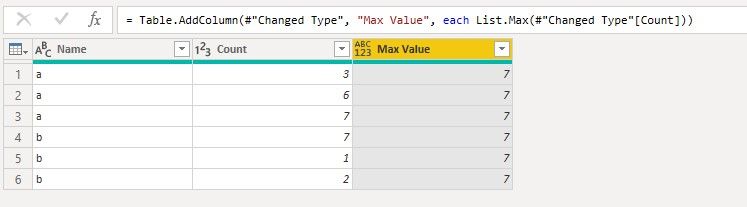
Then filter Count column by comparing its value with the value in Max Value column.
= Table.SelectRows(#"Added Custom", each [Count] = [Max Value])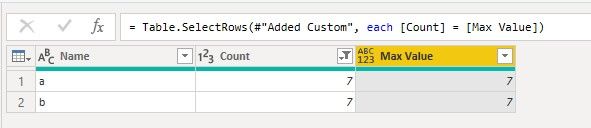
After that, you can remove the Max Value column.
Best Regards,
Community Support Team _ Jing
If this post helps, please Accept it as Solution to help other members find it.
- Mark as New
- Bookmark
- Subscribe
- Mute
- Subscribe to RSS Feed
- Permalink
- Report Inappropriate Content
Hi @v-jingzhang,
Thank you for your reply.
Unfortunately, the step
= Table.AddColumn(#"Changed Type", "Max Value", each List.Max(#"Changed Type"[Count]))
produces the following
Error: We Cannot Convert a value of Type List to Type Text
- Mark as New
- Bookmark
- Subscribe
- Mute
- Subscribe to RSS Feed
- Permalink
- Report Inappropriate Content
Hi @Anonymous
Are you able to use the User Interface to get the maximum value of Count column? Go to Transform > Statistics > Maximum.
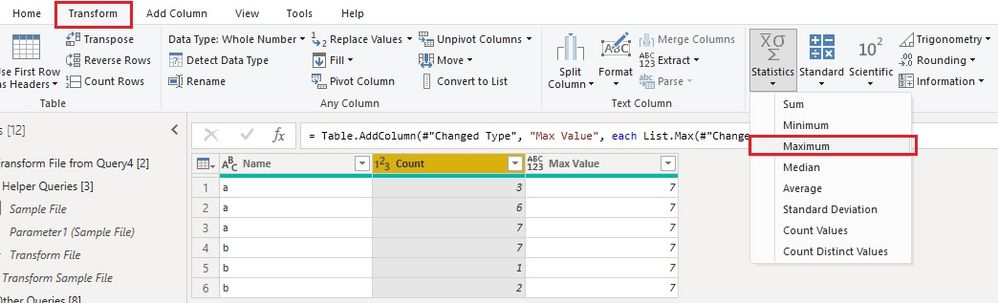
Jing
- Mark as New
- Bookmark
- Subscribe
- Mute
- Subscribe to RSS Feed
- Permalink
- Report Inappropriate Content
This produces the exact same error message
- Mark as New
- Bookmark
- Subscribe
- Mute
- Subscribe to RSS Feed
- Permalink
- Report Inappropriate Content
Hi @BA_Pete,
I am needing to filter a table to only contain rows that are the max within the count column. Therefore, I am trying to retrive the max value within the count column and use it as a variable (although I do not necessarily need to use it as a variable and could integrate in the filtering step).
To provide further context of what I am trying to achieve:
I have a table of records that have I need to expand and unpivot (refer to image below)
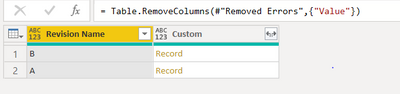
In this example there are only 2 revisions (A and B) but this could be any number and the field names within these records are all unique across revisions. Hence, I have implemented dynamic expansion of these records. To do this, I have stored the field names from the records as lists in a separate column.

Then I have combined these lists in the fields column

Expanded the records table using this combined list

Unpivoted these columns
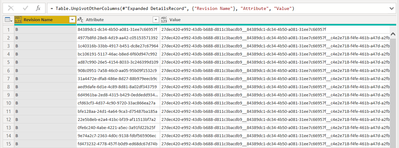
And finally obtained the count from the 'Value' column

This is where I want to filter all rows to only contain those that are equal to the max within the count column (i.e. 11 in this specific case.
The m-code can be seen below (with the api link removed for personal reasons)
let
Source = Json.Document(Web.Contents("API_Link" & Teamspace & "/" & #"Model ID" & "/revisions.json?key=" & #"API Key")),
#"Converted to Table" = Table.FromList(Source, Splitter.SplitByNothing(), null, null, ExtraValues.Error),
#"Expanded Column1" = Table.ExpandRecordColumn(#"Converted to Table", "Column1", {"_id", "author", "desc", "tag", "timestamp", "name", "branch", "fileType"}, {"_id", "author", "desc", "tag", "timestamp", "name", "branch", "fileType"}),
#"Removed Columns" = Table.RemoveColumns(#"Expanded Column1",{"_id", "author", "desc", "timestamp", "name", "branch", "fileType"}),
#"Renamed Columns" = Table.RenameColumns(#"Removed Columns",{{"tag", "Revision Name"}}),
#"Invoked Custom Function" = Table.AddColumn(#"Renamed Columns", "Data", each #"Retrieve Clean Unity_ID"([Revision Name])),
#"Expanded Data" = Table.ExpandTableColumn(#"Invoked Custom Function", "Data", {"Value"}, {"Value"}),
#"Added Custom" = Table.AddColumn(#"Expanded Data", "Custom", each Record.Field([Value],"idToPath")),
#"Removed Errors" = Table.RemoveRowsWithErrors(#"Added Custom", {"Custom"}),
#"Removed Columns1" = Table.RemoveColumns(#"Removed Errors",{"Value"}),
#"Added Custom4" = Table.AddColumn(#"Removed Columns1", "Fields", each Record.FieldNames([Custom])),
List_Example = List.Buffer(List.Combine(#"Added Custom4"[Fields])),
#"Expanded DetailsRecord" = Table.ExpandRecordColumn(#"Added Custom4", "Custom", List_Example, List_Example),
#"Unpivoted Other Columns" = Table.UnpivotOtherColumns(#"Expanded DetailsRecord", {"Revision Name"}, "Attribute", "Value"),
#"Added Custom1" = Table.AddColumn(#"Unpivoted Other Columns", "Count", each List.Count(Text.SplitAny([Value],"_"))),
#"Changed Type" = Table.TransformColumnTypes(#"Added Custom1",{{"Count", Int64.Type}}),
Max_num = List.Max(#"Changed Type"[Count]),
#"Added Custom2" = Table.AddColumn(#"Changed Type", "Max Number", each Max_num),
#"Added Custom3" = Table.AddColumn(#"Added Custom2", "Custom", each if [Count] = [Max Number] then [Attribute] else null),
#"Removed Other Columns" = Table.SelectColumns(#"Added Custom3",{"Custom", "Revision Name"}),
#"Renamed Columns1" = Table.RenameColumns(#"Removed Other Columns",{{"Custom", "Unity_id"}}),
#"Filtered Rows" = Table.SelectRows(#"Renamed Columns1", each ([Unity_id] <> null))
in
#"Filtered Rows"
Sorry for the long explanation and thank you for your help!
- Mark as New
- Bookmark
- Subscribe
- Mute
- Subscribe to RSS Feed
- Permalink
- Report Inappropriate Content
Hi @Anonymous ,
I'm unable to recreate your issue as I understand it.
Could you let me know exactly what you are trying to achieve with this function e.g. are you trying to turn the whole table into a single number, or want to use this max value as a variable somewhere else etc.
Please also share your M code for this query.
Pete
Now accepting Kudos! If my post helped you, why not give it a thumbs-up?
Proud to be a Datanaut!
Helpful resources

Fabric Community Update - July 2025
Find out what's new and trending in the Fabric community.

Power BI Monthly Update - July 2025
Check out the July 2025 Power BI update to learn about new features.


| User | Count |
|---|---|
| 13 | |
| 11 | |
| 9 | |
| 7 | |
| 6 |


