This is best Fabric, Power BI, SQL and AI community event. How do we know? The last event sold out! Save €200 with code FABCMTY200.
Register nowA new Data Days event is coming soon! This time we’re going bigger than ever. Fabric, Power BI, SQL, AI and more. Don't miss out.
Hello Everyone,
I am new to PBI and am having trouble in getting the below done.
Want to dynamically name the measure name from the output of the calculation.
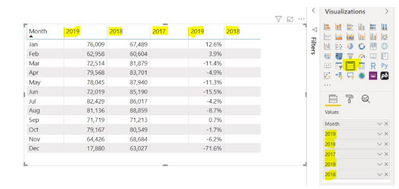
I have table visual with 5 measures, and I want to be able to rename them dynamically. Please See the screenshot below, where I have hardcoded the column names but I want them to be dynamic.
say my DAX reads
YEARNUMBER=YEAR("March 3, 2020 3:45 PM") and the result is 2020 and i want the measure name to be 2020 INSTEAD of YEARNUMBER.
Any help is really appreciated.
Solved! Go to Solution.
Hi @Anonymous ,
As mentioned above, when you put data in Table visual, the field name will be the table column header name. It can't be changed dynamically, you could submit this in ideas .
If you want to column show it based on date, you could chage your data structure(power query , unpivoy your data) like below(put name in Row, year in Column, amoun in Value in Matrix, then column name is 2018, 2019, 2020)
name year amout
| a | 2020 | 2 |
| a | 2019 | 3 |
| a | 2018 | 5 |
| b | 2020 | 2 |
| b | 2019 | 6 |
| b | 2018 | 3 |
If possible could you please inform me more detailed information(such as your expected output and your sample data )? Then I will help you more correctly.
Please do mask sensitive data before uploading.
Thanks for your understanding and support.
Best Regards,
Zoe Zhi
If this post helps, then please consider Accept it as the solution to help the other members find it more quickly.
Hi @Anonymous ,
As mentioned above, when you put data in Table visual, the field name will be the table column header name. It can't be changed dynamically, you could submit this in ideas .
If you want to column show it based on date, you could chage your data structure(power query , unpivoy your data) like below(put name in Row, year in Column, amoun in Value in Matrix, then column name is 2018, 2019, 2020)
name year amout
| a | 2020 | 2 |
| a | 2019 | 3 |
| a | 2018 | 5 |
| b | 2020 | 2 |
| b | 2019 | 6 |
| b | 2018 | 3 |
If possible could you please inform me more detailed information(such as your expected output and your sample data )? Then I will help you more correctly.
Please do mask sensitive data before uploading.
Thanks for your understanding and support.
Best Regards,
Zoe Zhi
If this post helps, then please consider Accept it as the solution to help the other members find it more quickly.
@Anonymous
I am not sure if It is possible to do so but, you can create a measure that shows all the years selected and show in a card visual above the table or use the Visual Title to include the dynamically selected values using Conditional Formatting.
________________________
Did I answer your question? Mark this post as a solution, this will help others!.
I accept KUDOS 🙂
⭕ Subscribe and learn Power BI from these videos
⚪ Website ⚪ LinkedIn ⚪ PBI User Group
Check out the May 2026 Power BI update to learn about new features.
Sign up to receive a private message when registration opens and key events begin.
If you have recently started exploring Fabric, we'd love to hear how it's going. Your feedback can help with product improvements.
| User | Count |
|---|---|
| 3 | |
| 3 | |
| 2 | |
| 1 | |
| 1 |
| User | Count |
|---|---|
| 9 | |
| 7 | |
| 4 | |
| 3 | |
| 3 |