FabCon is coming to Atlanta
Join us at FabCon Atlanta from March 16 - 20, 2026, for the ultimate Fabric, Power BI, AI and SQL community-led event. Save $200 with code FABCOMM.
Register now!- Power BI forums
- Get Help with Power BI
- Desktop
- Service
- Report Server
- Power Query
- Mobile Apps
- Developer
- DAX Commands and Tips
- Custom Visuals Development Discussion
- Health and Life Sciences
- Power BI Spanish forums
- Translated Spanish Desktop
- Training and Consulting
- Instructor Led Training
- Dashboard in a Day for Women, by Women
- Galleries
- Data Stories Gallery
- Themes Gallery
- Contests Gallery
- QuickViz Gallery
- Quick Measures Gallery
- Visual Calculations Gallery
- Notebook Gallery
- Translytical Task Flow Gallery
- TMDL Gallery
- R Script Showcase
- Webinars and Video Gallery
- Ideas
- Custom Visuals Ideas (read-only)
- Issues
- Issues
- Events
- Upcoming Events
The Power BI Data Visualization World Championships is back! Get ahead of the game and start preparing now! Learn more
- Power BI forums
- Forums
- Get Help with Power BI
- Power Query
- Re: Data changes are not updating in Data sets whe...
- Subscribe to RSS Feed
- Mark Topic as New
- Mark Topic as Read
- Float this Topic for Current User
- Bookmark
- Subscribe
- Printer Friendly Page

- Mark as New
- Bookmark
- Subscribe
- Mute
- Subscribe to RSS Feed
- Permalink
- Report Inappropriate Content
Data changes are not updating in Data sets when using Scheduled Refresh options.
Data changes are not updating in Data sets when using Scheduled Refresh options.
Source data are connected with 3 CSV files connected to Power BI from SharePoint and 2 files will have data updated on daily basis. I have enabled a schedule to refresh the data and will be placing the csv files manually. Schedule status shows successfully completed but the updated changes are not reflecting in the dataset. Only Refresh done inside the POWER QUERY EDITOR, the changes are reflecting in the tables. What could be the problem
- Mark as New
- Bookmark
- Subscribe
- Mute
- Subscribe to RSS Feed
- Permalink
- Report Inappropriate Content
@Anonymous
How did you check whether the change has updated the dataset?
Because, refresh does not automatically update the new data to reports on Power bi service, the change only reflect to the pined visuals in dashboard, maybe try manual refresh the report page on Power bi Service.
Paul Zheng _ Community Support Team
If this post helps, then please consider Accept it as the solution to help the other members find it more quickly.
- Mark as New
- Bookmark
- Subscribe
- Mute
- Subscribe to RSS Feed
- Permalink
- Report Inappropriate Content
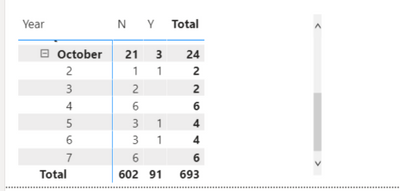
I created a table to identify the counts updated. My data visualizations are maintained based on daily status. Example - Today is October 08 2020. After the schedule refresh completes I manually validate and so far, You can see last updated values are till October 07 2020. That is something I manually refreshed


- Mark as New
- Bookmark
- Subscribe
- Mute
- Subscribe to RSS Feed
- Permalink
- Report Inappropriate Content
Maybe it is a timezone issue? The online refresh happens in UTC, while yours may be in a different timezone. As a result, when refreshing online, the service may be requesting data for a future date.
- Mark as New
- Bookmark
- Subscribe
- Mute
- Subscribe to RSS Feed
- Permalink
- Report Inappropriate Content
Hi Artemus,
I am scheduling the job for 10.00 AM EST or 5.00 UST. The files are generally dropped by 09.00 AM EST. Also, the refresh never made any updates for 2 days. Not sure, If I am missing anything beyond that
- Mark as New
- Bookmark
- Subscribe
- Mute
- Subscribe to RSS Feed
- Permalink
- Report Inappropriate Content
The important question is what time zone are you in?
If you are in UST, then your 5:00 your time is 23:00 UTC on the previous day. If you then try to get data for the date of that time, you will locally try to get the current day, but when refreshing online, you will try and get the previous day.
See if doing a refresh 2 hours later helps.
- Mark as New
- Bookmark
- Subscribe
- Mute
- Subscribe to RSS Feed
- Permalink
- Report Inappropriate Content
btw, What is UST time zone. I work in EST Time zone and it been scheduled to for 10.00 AM EST Hours and I drop my file at 9.00 AM EST hours.
Can I schedule the job for 12.00 PM EST and Drop the files for 9.00 AM EST. So, I will have more than 3 hours of time?
- Mark as New
- Bookmark
- Subscribe
- Mute
- Subscribe to RSS Feed
- Permalink
- Report Inappropriate Content
If you are in EST, and you are doing this at 10AM, then the timezone difference isn't big enough to make a difference.
I would need to understand your scenario a bit better to diagnonsis this. For example, if the files were protected by an account, and the system was set up to only return results that were avialable to the account, then a difference in the credentials could result in no data.
- Mark as New
- Bookmark
- Subscribe
- Mute
- Subscribe to RSS Feed
- Permalink
- Report Inappropriate Content
OK, In that case, please let me know the information you required to perform diagnosis in this case.
- I am using Power BI Desktop and having 3 data sets files manually loaded in my organization One Drive and my source will be like this

- 2 files are .CSV format that was replaced on daily basis by morning 9.30 AM EST hours. These 2 files will have updated employee training status, you can expect the rows count increased daily and few column values will be changed in the existing status. Ex - Training status of the employee will be converted from Not completed to completed and new enrollments will be added
- 3rd file is an excel file with country, region and location values. linked with 2 CSV files to generate location values
- The Data source settings are maintained as "Organizational" in the Privacy level and credentials for are maintained as Organizational account
Please let me know if you require any other information in this regards.
Helpful resources

Power BI Dataviz World Championships
The Power BI Data Visualization World Championships is back! Get ahead of the game and start preparing now!

Power BI Monthly Update - December 2025
Check out the December 2025 Power BI Holiday Recap!

FabCon Atlanta 2026
Join us at FabCon Atlanta, March 16-20, for the ultimate Fabric, Power BI, AI and SQL community-led event. Save $200 with code FABCOMM.


