Forum Discussion

Connect to Shared Calendars

 7 years ago
Hi,
I have it working now.
This how it worked for me (but i don't know if there is also an alternative solution).
- Get data-> Exchange online-> entered the mailaddress from the colleague who shared his agenda with me
- select Microsoft account, entered my credentials
- Select calendar
At this point I received the following error message:
DataSource.Error: ErrorItemNotFound: The specified object was not found in the store., The process failed to get the correct properties.
Details:
DataSourceKind=Exchange
DataSourcePath=[mail address from the colleague]
Details=
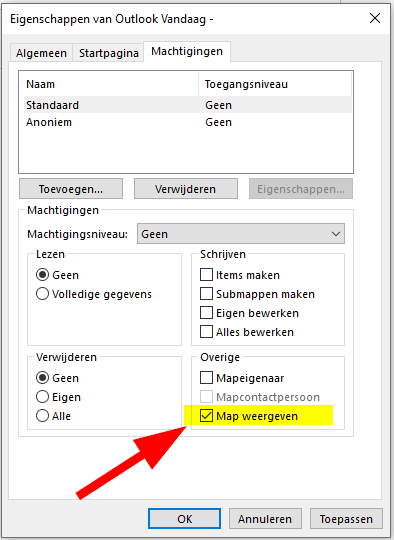
to solve this I let my colleague set the right ons his mailbox to show the folder.
(Dutch Screenshot)
Hi v-juanli-msft ,
Thanks for your reply.
I've tried it with the same steps you described, but can't see the shared calendars.
1. Get data-> Exchange online->entered my mailaddress
2. select Microsoft account, -> entered my credentials
next i will see the following:
Under Calendaar are only my appointments and under "Meeting request" is see only my meetingsrequests.
I also tried it with a seperate impersonate account that have the full rights on every calendar.
We are using only O365 mailboxes.
We are using only O365 mailboxes.
.....at least that's what I think. How can I check this?
- P-20197 years agoFrequent Visitor
Hi,
I have it working now.
This how it worked for me (but i don't know if there is also an alternative solution).
- Get data-> Exchange online-> entered the mailaddress from the colleague who shared his agenda with me
- select Microsoft account, entered my credentials
- Select calendar
At this point I received the following error message:
DataSource.Error: ErrorItemNotFound: The specified object was not found in the store., The process failed to get the correct properties.
Details:
DataSourceKind=Exchange
DataSourcePath=[mail address from the colleague]
Details=
to solve this I let my colleague set the right ons his mailbox to show the folder.
(Dutch Screenshot)
 Wkeith7 years agoHelper II
Hi, I am having the same problem. How did you get this image to appear? Is this within the settings in Outlook? If so, where did you find it under?
- P-20197 years agoFrequent Visitor
Hi,
You can open this window by clicking the right mouse button on the Calendar in Outlook and then choosing "Properties".
The setting is on the Authorization tab.
Best regards,
 Anonymous7 years agoNot applicable
Hi P-2019 ,
Did you have to fill in mailaddress AND password of the shared outlook account or mailaddress was enough to connect to the shared calender. I tried with shared calender and visible map as you suggested but still got the Error.
- P-20197 years agoFrequent Visitor
Hi Anonymous
First you have to fil in the email address of the shared calendar. When you are asked for credentials, you ust fill in your own credentials.
Which error do you recveive?
Regards,
- Anonymous6 years agoNot applicable
is it possible to show an English screenshot?
- P-20196 years agoFrequent Visitor
Hi,
I found a screenshot on the internet, but I think it's an older Outlook version.
It is the option "Folder visible" on the tab "Permissions"