FabCon is coming to Atlanta
Join us at FabCon Atlanta from March 16 - 20, 2026, for the ultimate Fabric, Power BI, AI and SQL community-led event. Save $200 with code FABCOMM.
Register now!- Power BI forums
- Get Help with Power BI
- Desktop
- Service
- Report Server
- Power Query
- Mobile Apps
- Developer
- DAX Commands and Tips
- Custom Visuals Development Discussion
- Health and Life Sciences
- Power BI Spanish forums
- Translated Spanish Desktop
- Training and Consulting
- Instructor Led Training
- Dashboard in a Day for Women, by Women
- Galleries
- Data Stories Gallery
- Themes Gallery
- Contests Gallery
- QuickViz Gallery
- Quick Measures Gallery
- Visual Calculations Gallery
- Notebook Gallery
- Translytical Task Flow Gallery
- TMDL Gallery
- R Script Showcase
- Webinars and Video Gallery
- Ideas
- Custom Visuals Ideas (read-only)
- Issues
- Issues
- Events
- Upcoming Events
The Power BI Data Visualization World Championships is back! Get ahead of the game and start preparing now! Learn more
- Power BI forums
- Forums
- Get Help with Power BI
- Power Query
- Combine values into a single cell based on multipl...
- Subscribe to RSS Feed
- Mark Topic as New
- Mark Topic as Read
- Float this Topic for Current User
- Bookmark
- Subscribe
- Printer Friendly Page


- Mark as New
- Bookmark
- Subscribe
- Mute
- Subscribe to RSS Feed
- Permalink
- Report Inappropriate Content
Combine values into a single cell based on multiple criteria
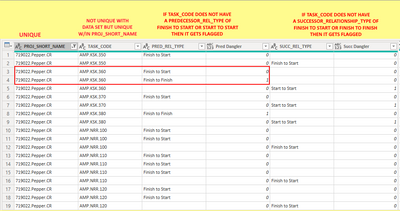
I really need some help. @mahoneypat @Anonymous @Vera_33 @edhans @v-kelly-msft I have the following table. I need to create a new table whereby if the proj_short_name and Task_code are the same then I can have a column that combines all the Pred_Rel_Type for that task code in one cell (Pred_Rels). For example in the box I have outlined, instead of that being two lines it would be one line and the Pred_Rels would show F/S, F/F. Can someone please help me!!
Here is a link to the sample data and my desired result:
Combine values into a single cell based on multiple criteria.pbix
Solved! Go to Solution.


- Mark as New
- Bookmark
- Subscribe
- Mute
- Subscribe to RSS Feed
- Permalink
- Report Inappropriate Content
Hi @Taffalaffa
Yes, but what is the logic? I did a quick one, only looked at PRED_REL_TYPE, but there is one row different from your desired result, so I guess you have something else to consider
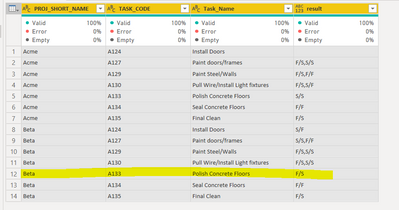
let
    Source = Table.FromRows(Json.Document(Binary.Decompress(Binary.FromText("tZNRa8IwEMe/Suiz0K6piI9uIgz2IPjgg/gQ3DkDMYH0BD++Sd1sZ5KTbhUKae6S313u7r/ZZLPdEbJRNnspK7e86xqFUmxujK3d/v7bjro3Jm5ZCqmRffrz+d6KI/hrC6llfWBo2AqFxZafdPSANzfvEJywh+jpDb1CAJWv3ZOHSvsx+/rXPjLtCei88PSTa9BaWsh/uvUhvw7I9vKMJ5uu/5Ry/DnUrerd5CvKEYbyXVoa5TN7M3pnAYEt1PcIRtrKS8Ie4ptsQKgIPFr7Jp+0Jwwwvp73ERQInagzT00S71blFVCk9Rgp6rgoKEfI7SWsirD3QMdnPFnnX7pt8cPr9jE79vgJYQ/Iz9ds71D/bjSt2OiMl5QjDPAkzbYBBtPs9gI=", BinaryEncoding.Base64), Compression.Deflate)), let _t = ((type nullable text) meta [Serialized.Text = true]) in type table [PROJ_SHORT_NAME = _t, TASK_CODE = _t, Task_Name = _t, PRED_REL_TYPE = _t, Pred_Task_Code = _t, SUCC_REL_TYPE = _t, SUCC_Task_Code = _t, #"Pred Dangler" = _t, #"Succ Dangler" = _t]),
    #"Changed Type" = Table.TransformColumnTypes(Source,{{"PROJ_SHORT_NAME", type text}, {"TASK_CODE", type text}, {"Task_Name", type text}, {"PRED_REL_TYPE", type text}, {"Pred_Task_Code", type text}, {"SUCC_REL_TYPE", type text}, {"SUCC_Task_Code", type text}, {"Pred Dangler", type text}, {"Succ Dangler", type text}}),
    #"Removed Other Columns" = Table.SelectColumns(#"Changed Type",{"PROJ_SHORT_NAME", "TASK_CODE", "Task_Name", "PRED_REL_TYPE"}),
    #"Added Custom" = Table.AddColumn(#"Removed Other Columns", "Custom", each if [PRED_REL_TYPE] = "Finish to Start" then "F/S" else if [PRED_REL_TYPE] = "Start to Start" then "S/S" else if [PRED_REL_TYPE] = "Finish to Finish" then "F/F" else if [PRED_REL_TYPE] = "Start to Finish" then "S/F" else [PRED_REL_TYPE]),
    #"Grouped Rows" = Table.Group(#"Added Custom", {"PROJ_SHORT_NAME", "TASK_CODE", "Task_Name"}, {{"result", each Text.Combine(_[Custom],",") }})
in
    #"Grouped Rows"


- Mark as New
- Bookmark
- Subscribe
- Mute
- Subscribe to RSS Feed
- Permalink
- Report Inappropriate Content
Hi @Taffalaffa ,
Using below M codes:
let
    Source = Table.FromRows(Json.Document(Binary.Decompress(Binary.FromText("i45WMje0NDAy0gtILShILdJzDlLSUXL0DdDzDvbWMzY1APLcMvMyizMUSvIVgksSi0qUYnWI0ERQlRk5RqNpgrCI00VQlTk5DjInymgLspxtQchsv6AgPUMDEp1NoSaCqgzJMZrOmgiqMiLHaPI1KcXGAgA=", BinaryEncoding.Base64), Compression.Deflate)), let _t = ((type nullable text) meta [Serialized.Text = true]) in type table [PROJ_SHORT_NAME = _t, TASK_CODE = _t, PRED_REL_TYPE = _t]),
    #"Changed Type" = Table.TransformColumnTypes(Source,{{"PROJ_SHORT_NAME", type text}, {"TASK_CODE", type text}, {"PRED_REL_TYPE", type text}}),
    #"Grouped Rows" = Table.Group(#"Changed Type", {"PROJ_SHORT_NAME", "TASK_CODE"}, {{"ALL", each _, type table [PROJ_SHORT_NAME=nullable text, TASK_CODE=nullable text, PRED_REL_TYPE=nullable text]}}),
    #"Added Index" = Table.AddIndexColumn(#"Grouped Rows", "Index", 1, 1, Int64.Type),
    #"Expanded ALL" = Table.ExpandTableColumn(#"Added Index", "ALL", {"PRED_REL_TYPE"}, {"ALL.PRED_REL_TYPE"}),
    #"Added Index1" = Table.AddIndexColumn(#"Expanded ALL", "Index.1", 0, 1, Int64.Type),
    #"Added Custom" = Table.AddColumn(#"Added Index1", "Custom", each try #"Added Index1"[ALL.PRED_REL_TYPE]{[Index.1]-1} otherwise null),
    #"Grouped Rows1" = Table.Group(#"Added Custom", {"PROJ_SHORT_NAME", "TASK_CODE"}, {{"Max index", each List.Max([Index.1]), type number}, {"All", each _, type table [PROJ_SHORT_NAME=nullable text, TASK_CODE=nullable text, ALL.PRED_REL_TYPE=nullable text, Index=number, Index.1=number, Custom=nullable text]}}),
    #"Expanded All" = Table.ExpandTableColumn(#"Grouped Rows1", "All", {"ALL.PRED_REL_TYPE", "Index", "Index.1", "Custom"}, {"All.ALL.PRED_REL_TYPE", "All.Index", "All.Index.1", "All.Custom"}),
    #"Added Custom1" = Table.AddColumn(#"Expanded All", "Custom", each if [All.Index.1]<>[Max index] then null
 else if [All.Custom]="Finish to Finish"
        then "Start to Start" else "Finish to Start"),
    #"Renamed Columns" = Table.RenameColumns(#"Added Custom1",{{"All.ALL.PRED_REL_TYPE", "PRED_REL_TYPE"}}),
    #"Removed Columns" = Table.RemoveColumns(#"Renamed Columns",{"Max index", "All.Index", "All.Index.1", "All.Custom"})
in
    #"Removed Columns"
And you will see:
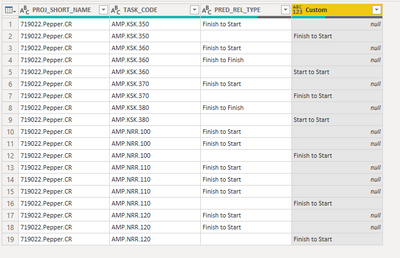
For the related .pbix file,pls see attached.
Best Regards,
Kelly
Did I answer your question? Mark my post as a solution!
- Mark as New
- Bookmark
- Subscribe
- Mute
- Subscribe to RSS Feed
- Permalink
- Report Inappropriate Content
Kelly,
Thank you so much for the help! This is super close to what I need. I have modified what you put and am getting an error that I am hoping you can solve for me. In the custom column you made I need the output to be a string of all the existing relationships for that task. So if all the relationships are "Finish to Start" then it shows "F/S". But if one of the relationships is "Finish to Start" and another for that same task is "Start to Start" then the custom column would show "F/S, S/S" and so on and so forth. But I can't quite figure out how to make that work.
let
Source = Table.FromRows(Json.Document(Binary.Decompress(Binary.FromText("i45WMje0NDAy0gtILShILdJzDlLSUXL0DdDzDvbWMzY1APLcMvMyizMUSvIVgksSi0qUYnWI0ERQlRk5RqNpgrCI00VQlTk5DjInymgLspxtQchsv6AgPUMDEp1NoSaCqgzJMZrOmgiqMiLHaPI1KcXGAgA=", BinaryEncoding.Base64), Compression.Deflate)), let _t = ((type nullable text) meta [Serialized.Text = true]) in type table [PROJ_SHORT_NAME = _t, TASK_CODE = _t, PRED_REL_TYPE = _t]),
#"Changed Type" = Table.TransformColumnTypes(Source,{{"PROJ_SHORT_NAME", type text}, {"TASK_CODE", type text}, {"PRED_REL_TYPE", type text}}),
#"Grouped Rows" = Table.Group(#"Changed Type", {"PROJ_SHORT_NAME", "TASK_CODE"}, {{"ALL", each _, type table [PROJ_SHORT_NAME=nullable text, TASK_CODE=nullable text, PRED_REL_TYPE=nullable text]}}),
#"Added Index" = Table.AddIndexColumn(#"Grouped Rows", "Index", 1, 1, Int64.Type),
#"Expanded ALL" = Table.ExpandTableColumn(#"Added Index", "ALL", {"PRED_REL_TYPE"}, {"ALL.PRED_REL_TYPE"}),
#"Added Index1" = Table.AddIndexColumn(#"Expanded ALL", "Index.1", 0, 1, Int64.Type),
#"Added Custom" = Table.AddColumn(#"Added Index1", "Custom", each try #"Added Index1"[ALL.PRED_REL_TYPE]{[Index.1]-1} otherwise null),
#"Grouped Rows1" = Table.Group(#"Added Custom", {"PROJ_SHORT_NAME", "TASK_CODE"}, {{"Max index", each List.Max([Index.1]), type number}, {"All", each _, type table [PROJ_SHORT_NAME=nullable text, TASK_CODE=nullable text, ALL.PRED_REL_TYPE=nullable text, Index=number, Index.1=number, Custom=nullable text]}}),
#"Expanded All" = Table.ExpandTableColumn(#"Grouped Rows1", "All", {"ALL.PRED_REL_TYPE", "Index", "Index.1", "Custom"}, {"All.ALL.PRED_REL_TYPE", "All.Index", "All.Index.1", "All.Custom"}),
#"Added Custom1" = Table.AddColumn(#"Expanded All", "Custom", each if [All.Index.1]<>[Max index] then null
else if Text.Contains([All.Custom],"Finish to Start") then "F/S"
else if Text.Contains([All.Custom],"Start to Start") then "S/S"
else if Text.Contains([All.Custom],"Finish to Finish") then "F/F"
else if Text.Contains([All.Custom],"Finish to Start" and "Start to Start") then "F/S, S/S"
else if Text.Contains([All.Custom],"Finish to Start" and "Finish to Finish") then "F/S, F/F"
else if Text.Contains([All.Custom],"Finish to Start" and "Start to Finish") then "F/S, S/F"
else if Text.Contains([All.Custom],"Start to Start" and "Finish to Finish") then "S/S, F/F"
else if Text.Contains([All.Custom],"Finish to Start" and "Start to Start" and "Finish to Finish") then "F/S, S/S, F/F"
else "" ),
#"Renamed Columns" = Table.RenameColumns(#"Added Custom1",{{"All.ALL.PRED_REL_TYPE", "PRED_REL_TYPE"}}),
#"Removed Columns" = Table.RemoveColumns(#"Renamed Columns",{"Max index", "All.Index", "All.Index.1", "All.Custom"})
in
#"Removed Columns"


- Mark as New
- Bookmark
- Subscribe
- Mute
- Subscribe to RSS Feed
- Permalink
- Report Inappropriate Content
How to get good help fast. Help us help you.
How To Ask A Technical Question If you Really Want An Answer
How to Get Your Question Answered Quickly - Give us a good and concise explanation
How to provide sample data in the Power BI Forum - Provide data in a table format per the link, or share an Excel/CSV file via OneDrive, Dropbox, etc.. Provide expected output using a screenshot of Excel or other image. Do not provide a screenshot of the source data. I cannot paste an image into Power BI tables.
Did I answer your question? Mark my post as a solution!
Did my answers help arrive at a solution? Give it a kudos by clicking the Thumbs Up!
DAX is for Analysis. Power Query is for Data Modeling
Proud to be a Super User!
MCSA: BI Reporting- Mark as New
- Bookmark
- Subscribe
- Mute
- Subscribe to RSS Feed
- Permalink
- Report Inappropriate Content
Hi @Taffalaffa
Agree with @edhans, you need to read the articles and understand how to ask your question...I don't understand what you want...you need to provide sample data and expected results in a format which everyone can copy (use Excel to generate some dummy data)
- Mark as New
- Bookmark
- Subscribe
- Mute
- Subscribe to RSS Feed
- Permalink
- Report Inappropriate Content
Got it! Thank you for the feedback! I have updated my question so hopefully it is clearer and provided sample data and my desired result.
- Mark as New
- Bookmark
- Subscribe
- Mute
- Subscribe to RSS Feed
- Permalink
- Report Inappropriate Content
Hi @Taffalaffa
Yes, but what is the logic? I did a quick one, only looked at PRED_REL_TYPE, but there is one row different from your desired result, so I guess you have something else to consider
let
    Source = Table.FromRows(Json.Document(Binary.Decompress(Binary.FromText("tZNRa8IwEMe/Suiz0K6piI9uIgz2IPjgg/gQ3DkDMYH0BD++Sd1sZ5KTbhUKae6S313u7r/ZZLPdEbJRNnspK7e86xqFUmxujK3d/v7bjro3Jm5ZCqmRffrz+d6KI/hrC6llfWBo2AqFxZafdPSANzfvEJywh+jpDb1CAJWv3ZOHSvsx+/rXPjLtCei88PSTa9BaWsh/uvUhvw7I9vKMJ5uu/5Ry/DnUrerd5CvKEYbyXVoa5TN7M3pnAYEt1PcIRtrKS8Ie4ptsQKgIPFr7Jp+0Jwwwvp73ERQInagzT00S71blFVCk9Rgp6rgoKEfI7SWsirD3QMdnPFnnX7pt8cPr9jE79vgJYQ/Iz9ds71D/bjSt2OiMl5QjDPAkzbYBBtPs9gI=", BinaryEncoding.Base64), Compression.Deflate)), let _t = ((type nullable text) meta [Serialized.Text = true]) in type table [PROJ_SHORT_NAME = _t, TASK_CODE = _t, Task_Name = _t, PRED_REL_TYPE = _t, Pred_Task_Code = _t, SUCC_REL_TYPE = _t, SUCC_Task_Code = _t, #"Pred Dangler" = _t, #"Succ Dangler" = _t]),
    #"Changed Type" = Table.TransformColumnTypes(Source,{{"PROJ_SHORT_NAME", type text}, {"TASK_CODE", type text}, {"Task_Name", type text}, {"PRED_REL_TYPE", type text}, {"Pred_Task_Code", type text}, {"SUCC_REL_TYPE", type text}, {"SUCC_Task_Code", type text}, {"Pred Dangler", type text}, {"Succ Dangler", type text}}),
    #"Removed Other Columns" = Table.SelectColumns(#"Changed Type",{"PROJ_SHORT_NAME", "TASK_CODE", "Task_Name", "PRED_REL_TYPE"}),
    #"Added Custom" = Table.AddColumn(#"Removed Other Columns", "Custom", each if [PRED_REL_TYPE] = "Finish to Start" then "F/S" else if [PRED_REL_TYPE] = "Start to Start" then "S/S" else if [PRED_REL_TYPE] = "Finish to Finish" then "F/F" else if [PRED_REL_TYPE] = "Start to Finish" then "S/F" else [PRED_REL_TYPE]),
    #"Grouped Rows" = Table.Group(#"Added Custom", {"PROJ_SHORT_NAME", "TASK_CODE", "Task_Name"}, {{"result", each Text.Combine(_[Custom],",") }})
in
    #"Grouped Rows"
- Mark as New
- Bookmark
- Subscribe
- Mute
- Subscribe to RSS Feed
- Permalink
- Report Inappropriate Content
This is fantastic! Thank you so much for your help! And great catch on the desired result that was incorrect. That was a mistake in my part!

Helpful resources

Power BI Dataviz World Championships
The Power BI Data Visualization World Championships is back! Get ahead of the game and start preparing now!

Power BI Monthly Update - November 2025
Check out the November 2025 Power BI update to learn about new features.

FabCon Atlanta 2026
Join us at FabCon Atlanta, March 16-20, for the ultimate Fabric, Power BI, AI and SQL community-led event. Save $200 with code FABCOMM.


