cancel
Showing results for 
Search instead for 
Did you mean: 

Get Fabric Certified for FREE during AI Skills Fest. This week only. Secure your voucher now.

Reply
Miss_A
Regular Visitor

Check Missing ID

I have the client ID are multiple source such as 9995-0001,9995-0002,9996-0001, 9996-0002, 9997-0001, 9997-0002. So, I want to check missing ID in which location. How to?

2 ACCEPTED SOLUTIONS
Anonymous
Not applicable

Hi @Miss_A ,


You can use your existing table in Power Query to create a combined table and then merge them. After the merge, the null in the expansion is the Missing ID and the corresponding location.

Here's an example.

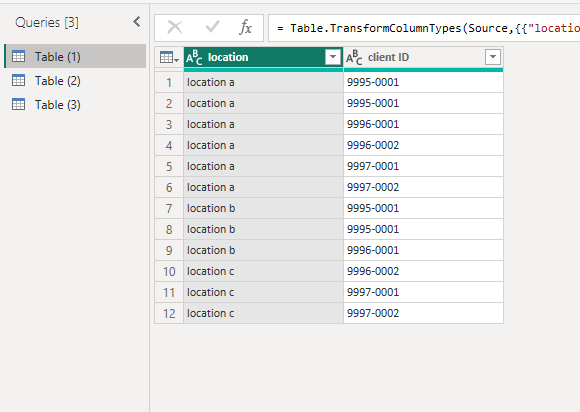
Table (1) is the main table.

vstephenmsft_1-1695970942952.png

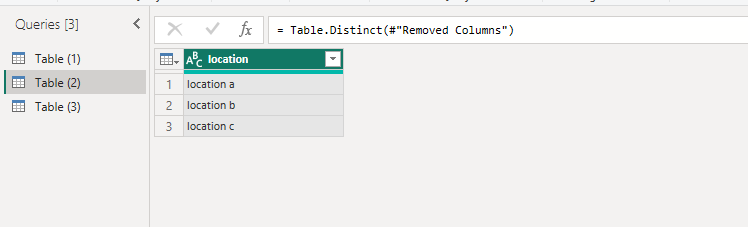
1.Copy the primary table, and then remove the columns and remove the duplicate rows to get the unique location column.

vstephenmsft_2-1695971028792.png

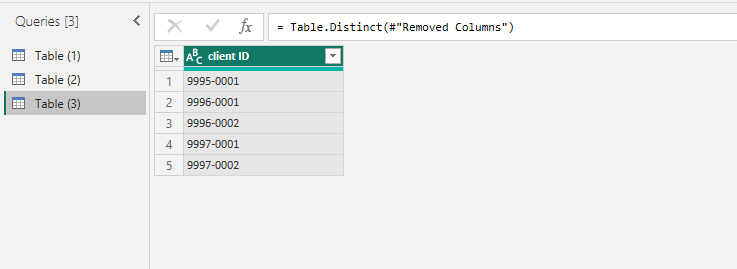
2.The same operation yields Table (3).

vstephenmsft_3-1695971175786.png


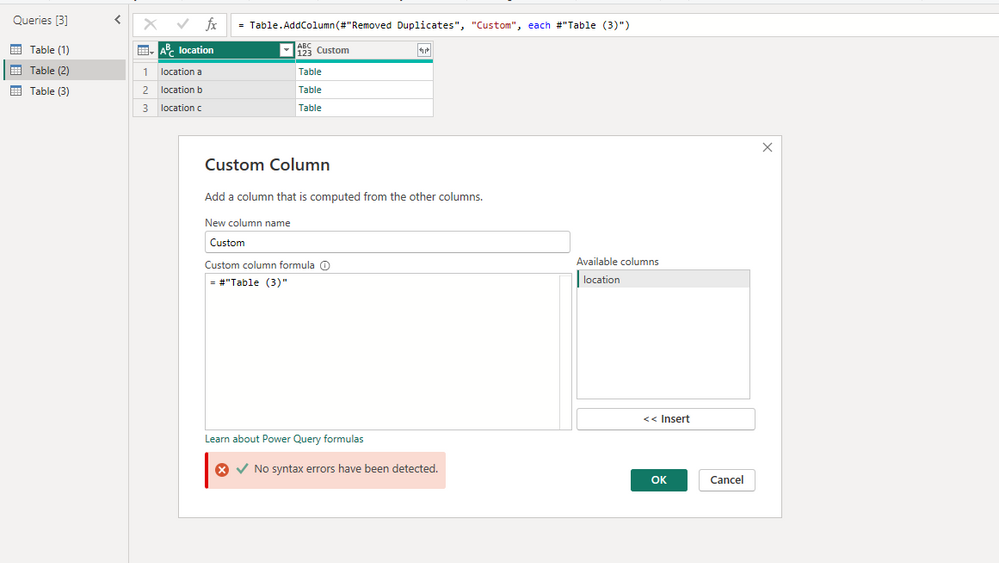
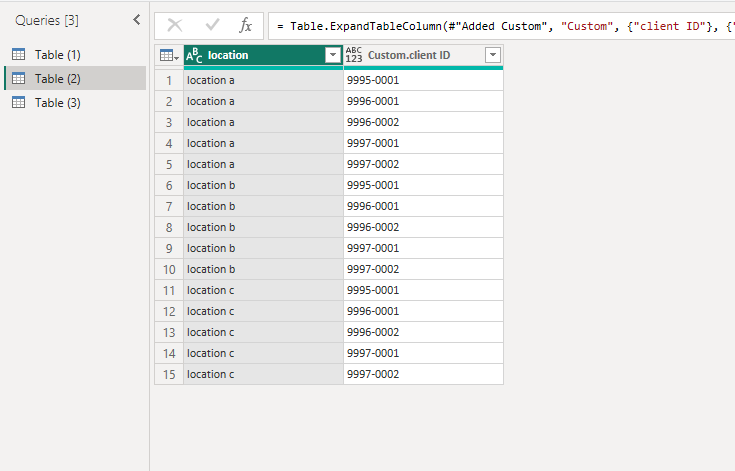
3.Add a custom column in Table (2) to reference the Table (3).

vstephenmsft_4-1695971214275.png


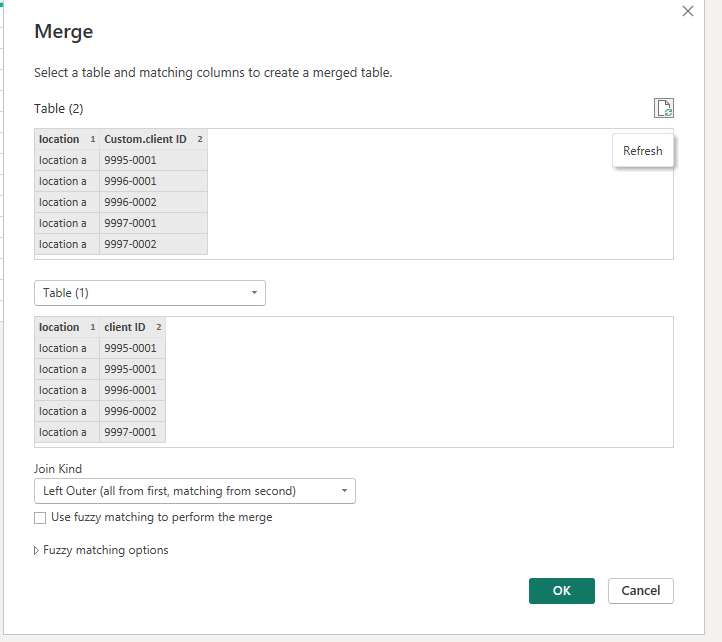
4.Expand it and then merge with the main table.

vstephenmsft_5-1695971263219.pngvstephenmsft_6-1695971271860.png

vstephenmsft_7-1695971280776.png


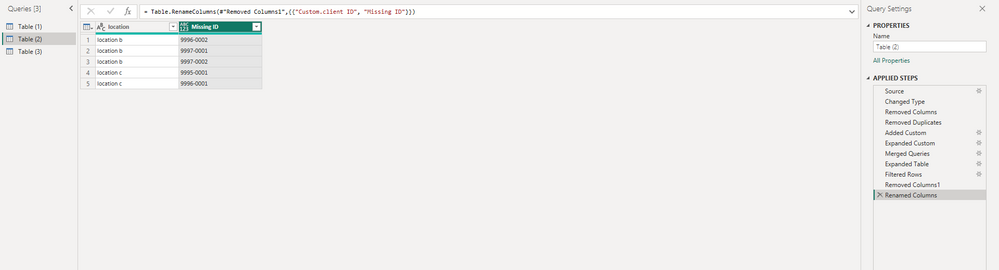
5.This is the final result.

vstephenmsft_8-1695971357692.png


Best Regards,

Stephen Tao


If this post helps, then please consider Accept it as the solution to help the other members find it more quickly.           

View solution in original post

Miss_A
Regular Visitor

2 REPLIES 2
Miss_A
Regular Visitor

Thank you.

Anonymous
Not applicable

Hi @Miss_A ,


You can use your existing table in Power Query to create a combined table and then merge them. After the merge, the null in the expansion is the Missing ID and the corresponding location.

Here's an example.

Table (1) is the main table.

vstephenmsft_1-1695970942952.png

1.Copy the primary table, and then remove the columns and remove the duplicate rows to get the unique location column.

vstephenmsft_2-1695971028792.png

2.The same operation yields Table (3).

vstephenmsft_3-1695971175786.png


3.Add a custom column in Table (2) to reference the Table (3).

vstephenmsft_4-1695971214275.png


4.Expand it and then merge with the main table.

vstephenmsft_5-1695971263219.pngvstephenmsft_6-1695971271860.png

vstephenmsft_7-1695971280776.png


5.This is the final result.

vstephenmsft_8-1695971357692.png


Best Regards,

Stephen Tao


If this post helps, then please consider Accept it as the solution to help the other members find it more quickly.           

Helpful resources

Announcements
May Power BI Update Carousel

Power BI Monthly Update - May 2026

Check out the May 2026 Power BI update to learn about new features.

Fabric SQL PBI Data Days

Data Days 2026 coming soon!

Sign up to receive a private message when registration opens and key events begin.

New to Fabric survey Carousel

New to Fabric Survey

If you have recently started exploring Fabric, we'd love to hear how it's going. Your feedback can help with product improvements.

Power BI DataViz World Championships carousel

Power BI DataViz World Championships - June 2026

A new Power BI DataViz World Championship is coming this June! Don't miss out on submitting your entry.