FabCon is coming to Atlanta
Join us at FabCon Atlanta from March 16 - 20, 2026, for the ultimate Fabric, Power BI, AI and SQL community-led event. Save $200 with code FABCOMM.
Register now!- Power BI forums
- Get Help with Power BI
- Desktop
- Service
- Report Server
- Power Query
- Mobile Apps
- Developer
- DAX Commands and Tips
- Custom Visuals Development Discussion
- Health and Life Sciences
- Power BI Spanish forums
- Translated Spanish Desktop
- Training and Consulting
- Instructor Led Training
- Dashboard in a Day for Women, by Women
- Galleries
- Data Stories Gallery
- Themes Gallery
- Contests Gallery
- QuickViz Gallery
- Quick Measures Gallery
- Visual Calculations Gallery
- Notebook Gallery
- Translytical Task Flow Gallery
- TMDL Gallery
- R Script Showcase
- Webinars and Video Gallery
- Ideas
- Custom Visuals Ideas (read-only)
- Issues
- Issues
- Events
- Upcoming Events
The Power BI Data Visualization World Championships is back! Get ahead of the game and start preparing now! Learn more
- Power BI forums
- Issues
- Issues
- PBI Error converting streaming dataset in direct q...
- Subscribe to RSS Feed
- Mark as New
- Mark as Read
- Bookmark
- Subscribe
- Printer Friendly Page
- Report Inappropriate Content

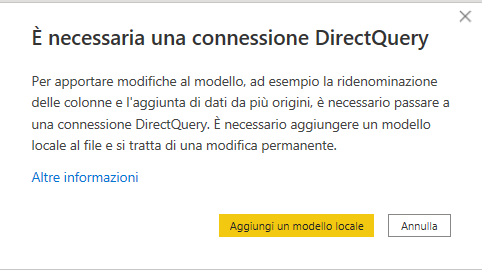
PBI Error converting streaming dataset in direct query
Need help on this, thanks
Feedback Type:
Frown (Error)
Error Message:
Il database '<ccon>Z_ECCED_datastream</ccon>' does not exist or you do not have permission to access it.
Dettagli tecnici:
RootActivityId: 45b17815-8962-4f03-b45a-acce78df12b0
Data (UTC): 3/7/2023 11:28:31 AM
Stack Trace:
Microsoft.AnalysisServices.AdomdClient.AdomdErrorResponseException
in Microsoft.AnalysisServices.AdomdClient.XmlaClient.CheckForSoapFault(XmlReader reader, XmlaResult xmlaResult, Boolean throwIfError)
in Microsoft.AnalysisServices.AdomdClient.XmlaClient.CheckForError(XmlReader reader, XmlaResult xmlaResult, Boolean throwIfError)
in Microsoft.AnalysisServices.AdomdClient.XmlaClient.CreateSession(ListDictionary properties, Boolean sendNamespaceCompatibility, String sessionToken)
in Microsoft.AnalysisServices.AdomdClient.AdomdConnection.XmlaClientProvider.Microsoft.AnalysisServices.AdomdClient.AdomdConnection.IXmlaClientProviderEx.CreateSession(Boolean sendNamespaceCompatibility)
in Microsoft.AnalysisServices.AdomdClient.AdomdConnection.ConnectToXMLA(Boolean createSession, Boolean isHTTP)
in Microsoft.AnalysisServices.AdomdClient.AdomdConnection.Open()
in Microsoft.PowerBI.Client.Windows.LiveConnectHelpers.AnalysisServices.AdomdQueryExecutor.OpenConnectionAndExecute[T](IAdomdConnectionPool connectionPool, IAdomdConnectionFactory connectionFactory, String connectionString, QueryExecutionOptions executionOptions, IPowerBITelemetryService telemetry, Func`2 execute)
in Microsoft.PowerBI.Client.Windows.LiveConnectHelpers.AnalysisServices.ASLiveExternalService.ExecuteCommand[T](String name, Func`2 execute)
in Microsoft.PowerBI.Client.Windows.LiveConnectHelpers.PowerBIService.PowerBIServiceLiveConnectionProperties.GetDatabasesAndCubes()
in Microsoft.PowerBI.Client.Windows.LiveConnectHelpers.ProxyModelConnectionCompleter.CompleteConnectionPropertiesIfNecessary(ILiveConnectionProperties connectionProperties, IPowerBIWindowService windowService)
in Microsoft.PowerBI.Client.Windows.AnalysisServices.LiveConnectToLocalDatabaseConverter.ShowNavigatorAndUpdateSelection(Report report, Query query, ILiveConnectionProperties liveConnectionProperties, IExceptionHandler exceptionHandler, IMinervaModalDialogManager minervaModalDialogManager, IPowerBIWindowService windowService, Func`1 applyChanges, ModelObject[] modelObjects)
in Microsoft.PowerBI.Client.Windows.AnalysisServices.LiveConnectToLocalDatabaseConverter.<Convert>d__8.MoveNext()
--- Fine traccia dello stack da posizione precedente dove è stata generata l'eccezione ---
in System.Runtime.ExceptionServices.ExceptionDispatchInfo.Throw()
in System.Runtime.CompilerServices.TaskAwaiter.HandleNonSuccessAndDebuggerNotification(Task task)
in Microsoft.PowerBI.Client.Windows.Commands.ApplicationCommands.DataImportCommands.<TryConvertLiveConnectToProxyModel>d__57.MoveNext()
--- Fine traccia dello stack da posizione precedente dove è stata generata l'eccezione ---
in System.Runtime.ExceptionServices.ExceptionDispatchInfo.Throw()
in System.Runtime.CompilerServices.TaskAwaiter.HandleNonSuccessAndDebuggerNotification(Task task)
in Microsoft.PowerBI.Client.Windows.Commands.ApplicationCommands.DataImportCommands.<TryConvertToProxyModelIfNecessary>d__56.MoveNext()
--- Fine traccia dello stack da posizione precedente dove è stata generata l'eccezione ---
in System.Runtime.ExceptionServices.ExceptionDispatchInfo.Throw()
in System.Runtime.CompilerServices.TaskAwaiter.HandleNonSuccessAndDebuggerNotification(Task task)
in Microsoft.PowerBI.Client.Windows.Commands.ApplicationCommands.DataImportCommands.<Connect>d__47.MoveNext()
--- Fine traccia dello stack da posizione precedente dove è stata generata l'eccezione ---
in System.Runtime.ExceptionServices.ExceptionDispatchInfo.Throw()
in System.Runtime.CompilerServices.TaskAwaiter.HandleNonSuccessAndDebuggerNotification(Task task)
in Microsoft.PowerBI.Client.Windows.IExceptionHandlerExtensions.<HandleAwaitableAsyncExceptions>d__1.MoveNext()
Stack Trace Message:
Il database '<ccon>Z_ECCED_datastream</ccon>' non esiste oppure non si dispone delle autorizzazioni per accedervi.
Dettagli tecnici:
RootActivityId: 45b17815-8962-4f03-b45a-acce78df12b0
Data (UTC): 3/7/2023 11:28:31 AM
Invocation Stack Trace:
in Microsoft.Mashup.Host.Document.ExceptionExtensions.GetCurrentInvocationStackTrace()
in Microsoft.Mashup.Client.UI.Shared.StackTraceInfo..ctor(String exceptionStackTrace, String invocationStackTrace, String exceptionMessage)
in Microsoft.PowerBI.Client.Windows.Telemetry.PowerBIUserFeedbackServices.GetStackTraceInfo(Exception e)
in Microsoft.PowerBI.Client.Windows.Telemetry.PowerBIUserFeedbackServices.ReportException(IWindowHandle activeWindow, IUIHost uiHost, FeedbackPackageInfo feedbackPackageInfo, Exception e, Boolean useGDICapture)
in Microsoft.Mashup.Client.UI.Shared.UnexpectedExceptionHandler.<>c__DisplayClass14_0.<HandleException>b__0()
in Microsoft.Mashup.Client.UI.Shared.UnexpectedExceptionHandler.HandleException(Exception e)
in Microsoft.PowerBI.Client.Windows.Utilities.PowerBIFormUnexpectedExceptionHandler.HandleException(Exception e)
in Microsoft.PowerBI.Client.Windows.IExceptionHandlerExtensions.<HandleAwaitableAsyncExceptions>d__1.MoveNext()
in System.Runtime.CompilerServices.AsyncTaskMethodBuilder.Start[TStateMachine](TStateMachine& stateMachine)
in Microsoft.PowerBI.Client.Windows.IExceptionHandlerExtensions.HandleAwaitableAsyncExceptions(IExceptionHandler exceptionHandler, Func`1 asyncFunc)
in Microsoft.PowerBI.Client.Windows.Commands.CompositeCommand`1.Execute(ICommand command, Object parameter)
in Microsoft.Practices.Prism.Commands.CompositeCommand.Execute(Object parameter)
in Microsoft.PowerBI.Client.Windows.Commands.CompositeCommand`1.Execute(T parameter)
in Microsoft.PowerBI.Client.Windows.CommandStoreHostService.<ExecuteCore>d__14.MoveNext()
in System.Runtime.CompilerServices.AsyncTaskMethodBuilder.Start[TStateMachine](TStateMachine& stateMachine)
in Microsoft.PowerBI.Client.Windows.CommandStoreHostService.ExecuteCore(String commandId, String parameterJson, Int64 promiseHandle)
in Microsoft.PowerBI.Client.Windows.IExceptionHandlerExtensions.<HandleAwaitableAsyncExceptions>d__1.MoveNext()
in System.Runtime.CompilerServices.AsyncTaskMethodBuilder.Start[TStateMachine](TStateMachine& stateMachine)
in Microsoft.PowerBI.Client.Windows.IExceptionHandlerExtensions.HandleAwaitableAsyncExceptions(IExceptionHandler exceptionHandler, Func`1 asyncFunc)
in Microsoft.PowerBI.Client.Windows.IExceptionHandlerExtensions.<HandleAsyncExceptions>d__0.MoveNext()
in System.Runtime.CompilerServices.AsyncVoidMethodBuilder.Start[TStateMachine](TStateMachine& stateMachine)
in Microsoft.PowerBI.Client.Windows.IExceptionHandlerExtensions.HandleAsyncExceptions(IExceptionHandler exceptionHandler, Func`1 asyncFunc)
in Microsoft.Mashup.Host.Document.ExceptionHandlerExtensions.HandleExceptions(IExceptionHandler exceptionHandler, Action action)
in System.RuntimeMethodHandle.InvokeMethod(Object target, Object[] arguments, Signature sig, Boolean constructor)
in System.Reflection.RuntimeMethodInfo.UnsafeInvokeInternal(Object obj, Object[] parameters, Object[] arguments)
in System.Delegate.DynamicInvokeImpl(Object[] args)
in System.Windows.Forms.Control.InvokeMarshaledCallbackDo(ThreadMethodEntry tme)
in System.Windows.Forms.Control.InvokeMarshaledCallbackHelper(Object obj)
in System.Threading.ExecutionContext.RunInternal(ExecutionContext executionContext, ContextCallback callback, Object state, Boolean preserveSyncCtx)
in System.Threading.ExecutionContext.Run(ExecutionContext executionContext, ContextCallback callback, Object state, Boolean preserveSyncCtx)
in System.Threading.ExecutionContext.Run(ExecutionContext executionContext, ContextCallback callback, Object state)
in System.Windows.Forms.Control.InvokeMarshaledCallback(ThreadMethodEntry tme)
in System.Windows.Forms.Control.InvokeMarshaledCallbacks()
in System.Windows.Forms.Control.WndProc(Message& m)
in System.Windows.Forms.NativeWindow.Callback(IntPtr hWnd, Int32 msg, IntPtr wparam, IntPtr lparam)
in System.Windows.Forms.UnsafeNativeMethods.DispatchMessageW(MSG& msg)
in System.Windows.Forms.UnsafeNativeMethods.DispatchMessageW(MSG& msg)
in System.Windows.Forms.Application.ComponentManager.System.Windows.Forms.UnsafeNativeMethods.IMsoComponentManager.FPushMessageLoop(IntPtr dwComponentID, Int32 reason, Int32 pvLoopData)
in System.Windows.Forms.Application.ThreadContext.RunMessageLoopInner(Int32 reason, ApplicationContext context)
in System.Windows.Forms.Application.ThreadContext.RunMessageLoop(Int32 reason, ApplicationContext context)
in System.Windows.Forms.Form.ShowDialog(IWin32Window owner)
in Microsoft.Mashup.Client.UI.Shared.WindowManager.ShowModal[T](T dialog, Func`1 showModalFunction)
in Microsoft.PowerBI.Client.Program.<>c__DisplayClass4_1.<Main>b__3()
in Microsoft.PowerBI.Client.Windows.IExceptionHandlerExtensions.<>c__DisplayClass3_0.<HandleExceptionsWithNestedTasks>b__0()
in Microsoft.Mashup.Host.Document.ExceptionHandlerExtensions.HandleExceptions(IExceptionHandler exceptionHandler, Action action)
in Microsoft.PowerBI.Client.Program.Main(String[] args)
PowerBINonFatalError:
{"AppName":"PBIDesktop","AppVersion":"2.110.805.0","ModuleName":"Microsoft.PowerBI.AdomdClient.dll","Component":"Microsoft.AnalysisServices.AdomdClient.XmlaClient","Error":"Microsoft.AnalysisServices.AdomdClient.AdomdErrorResponseException","MethodDef":"CheckForSoapFault","ErrorOffset":"54"}
AS Live Connection:
True
Performance Trace Logs:
C:\Users\30792\AppData\Local\Microsoft\Power BI Desktop\PerformanceTraces.zip
Enabled Preview Features:
PBI_compositeModelsOverAS
PBI_enableWebView2
PBI_sparklines
Disabled Preview Features:
PBI_shapeMapVisualEnabled
PBI_SpanishLinguisticsEnabled
PBI_qnaLiveConnect
PBI_azureMapVisual
PBI_b2bExternalDatasetSharing
PBI_enhancedTooltips
PQ_WebView2Connector
PBI_scorecardVisual
PBI_NlToDax
PBI_fieldParametersSuperSwitch
PBI_horizontalFusion
PBI_relationshipEditPane
Disabled DirectQuery Options:
TreatHanaAsRelationalSource
Cloud:
GlobalCloud
PowerBIUserFeedbackServices_IsReported:
True
Formulas:
section Section1;
You must be a registered user to add a comment. If you've already registered, sign in. Otherwise, register and sign in.
-
 Hongju_Jung
on:
Translation Issue in the Korean Version
Hongju_Jung
on:
Translation Issue in the Korean Version
- Nameless_LW on: Unable to find latest powerbi gateway STANDARD MOD...
- djordje369 on: Installing an update from template app fails
-
Hongju_Jung
on:
A Typo about Visual Gridline in the View menu (Kor...
- jake18 on: Fix High Vulnerabilities found in On-Prem Data Gat...
- BI_Tiffin on: Power BI Azure Map - Connecticut Geocoding Ambigui...
-
acig
 on:
Issue with new card visual - reference labels spac...
on:
Issue with new card visual - reference labels spac...
- catsamson on: Issues with new card visual displaying an URL imag...
- Shackleton on: Image in New Card Visual (incorrect size)
- Dilshanik on: Issue with new card visual after publishing to PBI...
- New 8,239
- Needs Info 3,502
- Investigating 3,602
- Accepted 2,089
- Declined 38
- Delivered 3,976
-
Reports
10,351 -
Data Modeling
4,191 -
Dashboards
4,147 -
Report Server
2,130 -
Gateways
2,129 -
APIS and Embedding
1,981 -
Custom Visuals
1,808 -
Content Packs
528 -
Mobile
355 -
Need Help
12 -
General Comment
7 -
Show and Tell
3 -
Tips and Tricks
2 -
Power BI Desktop
1