cancel
Showing results for 
Search instead for 
Did you mean: 

The Power BI Data Visualization World Championships is back! It's time to submit your entry. Live now!

Reply
etiskapp2
New Member

TripPin connector not working with on premise data gateway

Hi,


I have downloaded the github source code of the TripPin connector (from the tutorial). I have built it and added to PowerBi Desktop.

I've created a small report with a table that show some Airport data. I've published the report online (on my online workspace).

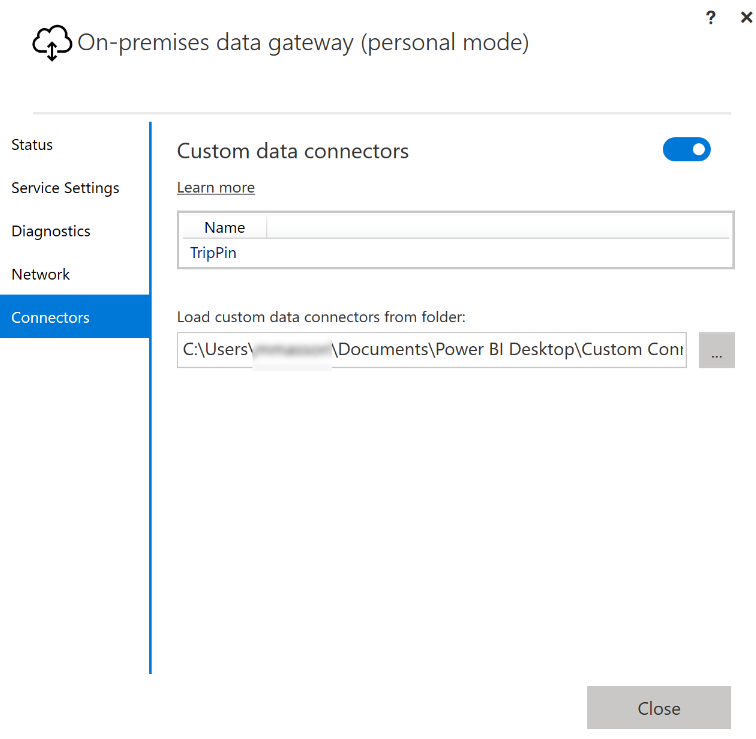
I've installed the on-premise data gateway and configured it. I see the TripPin connector in the gateway window (connector is listed).

When I try to refresh the data online, it says that de data source is not configured correctly. When I go to the Data connexion, I can't choose any authentication and so I cant connect it (see attached screenshot).

trippin.png

3 REPLIES 3
Anonymous
Not applicable

Hi @etiskapp2 ,

In order to make troubleshooting and get a solution, could you please check and confirm the following info?

TripPin 9 - Test Connection - Power Query | Microsoft Learn

1. Add a TestConnection handler to your connector: This is generally the same as your main data source function. The TestConnection handler is added to the Data Source Kind declaration record (the same place you declare its supported authentication type(s)).

2. Gateway

  • Install the On-Premises Data Gateway in Personal mode
  • Update the latest version
  • Enable Custom Connector support in the Gatewayvyiruanmsft_0-1695884726756.png


Best Regards

Regarding the gateway i've don exactly what you say.


I've downloaded the source code from github and used the 10-TableView1 folder in TripPin. So the test connection is already implemented.

I've got this as a test connection that comes from your repository : 

TripPin = [
// TestConnection is required to enable the connector through the Gateway
TestConnection = (dataSourcePath) => {"TripPin.Contents"},
Authentication = [
Anonymous = []
],
Label = "TripPin Part 10 - Query Folding part 1"
];

Anonymous
Not applicable

Hi @etiskapp2 ,

Whether it still not working? Did you get any other error message?

Best Regards

Helpful resources

Announcements
Power BI DataViz World Championships

Power BI Dataviz World Championships

The Power BI Data Visualization World Championships is back! It's time to submit your entry.

December 2025 Power BI Update Carousel

Power BI Monthly Update - December 2025

Check out the December 2025 Power BI Holiday Recap!

FabCon Atlanta 2026 carousel

FabCon Atlanta 2026

Join us at FabCon Atlanta, March 16-20, for the ultimate Fabric, Power BI, AI and SQL community-led event. Save $200 with code FABCOMM.