Join us at FabCon Atlanta from March 16 - 20, 2026, for the ultimate Fabric, Power BI, AI and SQL community-led event. Save $200 with code FABCOMM.
Register now!Get Fabric Certified for FREE during Fabric Data Days. Don't miss your chance! Request now
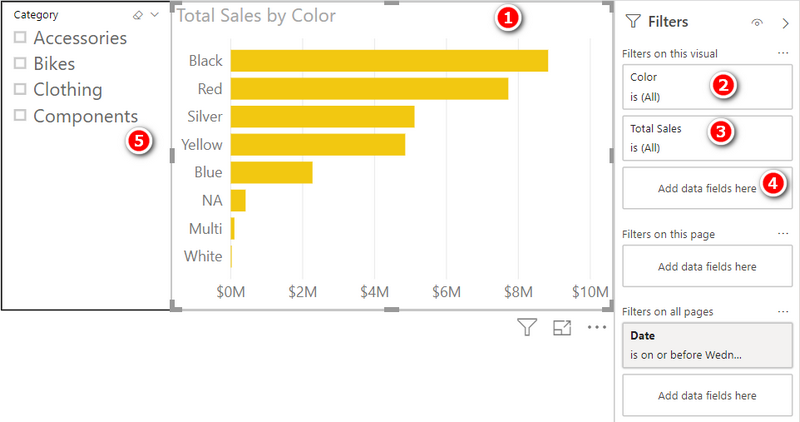
The section (for example: "Color") keeps on loading. When you hover the mouse away from the section, that's the time the data will show.
(The image is referencial)
Is this a normal behaviour from the PowerBI Client? Is there a way to fix this?
Made tests on:
- v2.10.2
- v2.10.3 Beta
I am having the same problem with Power BI embedded.
If I click on one of the filters (e.g., #2 or #3) in the example above, and don't move my mouse, the "loading" message is displayed and it takes longer than necessary to comlete the loading process and present the available filter values to be selected.
If I click on one of the filters (e.g., #2 or #3) in the example above, and then immediately move my mouse away from the filters, the avaialble filter values will be displayed almost immediately...
It seems like the "loading" message gets stuck unless you move your mouse somewhere else on the page...
Anyone else seeing this problem with Power BI embedded?
Check out the November 2025 Power BI update to learn about new features.
Advance your Data & AI career with 50 days of live learning, contests, hands-on challenges, study groups & certifications and more!
| User | Count |
|---|---|
| 5 | |
| 2 | |
| 2 | |
| 2 | |
| 1 |