cancel
Showing results for 
Search instead for 
Did you mean: 

The Power BI Data Visualization World Championships is back! It's time to submit your entry. Live now!

Reply
josh122398
New Member

Line Chart: Average of all Selected Lines during timestamp

Hello,


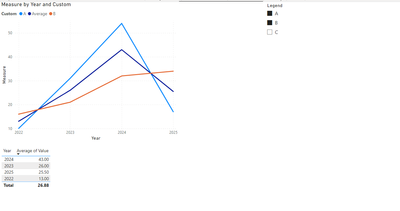
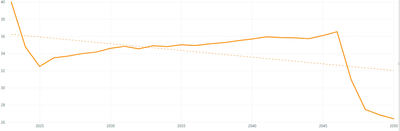
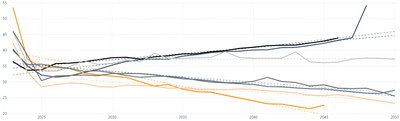
I tried to keep an average of all selected lines (during each timestamp) on my line chart. However, I don't think PowerBI allows me to keep this curve due to the way legends interact with the data. See below what I mean:


With the legend:

josh122398_0-1683217218743.png


Without the legend:

josh122398_1-1683217241059.png


In effect, I want the bottom curve (without the legend) overlayed with the top image's curves. Note, the curve without the legend will shift when I select/deselect the various legend values. I want this line to overlay with all unique legend values, and average the selected legend values when specified.


Hope this helps describe my issue in enough depth.

1 ACCEPTED SOLUTION
v-jianboli-msft
Community Support
Community Support

Hi @josh122398 ,


Here is my sample:
vjianbolimsft_1-1685090749552.png

Please try:

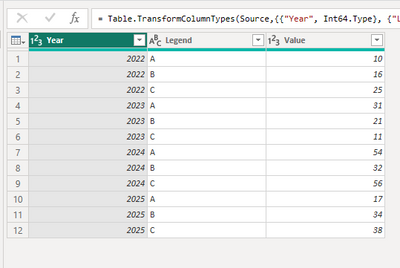
First create a new table like this:

let
    Source = Table.FromRows(Json.Document(Binary.Decompress(Binary.FromText("Vc6xDcAwCETRXahdGDBJ2iRjWOy/hk1ko0txzZO+oHeSKkKF7jmu5CXlCTlQ3jmxLboqZZSo5CdRcUpblTWUqFRQorK8bvvDE+WrGkpUepH7AA==", BinaryEncoding.Base64), Compression.Deflate)), let _t = ((type nullable text) meta [Serialized.Text = true]) in type table [Year = _t, Legend = _t, Value = _t]),
    #"Changed Type" = Table.TransformColumnTypes(Source,{{"Year", Int64.Type}, {"Legend", type text}, {"Value", Int64.Type}}),
    #"Removed Other Columns" = Table.SelectColumns(#"Changed Type",{"Legend"}),
    #"Removed Duplicates" = Table.Distinct(#"Removed Other Columns"),
    #"Added Custom" = Table.AddColumn(#"Removed Duplicates", "Custom", each {_[Legend],"Average"}),
    #"Expanded Custom" = Table.ExpandListColumn(#"Added Custom", "Custom")
in
    #"Expanded Custom"

vjianbolimsft_0-1685090706365.png

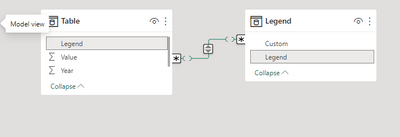
Then build relationship between the two tables:
vjianbolimsft_5-1685091360350.png

Create a slicer:

vjianbolimsft_4-1685091348703.png


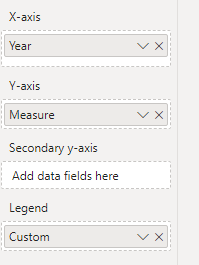
Apply the measure to the line chart:

Measure =
VAR _a =
    ALLSELECTED ( 'Table'[Legend] )
RETURN
    IF (
        SELECTEDVALUE ( Legend[Custom] ) = "Average",
        CALCULATE (
            AVERAGE ( 'Table'[Value] ),
            FILTER (
                ALL ( 'Table' ),
                [Legend]
                    IN _a
                        && [Year] = SELECTEDVALUE ( 'Table'[Year] )
            )
        ),
        SUM ( 'Table'[Value] )
    )
Measure =
VAR _a =
    ALLSELECTED ( 'Table'[Legend] )
RETURN
    IF (
        SELECTEDVALUE ( Legend[Custom] ) = "Average",
        CALCULATE (
            AVERAGE ( 'Table'[Value] ),
            FILTER (
                ALL ( 'Table' ),
                [Legend]
                    IN _a
                        && [Year] = SELECTEDVALUE ( 'Table'[Year] )
            )
        ),
        SUM ( 'Table'[Value] )
    )

vjianbolimsft_3-1685091338473.png


Final output:

vjianbolimsft_2-1685091320555.png


Best Regards,

Jianbo Li

If this post helps, then please consider Accept it as the solution to help the other members find it more quickly.

View solution in original post

2 REPLIES 2
v-jianboli-msft
Community Support
Community Support

Hi @josh122398 ,


Here is my sample:

vjianbolimsft_1-1685090749552.png

Please try:

First create a new table like this:

let
    Source = Table.FromRows(Json.Document(Binary.Decompress(Binary.FromText("Vc6xDcAwCETRXahdGDBJ2iRjWOy/hk1ko0txzZO+oHeSKkKF7jmu5CXlCTlQ3jmxLboqZZSo5CdRcUpblTWUqFRQorK8bvvDE+WrGkpUepH7AA==", BinaryEncoding.Base64), Compression.Deflate)), let _t = ((type nullable text) meta [Serialized.Text = true]) in type table [Year = _t, Legend = _t, Value = _t]),
    #"Changed Type" = Table.TransformColumnTypes(Source,{{"Year", Int64.Type}, {"Legend", type text}, {"Value", Int64.Type}}),
    #"Removed Other Columns" = Table.SelectColumns(#"Changed Type",{"Legend"}),
    #"Removed Duplicates" = Table.Distinct(#"Removed Other Columns"),
    #"Added Custom" = Table.AddColumn(#"Removed Duplicates", "Custom", each {_[Legend],"Average"}),
    #"Expanded Custom" = Table.ExpandListColumn(#"Added Custom", "Custom")
in
    #"Expanded Custom"

vjianbolimsft_0-1685090706365.png

Then build relationship between the two tables:

vjianbolimsft_5-1685091360350.png

Create a slicer:

vjianbolimsft_4-1685091348703.png


Apply the measure to the line chart:

Measure =
VAR _a =
    ALLSELECTED ( 'Table'[Legend] )
RETURN
    IF (
        SELECTEDVALUE ( Legend[Custom] ) = "Average",
        CALCULATE (
            AVERAGE ( 'Table'[Value] ),
            FILTER (
                ALL ( 'Table' ),
                [Legend]
                    IN _a
                        && [Year] = SELECTEDVALUE ( 'Table'[Year] )
            )
        ),
        SUM ( 'Table'[Value] )
    )
Measure =
VAR _a =
    ALLSELECTED ( 'Table'[Legend] )
RETURN
    IF (
        SELECTEDVALUE ( Legend[Custom] ) = "Average",
        CALCULATE (
            AVERAGE ( 'Table'[Value] ),
            FILTER (
                ALL ( 'Table' ),
                [Legend]
                    IN _a
                        && [Year] = SELECTEDVALUE ( 'Table'[Year] )
            )
        ),
        SUM ( 'Table'[Value] )
    )

vjianbolimsft_3-1685091338473.png


Final output:

vjianbolimsft_2-1685091320555.png


Best Regards,

Jianbo Li

If this post helps, then please consider Accept it as the solution to help the other members find it more quickly.
lbendlin
Super User
Super User

If this is important to you please consider voting for an existing idea or raising a new one at https://ideas.powerbi.com

Helpful resources

Announcements
Power BI DataViz World Championships

Power BI Dataviz World Championships

The Power BI Data Visualization World Championships is back! It's time to submit your entry.

December 2025 Power BI Update Carousel

Power BI Monthly Update - December 2025

Check out the December 2025 Power BI Holiday Recap!

FabCon Atlanta 2026 carousel

FabCon Atlanta 2026

Join us at FabCon Atlanta, March 16-20, for the ultimate Fabric, Power BI, AI and SQL community-led event. Save $200 with code FABCOMM.