Forum Discussion
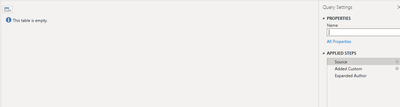
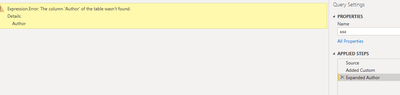
I am getting an empty table from Source after which when I try to expand a column am getting error
- Anonymous4 years ago
Hi NithyaKB ,
This problem seems to be caused by the absence of source table data information, resulting in an error in expand columns due to the Author column not being found. Please update the applied codes in your Advanced Editor as below and check whether it can work:
let Source = lists/getbytitle( list name)/select id, books,author/Title&Expand = "Author", CheckEmpty = if Table.IsEmpty(Source) then #table(type table [Author = [Author = any]], {}) else Source, #"Added Custom" = Table.AddColumn(CheckEmpty, "Title", each "Shakespeare"), #"Expanded Author" = Table.ExpandRecordColumn(#"Added Custom", "Author", {"Title"}, {"Author"}) in #"Expanded Author"If the above one is not working for your scenario, please share some sample data in your source table when there is some data in it. Later we will provide you a suitable solution base on your shared information. Thank you.
Best Regards
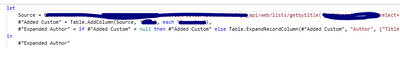
NithyaKB Try:
Source = lists/getbytitle( list name)/select id, books,author/Title&Expand = "Author",
"Added Custom" = Table.Add Column(Source , "Title" , each "Shakespeare")
"Expanded Author" = if #"Added Custom" = null then #"Added Custom" else Table.ExpandRecordColumn(#"Added Custom" , "Author",{"Title"},{"Author"})
in
#"Expanded Author"I tried the below query as suggested .But still facing same issue.
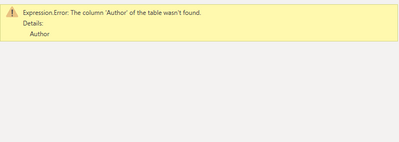
Please find below the screenshot of error message.
- NithyaKB4 years ago
Helper I
Greg_Deckler
Can you suggest how to get the multiple columnsSource = lists/getbytitle( list name)/select id, books,author/Title&Expand = "Author", "Added Custom" = Table.Add Column(Source , "Title" , each "Shakespeare") "Expanded Author" = if #"Added Custom" = null then #"Added Custom" else Table.ExpandRecordColumn(#"Added Custom" , "Author",{"Title"},{"Author"}) in #"Expanded Author"(id , books ,authors) , If these columns are emoty then it should return empty tables.