cancel
Showing results for 
Search instead for 
Did you mean: 

Next up in the FabCon + SQLCon recap series: The roadmap for Microsoft SQL and Maximizing Developer experiences in Fabric. All sessions are available on-demand after the live show. Register now

Reply
PragatiM
Regular Visitor

How to get date that is 7th working days from any specific date

Can someone help me to get the 7th working day (-7) from today in DAX

for eg: if today is 5/13/2020 then it should return 5/4/2020  excluding (5/9 and 5/10 weekend)

1 ACCEPTED SOLUTION

@PragatiM Net Work Days returns the number of working days between two dates, true. But it is the technique that I was pointing you to. In your case, you would create a table variable using CALENDAR that would be from your date to your date -9 (you can just subtract 9 from your date to get your starting date for CALENDAR). You would use ADDCOLUMNS to add a WEEKDAY column using 2 as the second parameter. You then FILTER this to remove rows where your weekday column is greater than 5. Now you use ADDCOLUMNS again to count how many days each date is away from your target date. You then FILTER this to 7 and that's your date.


If you want a specific implementation, please see this post regarding How to Get Your Question Answered Quickly: https://community.powerbi.com/t5/Community-Blog/How-to-Get-Your-Question-Answered-Quickly/ba-p/38490

The most important parts are:
1. Sample data as text, use the table tool in the editing bar
2. Expected output from sample data
3. Explanation in words of how to get from 1. to 2.


Follow on LinkedIn
@ me in replies or I'll lose your thread!!!
Instead of a Kudo, please vote for this idea
Become an expert!: Enterprise DNA
External Tools: MSHGQM
YouTube Channel!: Microsoft Hates Greg
Latest book!:
DAX For Humans

DAX is easy, CALCULATE makes DAX hard...

View solution in original post

4 REPLIES 4
Greg_Deckler
Community Champion
Community Champion

@PragatiM - You should be able to use the technique here for Net Working Days - https://community.powerbi.com/t5/Quick-Measures-Gallery/Net-Work-Days/m-p/367362#M109


The basic technique is that you use WORKDAY with the 2 parameter and exclude workdays that are > 5


Follow on LinkedIn
@ me in replies or I'll lose your thread!!!
Instead of a Kudo, please vote for this idea
Become an expert!: Enterprise DNA
External Tools: MSHGQM
YouTube Channel!: Microsoft Hates Greg
Latest book!:
DAX For Humans

DAX is easy, CALCULATE makes DAX hard...

Hi Greg,


Thank you for your reply.  For my scenario, the NetWorkingDays is fixed number, ie. NetWorkingDays = 7. I would need a Dax function that would return the date instead by subtracting 7 working days from current date or the selected date. I need this to find the average of 7 working days. Please let me know if you have solution for this.


Thanks,

Pragati

@PragatiM Net Work Days returns the number of working days between two dates, true. But it is the technique that I was pointing you to. In your case, you would create a table variable using CALENDAR that would be from your date to your date -9 (you can just subtract 9 from your date to get your starting date for CALENDAR). You would use ADDCOLUMNS to add a WEEKDAY column using 2 as the second parameter. You then FILTER this to remove rows where your weekday column is greater than 5. Now you use ADDCOLUMNS again to count how many days each date is away from your target date. You then FILTER this to 7 and that's your date.


If you want a specific implementation, please see this post regarding How to Get Your Question Answered Quickly: https://community.powerbi.com/t5/Community-Blog/How-to-Get-Your-Question-Answered-Quickly/ba-p/38490

The most important parts are:
1. Sample data as text, use the table tool in the editing bar
2. Expected output from sample data
3. Explanation in words of how to get from 1. to 2.


Follow on LinkedIn
@ me in replies or I'll lose your thread!!!
Instead of a Kudo, please vote for this idea
Become an expert!: Enterprise DNA
External Tools: MSHGQM
YouTube Channel!: Microsoft Hates Greg
Latest book!:
DAX For Humans

DAX is easy, CALCULATE makes DAX hard...

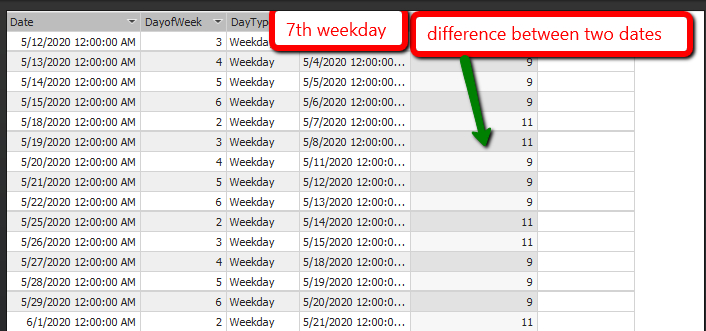
Thanks Greg,


Thank you for your suggession. I created a function that would list the7th working day for each day as per my need and then import that tabe to my tabular model for further process.  

png1.png


Helpful resources

Announcements
New to Fabric survey Carousel

New to Fabric Survey

If you have recently started exploring Fabric, we'd love to hear how it's going. Your feedback can help with product improvements.

Power BI DataViz World Championships carousel

Power BI DataViz World Championships - June 2026

A new Power BI DataViz World Championship is coming this June! Don't miss out on submitting your entry.

Join our Fabric User Panel

Join our Fabric User Panel

Share feedback directly with Fabric product managers, participate in targeted research studies and influence the Fabric roadmap.

March Power BI Update Carousel

Power BI Community Update - March 2026

Check out the March 2026 Power BI update to learn about new features.