cancel
Showing results for 
Search instead for 
Did you mean: 

Next up in the FabCon + SQLCon recap series: The roadmap for Microsoft SQL and Maximizing Developer experiences in Fabric. All sessions are available on-demand after the live show. Register now

Reply
AliSafa
Advocate I
Advocate I

Grant access to someone to be able to edit Data Flow

Hi Folks,

I've created a @DataFlow and i gave my colleague admin permission in the workspace.

Now, He is able to see the dataflow, but he is not able to edit it!


my question is : how can i give him permission for editing my dataflow?


Thank you

1 ACCEPTED SOLUTION
Anonymous
Not applicable

Hi @AliSafa ,

According to my investigation, currently only the owner of the dataflow can edit it. If the other person(workspace admins and workspace members) want to edit, he/she can edit it after taking over and becoming the new owner of the dataflow...

Power BI dataflows – Takeover

Best Regards

View solution in original post

5 REPLIES 5
MarkPalmberg
Kudo Commander
Kudo Commander

Anonymous
Not applicable

I have exactly the same issue with the thread's owner: I need to add table to the dataflow without having to taking over. There should be a "shared edit" right to the access set up.

Anonymous
Not applicable

Hi @AliSafa ,

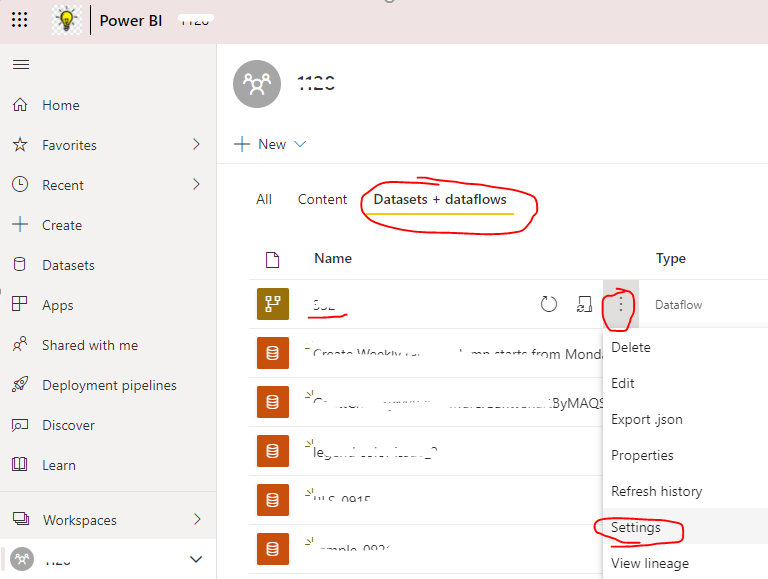
Only the owner of dataflow can edit it. So please ask your colleague to take over your dataflow by following steps first, then he can edit the dataflow after he become the owner of dataflow...

1. Select the More menu (the ellipsis) and select Settings

yingyinr_1-1615168518762.png

2. Click "Take over" button and input the credentials of all involved data sources in the dataflow

Best Regards

thanks yingsyire ,

but we both need to modify that data flow time to time.


Anonymous
Not applicable

Hi @AliSafa ,

According to my investigation, currently only the owner of the dataflow can edit it. If the other person(workspace admins and workspace members) want to edit, he/she can edit it after taking over and becoming the new owner of the dataflow...

Power BI dataflows – Takeover

Best Regards

Helpful resources

Announcements
New to Fabric survey Carousel

New to Fabric Survey

If you have recently started exploring Fabric, we'd love to hear how it's going. Your feedback can help with product improvements.

Power BI DataViz World Championships carousel

Power BI DataViz World Championships - June 2026

A new Power BI DataViz World Championship is coming this June! Don't miss out on submitting your entry.

Join our Fabric User Panel

Join our Fabric User Panel

Share feedback directly with Fabric product managers, participate in targeted research studies and influence the Fabric roadmap.

March Power BI Update Carousel

Power BI Community Update - March 2026

Check out the March 2026 Power BI update to learn about new features.