Join us at FabCon Atlanta from March 16 - 20, 2026, for the ultimate Fabric, Power BI, AI and SQL community-led event. Save $200 with code FABCOMM.
Register now!The Power BI Data Visualization World Championships is back! Get ahead of the game and start preparing now! Learn more
Hi Team,
i am not able to see Data Bars or Conditional formatting option in May2022 version of Power BI desktop.
can you please help me to find out?
Thanks in advance..
Solved! Go to Solution.
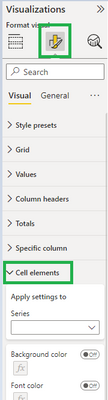
When you click on your table/matrix visual, go to 'Format your visual' and then 'Cell elements'.
There you will find conditional format and data bar options.
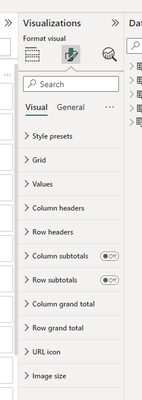
now cell elements is not visible also, can anyone help please
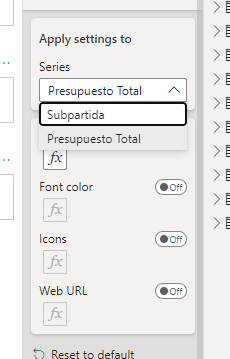
Data bars still not available! Only Background Color, Font Color, Icons and WEbURL conditional formatting
When you click on your table/matrix visual, go to 'Format your visual' and then 'Cell elements'.
There you will find conditional format and data bar options.
got it...Thank you buddy 👍
The Power BI Data Visualization World Championships is back! Get ahead of the game and start preparing now!
Check out the November 2025 Power BI update to learn about new features.
| User | Count |
|---|---|
| 4 | |
| 3 | |
| 2 | |
| 1 | |
| 1 |
| User | Count |
|---|---|
| 11 | |
| 8 | |
| 4 | |
| 3 | |
| 3 |