cancel
Showing results for 
Search instead for 
Did you mean: 

The Power BI Data Visualization World Championships is back! Get ahead of the game and start preparing now! Learn more

Reply
Anonymous
Not applicable

Custom Visual works online, but on desktop is a complete mess

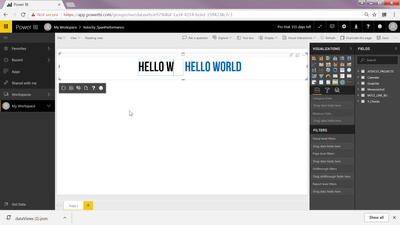
So I created a custom visual (basically two textbox allow user to use different font to type the title), and it works as expected powerBI online. See screenshot below:

2017-12-28 12_44_41-Power BI.png


Then I use pbiviz package to make a pbiviz file from this very custom visual.

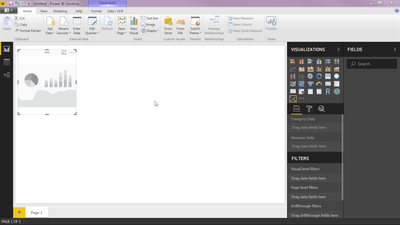
This thing showing on Power Bi Desktop as the screen shot below:

2017-12-28 12_47_39-Untitled - Power BI Desktop.png


I've updated to the latest version of power bi desktop.


Could someone please help me here?


1 ACCEPTED SOLUTION
v-viig
Community Champion
Community Champion

You must specify at least one data-column at Field pane (Category Data or Measure Data).


Ignat Vilesov,

Software Engineer


Microsoft Power BI Custom Visuals

pbicvsupport@microsoft.com

View solution in original post

1 REPLY 1
v-viig
Community Champion
Community Champion

You must specify at least one data-column at Field pane (Category Data or Measure Data).


Ignat Vilesov,

Software Engineer


Microsoft Power BI Custom Visuals

pbicvsupport@microsoft.com

Helpful resources

Announcements
November Power BI Update Carousel

Power BI Monthly Update - November 2025

Check out the November 2025 Power BI update to learn about new features.

Fabric Data Days Carousel

Fabric Data Days

Advance your Data & AI career with 50 days of live learning, contests, hands-on challenges, study groups & certifications and more!

FabCon Atlanta 2026 carousel

FabCon Atlanta 2026

Join us at FabCon Atlanta, March 16-20, for the ultimate Fabric, Power BI, AI and SQL community-led event. Save $200 with code FABCOMM.