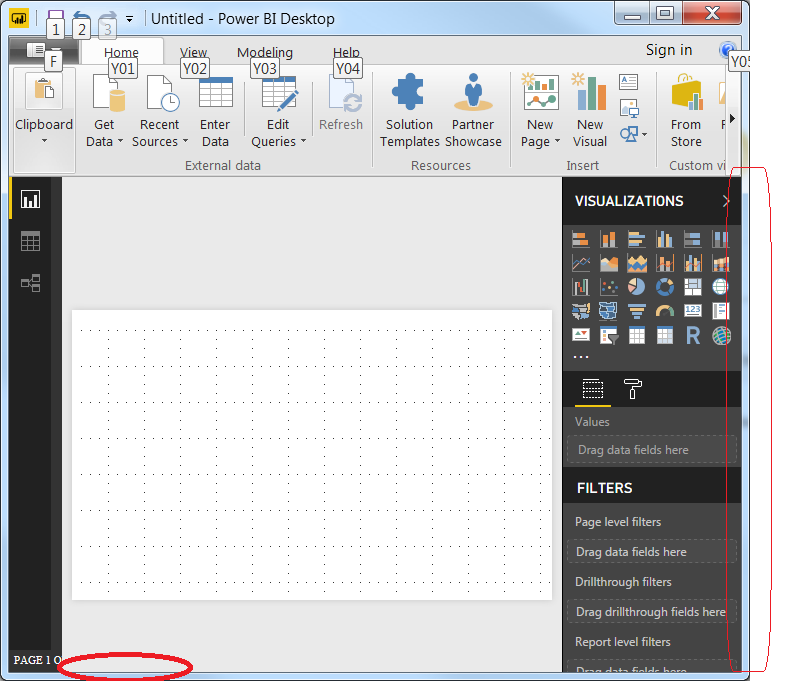
Issue:
1. The visualization you are seeing shows when I squeeze the window smaller and it maximized, it will disappear.
2. The Fields option which will show is not there.
3. The pages that will show at the bottom do not show.
Restore to default settings is probably there somewhere and if it is there please let me know, where and how to restore or reset.
I am running this on Windows 7 x64 (lenovo Thinkpad T50 i7 SSD) (not going to change to Windows 10 for some time WinX not an option.)
What may have caused this behaviour if related ?
a. There was a recent Windows update.
b. I installed Visual Studio 2017.
c. To get more real estate when working on Power BI report, I stretched the app across 2 monitors, then shrunk it to one monitor before publishing it.
After I noticed this behaviour, I uninstalled the Power BI Desktop app and reinstalled it, nothing changed.
I upgraded Power BI to the most recent OCTOBER release, uninstalled etc., no dice.
I thought this was probably my account, logged into my account from another laptop no issues.
Any help is appreciated.
if it is to do with the registry please send details of what they should be.


