FabCon is coming to Atlanta
Join us at FabCon Atlanta from March 16 - 20, 2026, for the ultimate Fabric, Power BI, AI and SQL community-led event. Save $200 with code FABCOMM.
Register now!- Power BI forums
- Get Help with Power BI
- Desktop
- Service
- Report Server
- Power Query
- Mobile Apps
- Developer
- DAX Commands and Tips
- Custom Visuals Development Discussion
- Health and Life Sciences
- Power BI Spanish forums
- Translated Spanish Desktop
- Training and Consulting
- Instructor Led Training
- Dashboard in a Day for Women, by Women
- Galleries
- Data Stories Gallery
- Themes Gallery
- Contests Gallery
- QuickViz Gallery
- Quick Measures Gallery
- Visual Calculations Gallery
- Notebook Gallery
- Translytical Task Flow Gallery
- TMDL Gallery
- R Script Showcase
- Webinars and Video Gallery
- Ideas
- Custom Visuals Ideas (read-only)
- Issues
- Issues
- Events
- Upcoming Events
View all the Fabric Data Days sessions on demand. View schedule
- Power BI forums
- Forums
- Get Help with Power BI
- Desktop
- Re: stucking on creating connection in model
- Subscribe to RSS Feed
- Mark Topic as New
- Mark Topic as Read
- Float this Topic for Current User
- Bookmark
- Subscribe
- Printer Friendly Page

- Mark as New
- Bookmark
- Subscribe
- Mute
- Subscribe to RSS Feed
- Permalink
- Report Inappropriate Content
stucking on creating connection in model
Hi,
I have a data model in power bi desktop, the tables are loaded from ssas server, and it refreshed data well yesterday.
But today when I pulled in more data (400,000 rows to 17,986,280 rows) to ssas server, and click refresh data of the fact table (refresh only one table), it's stucking in "Creating connection in model" 1 hour...(still stucking)
Also, I've exmained the table which has no blank columns. is it normal?
or any experience to check the problem efficiently?
Thanks a lot!
Solved! Go to Solution.

- Mark as New
- Bookmark
- Subscribe
- Mute
- Subscribe to RSS Feed
- Permalink
- Report Inappropriate Content
@Leann,
Do you choose “Import” or “Connect Live” mode to connect to SSAS database in Power BI Desktop? I would recommend uncheck the following options in Power BI Desktop and then refresh your data model.
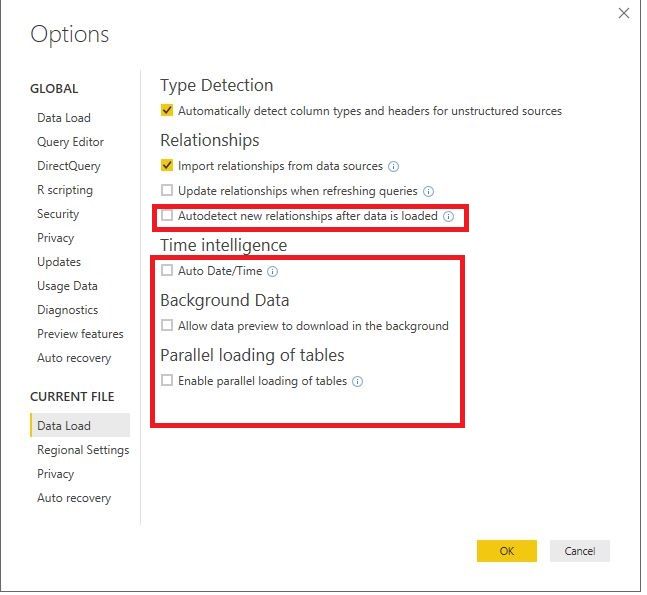
If the above error still occurs, please try to re-connect to the SSAS database in Power BI Desktop, pull in columns and rows you need to build report.
Regards,
Lydia
- Mark as New
- Bookmark
- Subscribe
- Mute
- Subscribe to RSS Feed
- Permalink
- Report Inappropriate Content
How did you downgrade the version?


- Mark as New
- Bookmark
- Subscribe
- Mute
- Subscribe to RSS Feed
- Permalink
- Report Inappropriate Content
@Anonymous
You need to uninstall your current desktop version, then download one of these versions to re-install
August 2021 version of Power BI Desktop - 64-bit:
https://download.microsoft.com/download/8/8/0/880BCA75-79DD-466A-927D-1ABF1F5454B0/PBIDesktopSetup-2021-08_x64.exe
August 2021 version of Power BI Desktop - 32-bit:
https://download.microsoft.com/download/8/8/0/880BCA75-79DD-466A-927D-1ABF1F5454B0/PBIDesktopSetup-2021-08.exe

- Mark as New
- Bookmark
- Subscribe
- Mute
- Subscribe to RSS Feed
- Permalink
- Report Inappropriate Content
beware of "--comments"
- Mark as New
- Bookmark
- Subscribe
- Mute
- Subscribe to RSS Feed
- Permalink
- Report Inappropriate Content
Still no luck after doint that. only difference is mine works and loads but its stopped telling me how many rows are being loaded?
- Mark as New
- Bookmark
- Subscribe
- Mute
- Subscribe to RSS Feed
- Permalink
- Report Inappropriate Content
Hi Lyida@Anonymous,
Thanks a lot for your help. After I disable the features you mentioned plus "import relationship from data source", I can load the table smoothly. 🙂
I found the cause might be the new source of the dimension table contains duplicate rows, it caused the hang on problem.
one more question, if I refresh the data from power bi service, will it check the relationship as well? or is related to what I set in the option power bi desktop? Thanks for your answer. 🙂
Have a nice weekend!
LeAnn

- Mark as New
- Bookmark
- Subscribe
- Mute
- Subscribe to RSS Feed
- Permalink
- Report Inappropriate Content
I have the same problem, I followed the same steps as in your proposed solution, but i'm still having issues refreshing the data.
Can anyone help me?
- Mark as New
- Bookmark
- Subscribe
- Mute
- Subscribe to RSS Feed
- Permalink
- Report Inappropriate Content
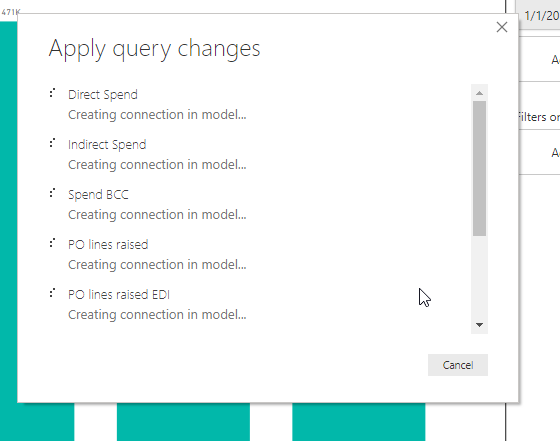
I cannot refresh my data. Creating connection in model never finishes. See printscreen. Data source settings are adjusted due to changed network name but oke now. It has always worked before.

- Mark as New
- Bookmark
- Subscribe
- Mute
- Subscribe to RSS Feed
- Permalink
- Report Inappropriate Content
Hi Hypeerchef1969,
I have also not been able to resolve my being stuck on "creating connection in model" using the options in the suggested solution above.
Have you managed to resolve your issue?
I would be grateful to hear from you or anybody else with suggestions as what to try next.
Siggy
- Mark as New
- Bookmark
- Subscribe
- Mute
- Subscribe to RSS Feed
- Permalink
- Report Inappropriate Content
Hi again,
I have resolved my issue.
For some reason one of my spreadsheets had unexpectedly added MANY additional blank columns!
After deleting these columns my PowerBI refreshed as usual.
I located and resolved the offending spreadsheet using PowerBI's "Transform data" and reviewing the columns for each "Navigation" step in each data source.
Siggy
- Mark as New
- Bookmark
- Subscribe
- Mute
- Subscribe to RSS Feed
- Permalink
- Report Inappropriate Content
Thanks Sgandalf for your feedback.
Since I put my measures into a Measure table, my dataset need more time to refresh locally, but it finish succesfully.
But my problem is in the Power BI service, when I publish my dataset into a workspace, just after publishing, it is thinking, like refreshing. And after much more time than usual, it crash.

with this error:

I check all my tab and no one has colum empty, my model was working perfectly before this measured table.
Few days ago, there were a problem with the gateway, but everything had been updated few days ago with the lastest version, so I get stuck there.
the last refresh fail notification
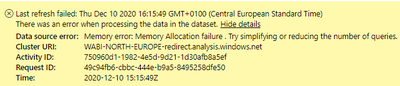
Do somebody has any solution?
thanks in advance,
kind regards
Christophe
Helpful resources

Power BI Monthly Update - November 2025
Check out the November 2025 Power BI update to learn about new features.

Fabric Data Days
Advance your Data & AI career with 50 days of live learning, contests, hands-on challenges, study groups & certifications and more!

FabCon Atlanta 2026
Join us at FabCon Atlanta, March 16-20, for the ultimate Fabric, Power BI, AI and SQL community-led event. Save $200 with code FABCOMM.


