Join us at FabCon Atlanta from March 16 - 20, 2026, for the ultimate Fabric, Power BI, AI and SQL community-led event. Save $200 with code FABCOMM.
Register now!The Power BI Data Visualization World Championships is back! Get ahead of the game and start preparing now! Learn more
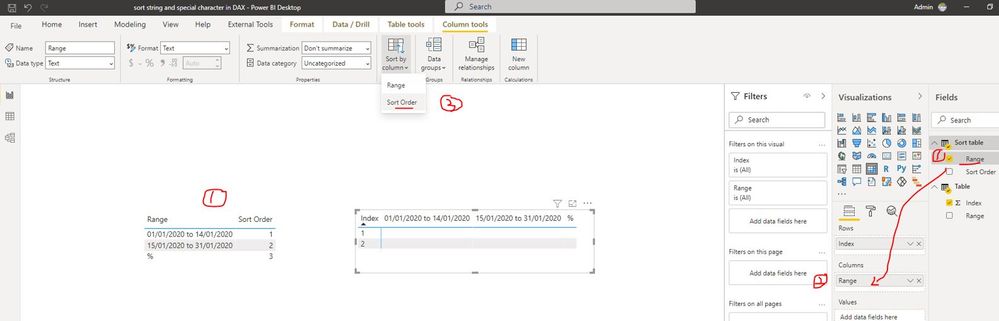
I have created the matrix with format of 2 columns (date_range, %).
Source Data (Sample)
| 1 | 01/01/2020 to 14/01/2020 |
| 1 | % |
| 2 | 15/01/2020 to 31/01/2020 |
| 2 | % |
I am displaying the above source data in matrix columns, If I place column2 then I want to get a view like below (Daterange first and % next):
01/01/2020 to 14/01/2020 | %
But when I included in matrix I am getting like below (% first and Daterange Next)
% | 01/01/2020 to 14/01/2020
Tried to sort ascending and descending but the view doesn't change.
I am sure their should be a way to sort the display in format (DateRange first and Percentage next).
Any help is appretiated.
Thanks
Solved! Go to Solution.
Hi @siva_powerbi ,
I created a sample pbix file(see attachment), please check whether that is what you want.
In addition, you can also refer the method in the following links to get it.
Sort a Column with a Custom Order in Power BI
Power BI - Custom Sorting in 3 Easy Steps!
Best Regards
Hi @siva_powerbi ,
I created a sample pbix file(see attachment), please check whether that is what you want.
In addition, you can also refer the method in the following links to get it.
Sort a Column with a Custom Order in Power BI
Power BI - Custom Sorting in 3 Easy Steps!
Best Regards
@siva_powerbi Not entirely certain I am following this. Can you provide sample data as text?
Sorry, having trouble following, can you post sample data as text and expected output?
Not really enough information to go on, please first check if your issue is a common issue listed here: https://community.powerbi.com/t5/Community-Blog/Before-You-Post-Read-This/ba-p/1116882
Also, please see this post regarding How to Get Your Question Answered Quickly: https://community.powerbi.com/t5/Community-Blog/How-to-Get-Your-Question-Answered-Quickly/ba-p/38490
The most important parts are:
1. Sample data as text, use the table tool in the editing bar
2. Expected output from sample data
3. Explanation in words of how to get from 1. to 2.
Thanks for the reply sir, Edited question with sample data.
The Power BI Data Visualization World Championships is back! Get ahead of the game and start preparing now!
Check out the November 2025 Power BI update to learn about new features.
| User | Count |
|---|---|
| 66 | |
| 44 | |
| 40 | |
| 29 | |
| 19 |
| User | Count |
|---|---|
| 200 | |
| 130 | |
| 102 | |
| 72 | |
| 55 |