
Join us at FabCon Atlanta from March 16 - 20, 2026, for the ultimate Fabric, Power BI, AI and SQL community-led event. Save $200 with code FABCOMM.
Register now!View all the Fabric Data Days sessions on demand. View schedule
Hi all,
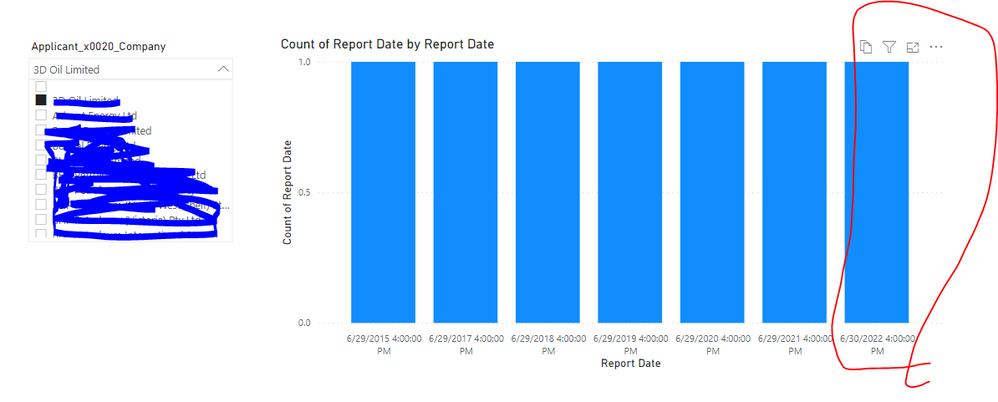
I have a SharePoint list with two columns, Company and Report date. Each company can have a few report dates. Using power bi, how can I show only the maximum date from the list of dates for each company. from below image you can see when I select a company it shows all the available report dates and I only want to show the latest date or have adifferent color.
Hi @Harris021
I did a local test ,you can take a reference
I Create 2 measure ,one is to calculate the maxdate per company,the other one is to calculate the count for the maxdate
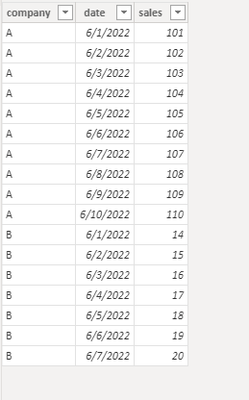
Here is my test table
Measure for maxdate: maxdate = CALCULATE(MAX('Table (3)'[date]), ALLEXCEPT('Table (3)','Table (3)'[company]))
Measure for sales :salesformaxdate = CALCULATE(SUM('Table (3)'[sales]),FILTER('Table (3)','Table (3)'[date]=MAX('Table (3)'[date])))
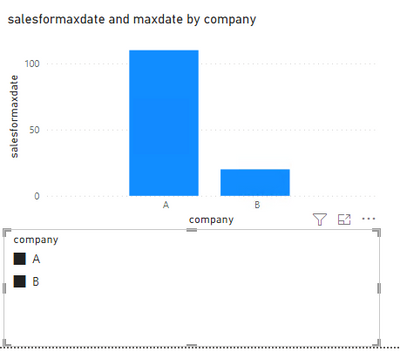
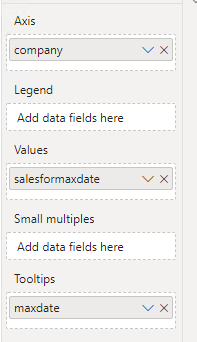
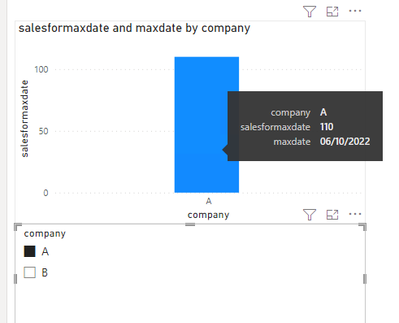
Then in visualization:
When only select company A
Best Regards,
Community Support Team _Isabella
If this post helps, then please consider Accept it as the solution to help the other members find it more quickly.
Hi @Harris021 ,
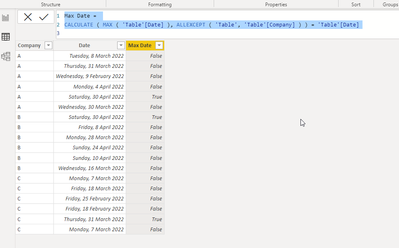
You can create a calculated column to determine whether a date is the max date for a particular item and use this to filter a measure, a visual, a page or the entire report. Example:
Max Date =
CALCULATE ( MAX ( 'Table'[Date] ), ALLEXCEPT ( 'Table', 'Table'[Company] ) ) = 'Table'[Date]
Check out the November 2025 Power BI update to learn about new features.
Advance your Data & AI career with 50 days of live learning, contests, hands-on challenges, study groups & certifications and more!