Get certified for free when you join Fabric Data Days 2026 and dive into Fabric, Power BI, SQL, AI, and other essential data skills.
Join nowData Days is here! Join us now for 60+ days of learning, challenges, and connection. Learn more
while i am excuting the Power query the list does not contain no records in Power Bi .At that time it showing the " the table is empty "i want to show false.But i am getting error.Can you please help me how to make it as false.
Solved! Go to Solution.
@jayendra,
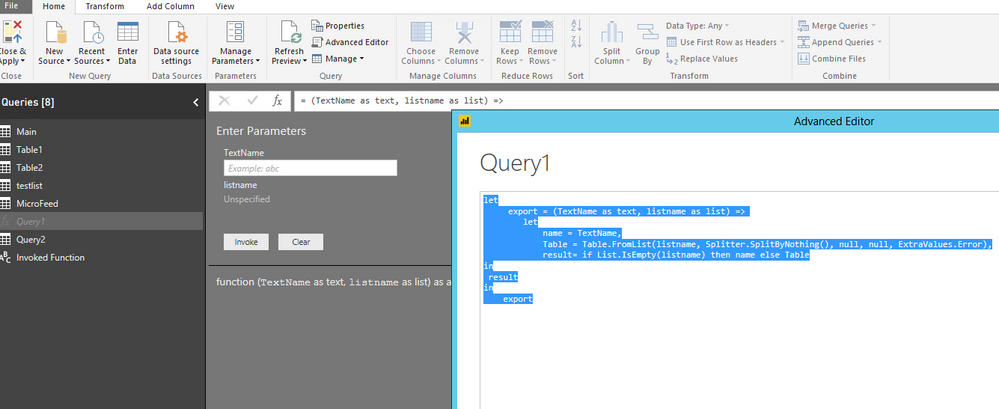
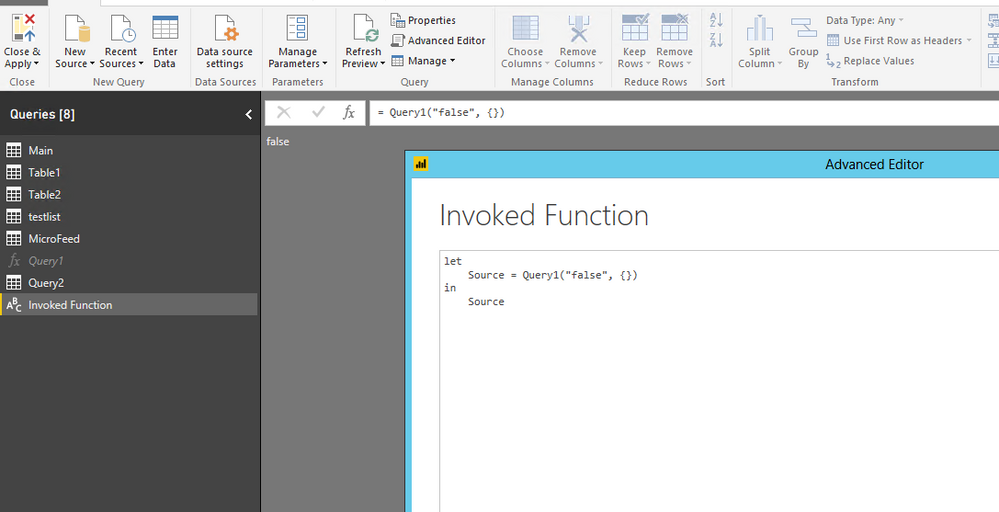
Add a new blank query in Power BI Desktop, then create a function in the Advanced Editor of the query with the List.IsEmpty function to check the list, when the list is empty, return false, otherwise expand the list. Below is an example for your reference.
let export = (TextName as text, listname as list) => let name = TextName, Table = Table.FromList(listname, Splitter.SplitByNothing(), null, null, ExtraValues.Error), result= if List.IsEmpty(listname) then name else Table in result in export
Regards,
@jayendra,
Add a new blank query in Power BI Desktop, then create a function in the Advanced Editor of the query with the List.IsEmpty function to check the list, when the list is empty, return false, otherwise expand the list. Below is an example for your reference.
let export = (TextName as text, listname as list) => let name = TextName, Table = Table.FromList(listname, Splitter.SplitByNothing(), null, null, ExtraValues.Error), result= if List.IsEmpty(listname) then name else Table in result in export
Regards,
Hi,
Could you try with Column = IF(ISBLANK(table[columntocheck]);"False";table[columntocheck])
Regards,
Salvador.
Don't miss out on Data Days, June 15 through August 7. Learn Fabric, Power BI, SQL, AI and more.
Check out the May 2026 Power BI update to learn about new features.
| User | Count |
|---|---|
| 23 | |
| 21 | |
| 20 | |
| 18 | |
| 13 |
| User | Count |
|---|---|
| 58 | |
| 50 | |
| 38 | |
| 31 | |
| 27 |