Don't miss your chance to take the Fabric Data Engineer (DP-600) exam for FREE! Find out how by attending the DP-600 session on April 23rd (pacific time), live or on-demand.
Learn moreNext up in the FabCon + SQLCon recap series: The roadmap for Microsoft SQL and Maximizing Developer experiences in Fabric. All sessions are available on-demand after the live show. Register now
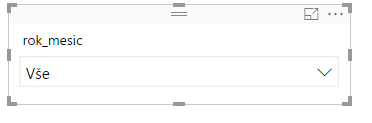
Hi when I use this type of slicer
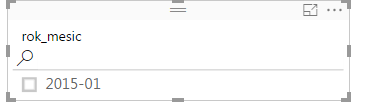
I often loose possibilty to search
Where is the problem?
Solved! Go to Solution.
When the slicer is a dropdown you can click in ellipses (...) Search
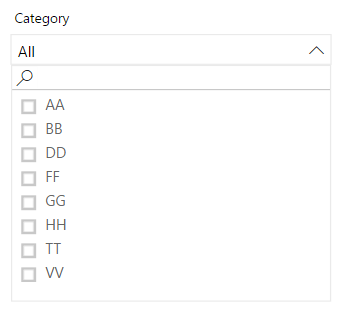
The search option appears when you expand the dropdown
When the slicer is a dropdown you can click in ellipses (...) Search
The search option appears when you expand the dropdown
When I try to use the search function within the drop down slicer I can see it but it will not allow me to click in or type next to the magnifying glass.
I'm seeing exactly the same problem. When I select 'dropdown' as the type of slicer. The 'search' feature appears but I'm unable to type characters into the search field. Instead of the mouse becoming a vertical edit bar, it becomes a selection hand when mousing over the search field. Why would search be incompatible with dropdown?
Unable to type characters into the search field.
Check out the April 2026 Power BI update to learn about new features.
If you have recently started exploring Fabric, we'd love to hear how it's going. Your feedback can help with product improvements.
A new Power BI DataViz World Championship is coming this June! Don't miss out on submitting your entry.
| User | Count |
|---|---|
| 48 | |
| 46 | |
| 41 | |
| 20 | |
| 17 |
| User | Count |
|---|---|
| 70 | |
| 69 | |
| 32 | |
| 27 | |
| 26 |