Join us at FabCon Atlanta from March 16 - 20, 2026, for the ultimate Fabric, Power BI, AI and SQL community-led event. Save $200 with code FABCOMM.
Register now!Get Fabric Certified for FREE during Fabric Data Days. Don't miss your chance! Request now
Hi,
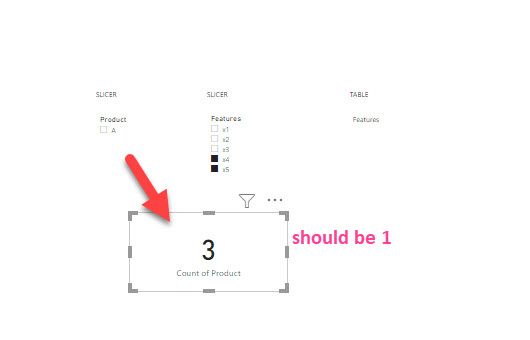
I would like to use "and logic" with multiselection in a slicer. For example; A has x4 and x5 features. A, B, and D have x4 feature. If I select x4 and x5 features, I want to see only A product in the slicer and show the count, which is 1 in a card. I have the example data below as well.
Thanks in advance!
| Product | Features |
| A | x1 |
| A | x2 |
| A | x3 |
| A | x4 |
| A | x5 |
| B | x1 |
| B | x2 |
| B | x3 |
| B | x4 |
| C | x1 |
| C | x2 |
| C | x3 |
| D | x4 |
Solved! Go to Solution.
@IF
This is a link to the original post for people to reference.
https://community.powerbi.com/t5/Desktop/Multiple-selection-with-and-logic/m-p/1663300#M664888
To get the cont of filtered products you can use something like this.
Filtered Product Count =
VAR _FilteredProducts =
FILTER (
VALUES( 'Table'[Product] ),
[Product Filter] = 1
)
RETURN
COUNTROWS ( _FilteredProducts )
@IF
This is a link to the original post for people to reference.
https://community.powerbi.com/t5/Desktop/Multiple-selection-with-and-logic/m-p/1663300#M664888
To get the cont of filtered products you can use something like this.
Filtered Product Count =
VAR _FilteredProducts =
FILTER (
VALUES( 'Table'[Product] ),
[Product Filter] = 1
)
RETURN
COUNTROWS ( _FilteredProducts )
@IF check this post and I hope it helps.
Check my latest blog post Compare Budgeted Scenarios vs. Actuals I would ❤ Kudos if my solution helped. 👉 If you can spend time posting the question, you can also make efforts to give Kudos to whoever helped to solve your problem. It is a token of appreciation!
⚡Visit us at https://perytus.com, your one-stop-shop for Power BI-related projects/training/consultancy.⚡
Subscribe to the @PowerBIHowTo YT channel for an upcoming video on List and Record functions in Power Query!!
Learn Power BI and Fabric - subscribe to our YT channel - Click here: @PowerBIHowTo
If my solution proved useful, I'd be delighted to receive Kudos. When you put effort into asking a question, it's equally thoughtful to acknowledge and give Kudos to the individual who helped you solve the problem. It's a small gesture that shows appreciation and encouragement! ❤
Did I answer your question? Mark my post as a solution. Proud to be a Super User! Appreciate your Kudos 🙂
Feel free to email me with any of your BI needs.
Check out the November 2025 Power BI update to learn about new features.
Advance your Data & AI career with 50 days of live learning, contests, hands-on challenges, study groups & certifications and more!