Join us at FabCon Atlanta from March 16 - 20, 2026, for the ultimate Fabric, Power BI, AI and SQL community-led event. Save $200 with code FABCOMM.
Register now!View all the Fabric Data Days sessions on demand. View schedule
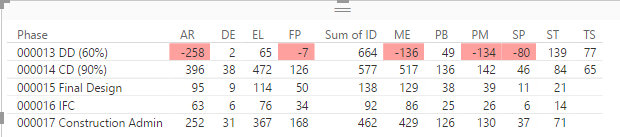
I've put together a Table with data from a pivot table. All columns are summed so I can apply conditional formatting, but the "ID" column is the only column that has "Sum of" in the header. I cannot figure out why it is the only column with it or how to get it to go away. If I change the value type (to Average, Count, etc.) of the other columns, then it adds the "(value type) of" in the column header. Sum is the only selection that doesn't add text to the column header. Something is off.
Solved! Go to Solution.
Have a crack at making your own measures.
So rather than dragging your value across and setting the aggregation type. Create a new measure like
ID = SUM('Table'[Value])and dragging this measure to your visual.
Have a crack at making your own measures.
So rather than dragging your value across and setting the aggregation type. Create a new measure like
ID = SUM('Table'[Value])and dragging this measure to your visual.
With this approach, your measure name becomes the column header.
Check out the November 2025 Power BI update to learn about new features.
Advance your Data & AI career with 50 days of live learning, contests, hands-on challenges, study groups & certifications and more!