cancel
Showing results for 
Search instead for 
Did you mean: 

Learn from the best! Meet the four finalists headed to the FINALS of the Power BI Dataviz World Championships! Register now

Reply
Anonymous
Not applicable

quick measure month over month

Dear Community,


I have the following issue. I have a dataset which can be represented (simplified version!) as follows:


COUNTRY1           VALUE         DATE (dd.mm.yy.)

COUNTRY1           VALUE        DATE (dd.mm.yy.)

COUNTRY1           VALUE         DATE (dd.mm.yy.)

COUNTRY 2           VALUE        DATE (dd.mm.yy.)

COUNTRY 2           VALUE        DATE (dd.mm.yy.)

COUNTRY 2           VALUE         DATE (dd.mm.yy.)

...


and so on. I am trying to build some quick measures to aggreated changes in values month over month, or quarter over quarter.

It works until when I do not apply the 'country' dimension, meaning that it corectly represent the requestes variations over the selected timeline only with the total sum of the values. 

When I introduce the country dimension in the visual, to dipsplay e.g. the variation in bunch of selected countries, it does not work anymore in the sense that it seems like it cannot aggregate countries (please note that countries repeat themselves clearly, so it does not aggregate all the value for 'Brazil' and shows the related aggreagate variation). 


Countires are otherwise aggregated correctly within other fields.

Hope I was able to explain this, can it be related to wrong settings in relation between different tables ? (the date table is separate from the other main table which inlcudes countries, values and other data points.


Thanks a lot in advance for any hint and sorry for the long post!


2 REPLIES 2
Anonymous
Not applicable

Hi @v-piga-msft ,


thanks for the reply! The formula is the one automatically generated by the quick measure function (Month over Month variation, or quarter over quarter variation). In fact, it works well in the following table visual, where I can display the correct change over month of the total values (column1.count):


ex.1.png


THe problem is when I add another dimension, the country dimension.

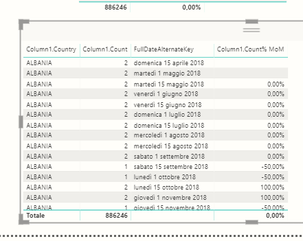
Instead of aggregating the values belonging to the same countires and showing me the total variation for each of the countries, it creates multiple entries for each of the countires:


ex.3.png


To sum up: what I want to do, is to dispaly the list of countries with a QoQ or MoM variation in values, so that I can filter e.g. top 5 in growth.


Hope this helped in clarifying the issue!


thanks again!

v-piga-msft
Resident Rockstar
Resident Rockstar

Hi @Anonymous ,

I'm afraid that should be caused by your measure formula.

If it is convenient, could you share your quick measure formula here?

In addition, to solve your problem more quickly, please share your data sample as table format and your desired output so that we could help further on it.

Best  Regards,

Cherry


Community Support Team _ Cherry Gao
If this post helps, then please consider Accept it as the solution to help the other members find it more quickly.

Helpful resources

Announcements
Join our Fabric User Panel

Join our Fabric User Panel

Share feedback directly with Fabric product managers, participate in targeted research studies and influence the Fabric roadmap.

February Power BI Update Carousel

Power BI Monthly Update - February 2026

Check out the February 2026 Power BI update to learn about new features.

FabCon Atlanta 2026 carousel

FabCon Atlanta 2026

Join us at FabCon Atlanta, March 16-20, for the ultimate Fabric, Power BI, AI and SQL community-led event. Save $200 with code FABCOMM.