Forum Discussion

Anonymous's avatar
Anonymous
Not applicable
3 years ago
Solved

powerautomation

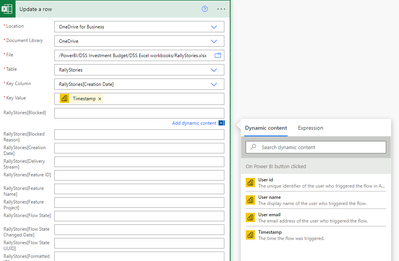
Hi, I would like to export from powerbi to an excel workbook with a table already set up  I use the template "Update an Excel file from PowerBI" After the "On Power BI button Clicked", the next ste...
  • Anonymous's avatar
    Anonymous
    3 years ago

    Hi Anonymous ,


    Based on my research, it's belong to Power Automate Fundamentals.

    Please refer to

    Power Automate Fundamentals # 39: Update A row in Power Automate

    Values should be provided as follows:

    Location : OneDrive for Business
    Document Library : OneDrive
    File :ExcelWorkBooks/Employee.xlsx
    Table : Table1
    Key Column: Sno [This is the column which is present in Table1 in Spread sheet]
    Key Value : Sno [Select Dynamic value present in List rows present in a table]
    Date : triggerOutputs()['headers']['x-ms-user-timestamp']


    Best Regards,

    Stephen Tao


    If this post helps, then please consider Accept it as the solution to help the other members find it more quickly.

  • Anonymous's avatar
    Anonymous
    3 years ago

    Thanks for your help!