cancel
Showing results for 
Search instead for 
Did you mean: 

Get Fabric Certified for FREE during Fabric Data Days. Don't miss your chance! Request now

Reply
Roinka
Helper I
Helper I

% per row and not per total

Hi there,

I have a matrix which shows the no of participants per category per type.

Category  | Type 1  |  Type 2 | Type 3

categoryA, 20, 40, 40                                                                          --(total 100 participants)

categoryB, 10,160,30                                                                          --(total 200 participants)


I am using a measure which holds the NoOfParticipants which is the CountRows of the table. The measure is auto   filtered by the category and type in the matrix.


I would like to present this as a % out of a total per row, so in above example we will get:

Category  | Type 1  |  Type 2 | Type 3

categoryA, 20%, 40%, 40%                                                                          --(total 100% participants)

categoryB, 5%,80%,15%                                                                              --(total 100% participants)


How do i create the second matrix?

Thank you.

1 ACCEPTED SOLUTION
Cmcmahan
Resident Rockstar
Resident Rockstar

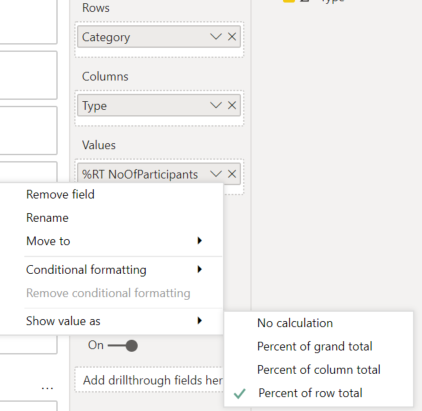
EDIT: I completely misread the question.  You can just use the Show Value As option in the dropdown of the measure in the matrix options to select Row Total.  This gives the results you want without any complicated measures.

 snipa.PNG


I'm leaving my previous answer below, just in case you find it interesting.


If you could share your current COUNTROWS measure, that would be incredibly helpful as a starting point for us.  


It seems likely that you can to use an expression like this that uses ISINSCOPE to determine if it is being calculated as a regular value or as a column total in a matrix.

NoOfParticipants for Matrix = 
IF( 
    ISINSCOPE(Table1[Type]), 
    [NoOfParticipants], 
    DIVIDE(
        [NoOfParticipants], 
        CALCULATE([NoOfParticipants], ALLSELECTED(Table1) ) 
    )*100 
)


View solution in original post

2 REPLIES 2
Cmcmahan
Resident Rockstar
Resident Rockstar

EDIT: I completely misread the question.  You can just use the Show Value As option in the dropdown of the measure in the matrix options to select Row Total.  This gives the results you want without any complicated measures.

 snipa.PNG


I'm leaving my previous answer below, just in case you find it interesting.


If you could share your current COUNTROWS measure, that would be incredibly helpful as a starting point for us.  


It seems likely that you can to use an expression like this that uses ISINSCOPE to determine if it is being calculated as a regular value or as a column total in a matrix.

NoOfParticipants for Matrix = 
IF( 
    ISINSCOPE(Table1[Type]), 
    [NoOfParticipants], 
    DIVIDE(
        [NoOfParticipants], 
        CALCULATE([NoOfParticipants], ALLSELECTED(Table1) ) 
    )*100 
)


jthomson
Solution Sage
Solution Sage

Divide the first measure by itself, but in the second one use calculate and allexcept whatever the type field is

Helpful resources

Announcements
November Power BI Update Carousel

Power BI Monthly Update - November 2025

Check out the November 2025 Power BI update to learn about new features.

Fabric Data Days Carousel

Fabric Data Days

Advance your Data & AI career with 50 days of live learning, contests, hands-on challenges, study groups & certifications and more!

FabCon Atlanta 2026 carousel

FabCon Atlanta 2026

Join us at FabCon Atlanta, March 16-20, for the ultimate Fabric, Power BI, AI and SQL community-led event. Save $200 with code FABCOMM.

Top Solution Authors
Top Kudoed Authors