
Join us at FabCon Atlanta from March 16 - 20, 2026, for the ultimate Fabric, Power BI, AI and SQL community-led event. Save $200 with code FABCOMM.
Register now!Get Fabric Certified for FREE during Fabric Data Days. Don't miss your chance! Request now
Hello,
in my Power BI matrix Ihave as column "period" and as values 1) food and 2 ) drinks .
I see alway both values ( food and drinks) per period, but i want to see first all periods for food and then all periods for drinks
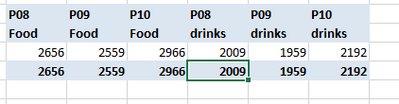
it should look like this in Power BI :
is this possible ?
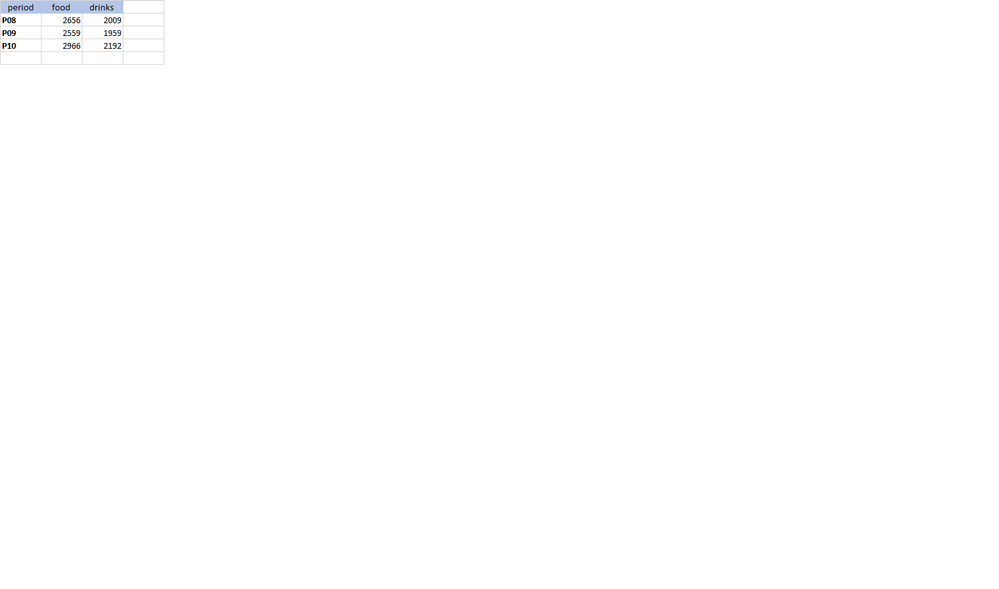
the table looks like this :
if I take period into rows I m getting this view :
this is not what I want.
i want per person first food from P08-P12, than drinks from P08-P12
in excel in the pivot i can change the order of values :
Hi @Sonne ,
What does the original data table look like?Please show with screenshots or paste table data.
Best Regards,
Liang
If this post helps, then please consider Accept it as the solution to help the other members find it more quickly.
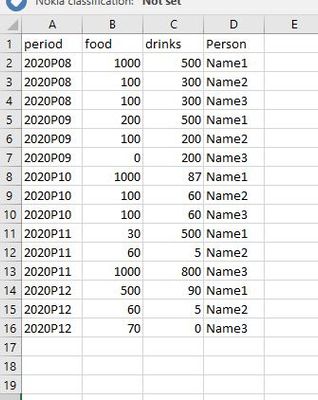
hello , this is the excel table inserted into power BI. I can not change the format as this file is coming from a tool :
Hi @Sonne ,
Based on the data you provide, food and drinks are at the same level and cannot be drilled to meet your needs. You need to use bookmarks to solve this problem.
https://radacad.com/bookmarks-and-buttons-making-power-bi-charts-even-more-interactive
Best Regards,
Liang
If this post helps, then please consider Accept it as the solution to help the other members find it more quickly.
Check out the November 2025 Power BI update to learn about new features.
Advance your Data & AI career with 50 days of live learning, contests, hands-on challenges, study groups & certifications and more!