Join us at FabCon Atlanta from March 16 - 20, 2026, for the ultimate Fabric, Power BI, AI and SQL community-led event. Save $200 with code FABCOMM.
Register now!The Power BI Data Visualization World Championships is back! It's time to submit your entry. Live now!
Hey there.
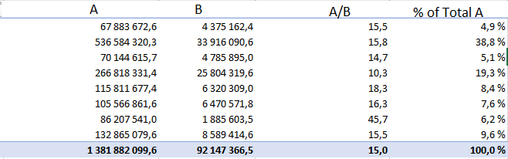
I have following data structure:
Measures A and B are comming from data source as simple Sum([Col_A]) or Sum([Col_B]).
A/B is created by DIVIDE([A],[B]).
What I'm trying to achieve is get % of Total based on [A/B]. I tried to reapply similar formula that I'm using for [% of Total A] : DIVIDE([A], CALCULATE([A],ALLSELECTED(Table))). But naturally it's not working properly as DAX divides everything by "15,0" instead of "152,2" (sum of individual values in A/B column).
How to properly write DAX formula for that scenario?
HI, @Glaeran
This looks like a measure totals problem. Very common. See this post about it
https://community.powerbi.com/t5/DAX-Commands-and-Tips/Dealing-with-Measure-Totals/td-p/63376
Also, this Quick Measure, Measure Totals, The Final Word should get you what you need:
https://community.powerbi.com/t5/Quick-Measures-Gallery/Measure-Totals-The-Final-Word/m-p/547907
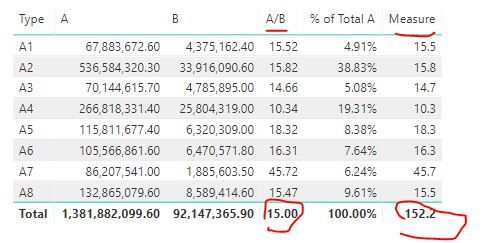
For your case, add new measure based on [A/B]
Measure = VAR _TABLE=SUMMARIZE('Table','Table'[Type],"_A/B",[A/B]) RETURN
SUMX(_TABLE,[_A/B])
Result:
Best Regards,
Lin
@v-lili6-msft thank you. This is almost what I'm looking for.
My main issue now is that this measure shouldn't be dependant on "Type" as this can get changed by the end-users dynamically [measure is supposed to land in SSAS cube]. Any ideas here?
You can't create measure on SSAS from PBI. It's not supported.
You can import pbix as new tabular model. It's all.
@saykasku I don't want to create measure in PowerBI.
Entire calculation will be placed in SSAS which will be connected to PBI/Excel/Other tools. And user will have a chance on which level he wants to see the data. Therefore I believe that hardcoding reference column won't work in my scenario as this can change easily and wrong values will be displayed.
In this case u are dividing by 1 381 882 099,6.
If u want to divide by 155,2 u need to:
The Power BI Data Visualization World Championships is back! It's time to submit your entry.
Check out the January 2026 Power BI update to learn about new features.
| User | Count |
|---|---|
| 61 | |
| 47 | |
| 39 | |
| 23 | |
| 23 |
| User | Count |
|---|---|
| 144 | |
| 106 | |
| 63 | |
| 38 | |
| 31 |