cancel
Showing results for 
Search instead for 
Did you mean: 

View all the Fabric Data Days sessions on demand. View schedule

Reply
Anonymous
Not applicable

multi slicer selector that is measurement based

Hello, 


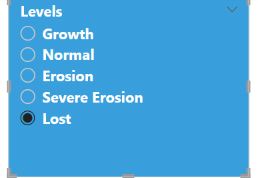
Having issues with trying to select multiple values on a slicer that is measurement based.  Currently, it works when one value is selected.


Any assistiance or recomandation are greatly appriaciated!


learn2fly_0-1673296014647.png


here is the dax code: 


Level  =
var erosion = [erosion %]

 
RETURN
IF( HASONEFILTER(Erosion_Class[Order]),
SWITCH(TRUE(),
VALUES(Erosion_Class[Order]) =1 && erosion >= .20, erosion ,

VALUES(Erosion_Class[Order]) =2 && erosion >= -.1 && erosion < .15 , erosion ,
VALUES(Erosion_Class[Order]) =3 && erosion > -.4 && erosion < -.10 , erosion ,
VALUES(Erosion_Class[Order]) =4 && erosion >=  - .9999        &&  erosion <= -.4  , erosion ,
VALUES(Erosion_Class[Order]) =5 && erosion < - .9999999999999 , erosion ))
2 REPLIES 2
Anonymous
Not applicable

Hi @Anonymous ,


Can you provide some sample data and illustrate the expected output? That would be helpful. 
For a multi-select slicer, I would normally use ALLSELECTED('Table'[ColumnName]) to get multiple values. Then determining whether the value is IN ALLSELECTED('Table'[ColumnName]).

How to provide sample data in the Power BI Forum


Best Regards,
Gao

Community Support Team


If there is any post helps, then please consider Accept it as the solution  to help the other members find it more quickly. If I misunderstand your needs or you still have problems on it, please feel free to let us know. Thanks a lot!

How to get your questions answered quickly --  How to provide sample data in the Power BI Forum

Anonymous
Not applicable

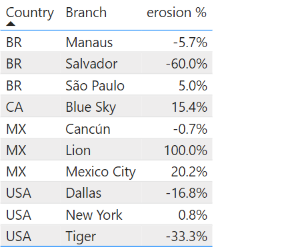
Can't load the file but here is the m code and images to give an idea of how it looks
learn2fly_0-1673464886780.png


erosion % = DIVIDE(sum(Sales[Period2 Sales]) - SUM(Sales[Period1 Sales]),SUM(Sales[Period1 Sales]))
 
Sales table: 
 
let
Source = Table.FromRows(Json.Document(Binary.Decompress(Binary.FromText("XY9BDoIwFESv0rBmUVqKa8GlGCOaaAiLH2xMQ9MmKCrn8RZuuZgtRUE2f9rO659Mnnue7x2ypZl7ceG1UYoxNkKsFH4PpEcz1kIr+856m03sxH6PZcNRVrXmGDlkwUYk3pmRgbzDWU9CAjJHupdGW2ikNpfQQeEcSkFBc7VbXBClI+C6bPgDnXRdDREuKphTK5AS7J6IMGo7EUz/Kqf8KUqNEnFrv/YAT6kEVNm9Vd+YsV/x4gM=", BinaryEncoding.Base64), Compression.Deflate)), let _t = ((type nullable text) meta [Serialized.Text = true]) in type table [Region = _t, Country = _t, Branch = _t, #"Period1 Sales" = _t, #"Period2 Sales" = _t]),
#"Changed Type" = Table.TransformColumnTypes(Source,{{"Region", type text}, {"Country", type text}, {"Branch", type text}, {"Period1 Sales", Int64.Type}, {"Period2 Sales", Int64.Type}})
in
#"Changed Type"
 
 
Erosion_Class table: 
 
let
Source = Table.FromRows(Json.Document(Binary.Decompress(Binary.FromText("i45Wci/KLy/JUNJRMlSK1YlW8ssvyk3MAXKNwFzXovzizPw8IN8YzA9OLUstSlVACJuAhX3yi0uAHFOl2FgA", BinaryEncoding.Base64), Compression.Deflate)), let _t = ((type nullable text) meta [Serialized.Text = true]) in type table [Selection = _t, Order = _t]),
#"Changed Type" = Table.TransformColumnTypes(Source,{{"Selection", type text}, {"Order", Int64.Type}})
in
#"Changed Type"

Helpful resources

Announcements
November Power BI Update Carousel

Power BI Monthly Update - November 2025

Check out the November 2025 Power BI update to learn about new features.

Fabric Data Days Carousel

Fabric Data Days

Advance your Data & AI career with 50 days of live learning, contests, hands-on challenges, study groups & certifications and more!

FabCon Atlanta 2026 carousel

FabCon Atlanta 2026

Join us at FabCon Atlanta, March 16-20, for the ultimate Fabric, Power BI, AI and SQL community-led event. Save $200 with code FABCOMM.

Top Solution Authors
Top Kudoed Authors