Fabric Data Days starts November 4th!
Advance your Data & AI career with 50 days of live learning, dataviz contests, hands-on challenges, study groups & certifications and more!
Get registered- Power BI forums
- Get Help with Power BI
- Desktop
- Service
- Report Server
- Power Query
- Mobile Apps
- Developer
- DAX Commands and Tips
- Custom Visuals Development Discussion
- Health and Life Sciences
- Power BI Spanish forums
- Translated Spanish Desktop
- Training and Consulting
- Instructor Led Training
- Dashboard in a Day for Women, by Women
- Galleries
- Data Stories Gallery
- Themes Gallery
- Contests Gallery
- Quick Measures Gallery
- Visual Calculations Gallery
- Notebook Gallery
- Translytical Task Flow Gallery
- TMDL Gallery
- R Script Showcase
- Webinars and Video Gallery
- Ideas
- Custom Visuals Ideas (read-only)
- Issues
- Issues
- Events
- Upcoming Events
Get Fabric Certified for FREE during Fabric Data Days. Don't miss your chance! Learn more
- Power BI forums
- Forums
- Get Help with Power BI
- Desktop
- Re: missing subtotal for running total in matrix
- Subscribe to RSS Feed
- Mark Topic as New
- Mark Topic as Read
- Float this Topic for Current User
- Bookmark
- Subscribe
- Printer Friendly Page


- Mark as New
- Bookmark
- Subscribe
- Mute
- Subscribe to RSS Feed
- Permalink
- Report Inappropriate Content
missing subtotal for running total in matrix
I have the following matrix and table, the subotal is missing in the running totals where the category is empty.

| Category | Sub Category | Sub Category 2 | Amount | Date |
| 1 | 1.1 | 1.1.1 | 1 | 01/01/20 |
| 1 | 1.2 | 1.2.1 | 1 | 01/02/20 |
| 1 | 1.3 | 1.3.1 | 1 | 01/03/20 |
| 1 | 1.1 | 1.1.2 | 1 | 01/04/20 |
| 1 | 1.2 | 1.2.2 | 1 | 01/05/20 |
| 1 | 1.3 | 1.3.2 | 1 | 01/06/20 |
| 2 | 2.1 | 2.1.1 | 1 | 01/06/20 |
| 2 | 2.1 | 2.1.2 | 1 | 01/05/20 |
| 2 | 2.2 | 2.2.2 | 1 | 01/04/20 |
| 2 | 2.2 | 2.2.1 | 1 | 01/03/20 |
| 2 | 2.3 | 2.3.1 | 1 | 01/02/20 |
I used quick measure for running total -
Solved! Go to Solution.


- Mark as New
- Bookmark
- Subscribe
- Mute
- Subscribe to RSS Feed
- Permalink
- Report Inappropriate Content
I think this has to do with the structure of the data, what I did was this:
- A new column has been created that joins the category - subcategory - Subcategory2
ID_CAT = 'Table'[Category]&'Table'[Sub Category]&'Table'[Sub Category 2]- A new table has been created with the categories
IDCAT = SUMMARIZE('Table';' Table'[Category];' Table'[Sub Category];' Table'[Sub Category 2];' Table'[ID_CAT])
Now create the following measure:
Total Value = CALCULATE(sum('Table'[Amount]); FILTER(ALLSELECTED(IDCAT[Category]);IDCAT[Category]<= MAX(IDCAT[Category])))
Result below and in attach PBIX file.
Regards
Miguel Félix
Did I answer your question? Mark my post as a solution!
Proud to be a Super User!
Check out my blog: Power BI em Português- Mark as New
- Bookmark
- Subscribe
- Mute
- Subscribe to RSS Feed
- Permalink
- Report Inappropriate Content
Hi @mahendi ,
Do you want a sub total for every subcategory so looking at your data in January all subtotals show 1 on February first will show 1 next will show 2 and so on?
Regards
Miguel Félix
Did I answer your question? Mark my post as a solution!
Proud to be a Super User!
Check out my blog: Power BI em Português- Mark as New
- Bookmark
- Subscribe
- Mute
- Subscribe to RSS Feed
- Permalink
- Report Inappropriate Content
- Mark as New
- Bookmark
- Subscribe
- Mute
- Subscribe to RSS Feed
- Permalink
- Report Inappropriate Content
I think this has to do with the structure of the data, what I did was this:
- A new column has been created that joins the category - subcategory - Subcategory2
ID_CAT = 'Table'[Category]&'Table'[Sub Category]&'Table'[Sub Category 2]- A new table has been created with the categories
IDCAT = SUMMARIZE('Table';' Table'[Category];' Table'[Sub Category];' Table'[Sub Category 2];' Table'[ID_CAT])
Now create the following measure:
Total Value = CALCULATE(sum('Table'[Amount]); FILTER(ALLSELECTED(IDCAT[Category]);IDCAT[Category]<= MAX(IDCAT[Category])))
Result below and in attach PBIX file.
Regards
Miguel Félix
Did I answer your question? Mark my post as a solution!
Proud to be a Super User!
Check out my blog: Power BI em Português- Mark as New
- Bookmark
- Subscribe
- Mute
- Subscribe to RSS Feed
- Permalink
- Report Inappropriate Content
@MFelix Thank you for the suggestion but in this particular scenario the display sequence is important.
I am trying to display running total in the sub total rows. if a category is empty it should still carry the total from previous sub total as it is a running total.
- Mark as New
- Bookmark
- Subscribe
- Mute
- Subscribe to RSS Feed
- Permalink
- Report Inappropriate Content
Hi @mahendi,
Then the issue is with your formula you are only picking up values that are above the category you must use a sumx for the subtotals.
Regards
Miguel Félix
Did I answer your question? Mark my post as a solution!
Proud to be a Super User!
Check out my blog: Power BI em Português- Mark as New
- Bookmark
- Subscribe
- Mute
- Subscribe to RSS Feed
- Permalink
- Report Inappropriate Content
Hi @mahendi ,
The calculation you have is correct based on the matrix setup and the measure.
In your measure you are picking all the values that are On or After your Maximum category value, looking at the image you have for category 1 subtotal the value 1 for category 2 there is no value so the Sub Total value for that category is blank and it cannot be 1.
Believe you are looking at the sub total at a different way, I have made some changes to the setup of the matrix and renamed the totals:
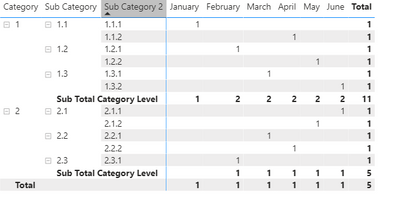
Has you can see the lines that refer to subcategory is blanks.
Regards
Miguel Félix
Did I answer your question? Mark my post as a solution!
Proud to be a Super User!
Check out my blog: Power BI em Português
Helpful resources

Fabric Data Days
Advance your Data & AI career with 50 days of live learning, contests, hands-on challenges, study groups & certifications and more!

Power BI Monthly Update - October 2025
Check out the October 2025 Power BI update to learn about new features.

FabCon Atlanta 2026
Join us at FabCon Atlanta, March 16-20, for the ultimate Fabric, Power BI, AI and SQL community-led event. Save $200 with code FABCOMM.


| User | Count |
|---|---|
| 84 | |
| 49 | |
| 36 | |
| 31 | |
| 30 |


